



Origami Org Chart Slide – Effective Team Structure and Collaboration
RB0800007_5
- Last Update 03/18/2025
- File Size 0.2MB
- # of Slides 2
- File Format PPTX
- Slide Ratio 4:3
- Color
Keywords
- #Content-Based Slides
- #Design-Based Slides
- #Company Introduction
- #Diagram
- #Manpower
- #Organizational Chart
- #Cluster
- #Closed Cluster Diagram
- #4:3
- #organization chart PowerPoint slide
- #org chart diagram
- #hierarchical structure slide
- #team organization PPT
- #department structure template
- #company organization chart
- #how to create org chart in PowerPoint
About the Product
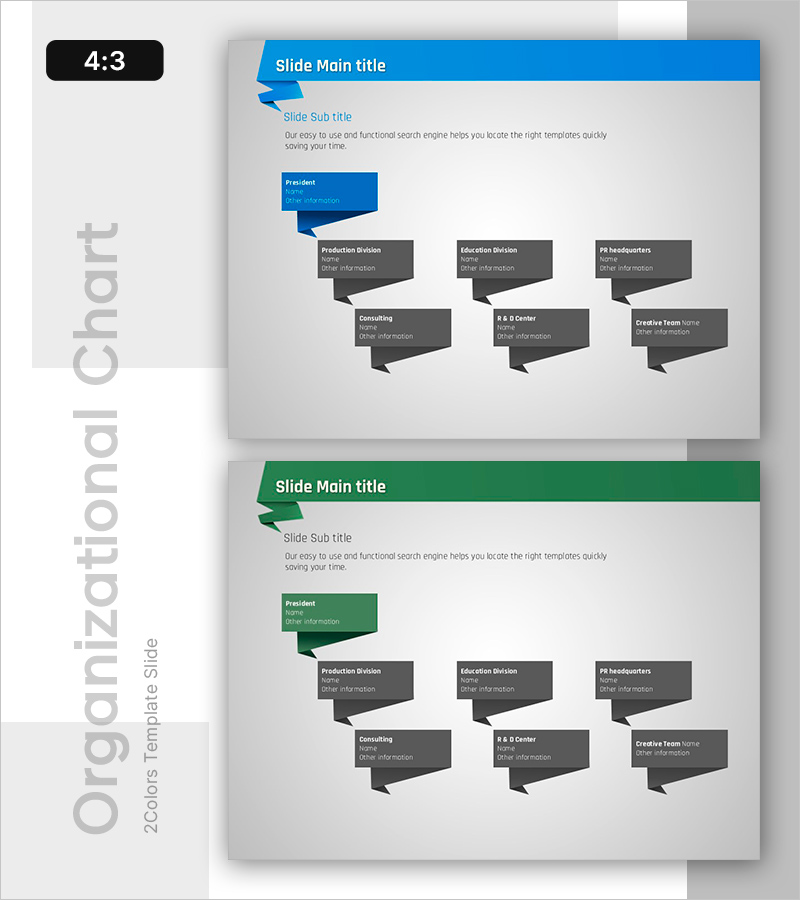
A hierarchical organization chart PowerPoint slide that clearly visualizes your company's reporting structure and departmental relationships. This slide features a closed-form organizational diagram with 8 nodes arranged in a pyramid structure: President at the top, followed by three primary divisions (Production, Education, PR) and three secondary departments (Consulting, R&D Center, Creative Team). The design uses a blue-and-dark-gray color scheme to distinguish leadership from departments, with arrow connectors showing reporting lines. Two slide variations are included—one with a blue header and one with a green header—allowing you to match your corporate branding. The 4:3 aspect ratio and PPTX format make it compatible with all PowerPoint versions. Perfect for organizational restructuring announcements, team introductions, and management presentations.
Usage Points
-
Main Usage
This organizational diagram slide is designed to display reporting relationships and departmental hierarchy at a glance. The pyramid-shaped structure clearly positions the president and each department, while the 3D-style shapes enhance visual engagement. Ideal for announcing organizational changes, onboarding new employees, and explaining management structure during investor presentations or company overview meetings.
-
How to Use
Simply open the slide and replace department names and contact information with your own data. The blue header version suits tech and financial companies, while the green header works well for environmental and energy sectors. All shapes and text are fully editable—you can customize colors, add or remove departments by copying shapes, and adjust the layout to match your organizational structure.
-
Recommended For
HR and personnel teams announcing organizational restructuring, executives presenting management structure, new employee onboarding programs, consulting firms analyzing client organizations, corporate overview presentations, and internal communication materials emphasizing team collaboration and reporting relationships.
-
Slide Structure
Slide 1: Blue header with President node (blue shape) connected to 3 primary departments (dark gray) and 3 secondary departments (dark gray). Slide 2: Identical structure with green header. All shapes use 3D trapezoid forms to convey hierarchy, with arrow connectors linking superior and subordinate positions.
Related Products
-
Introduction of Key Personnel Profiles – Understanding Team Structure through Diagrams
#Company Introduction #Diagram #Manpower
-
Representative & Team Profiles Leading to Success
#Company Introduction #Diagram #Manpower
-

Introduction of the Clothing Business Representative Profile Slide
#Company Introduction #Diagram #Manpower
-
Industry-leading representatives & team personnel – Effective Organizational Chart
#Company Introduction #Diagram #Manpower
