



Introduction of Key Personnel Profiles – Understanding Team Structure through Diagrams
RM0100018_8
- Last Update 01/31/2025
- File Size 3.3MB
- # of Slides 2
- File Format PPTX
- Slide Ratio 16:9
- Color
Keywords
- #Content-Based Slides
- #Design-Based Slides
- #Company Introduction
- #Diagram
- #Manpower
- #Organizational Chart
- #Cluster
- #Closed Cluster Diagram
- #16:9
- #team structure diagram PowerPoint
- #organizational chart slide template
- #team profile card presentation
- #key personnel introduction slide
- #cluster diagram PowerPoint template
About the Product
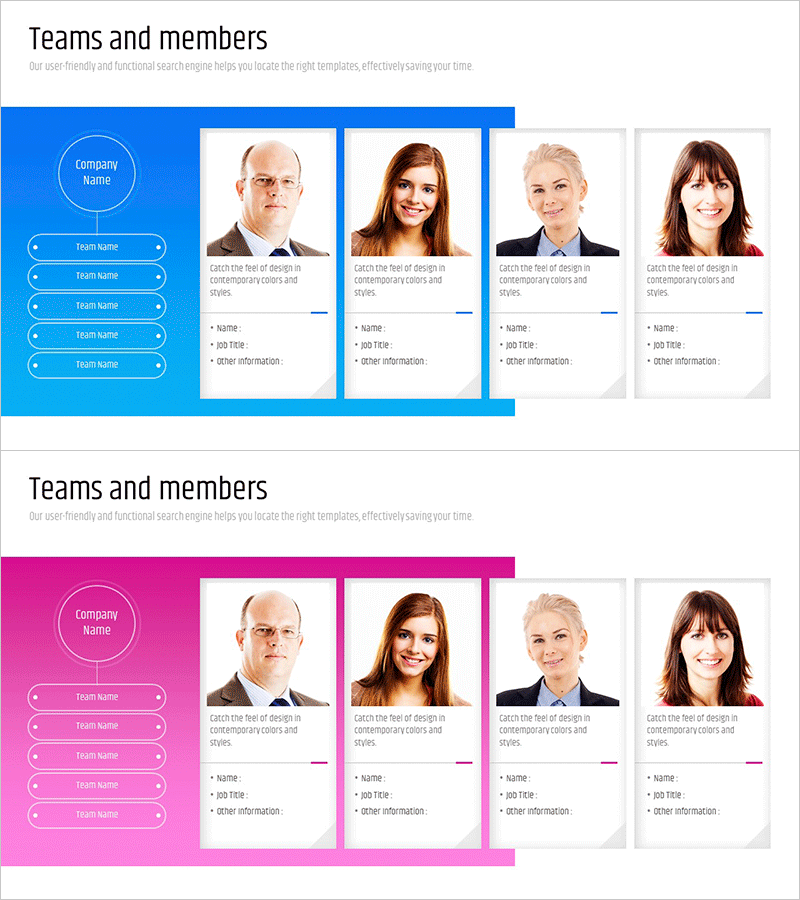
A cluster diagram PowerPoint slide for visually presenting key personnel and team composition. The layout features a colored background section on the left (blue or pink) with company name and team names, while the right side displays four profile cards in a grid arrangement. Each card includes a portrait photo, job title, name, and role description with color accent lines for visual hierarchy. This 2-slide set offers both blue and pink color options to match your corporate brand. Ideal for company introductions, organizational presentations, team building materials, and stakeholder meetings.
Usage Points
-
Main Usage
The primary goal is to visualize organizational structure and key personnel at a glance. The profile card format clearly displays each team member's name, job title, and role, effectively communicating organizational hierarchy. Enhances credibility and professionalism in company introduction or team overview sections.
-
How to Use
Use in company introduction presentations, team building events, new employee orientation materials, investor pitch decks, and organizational overview slides. Simply replace the company name and team names on the left background, then update each profile card with actual team member photos, titles, and descriptions.
-
Recommended For
HR professionals, executives, team leaders, and corporate marketing specialists introducing organizational structure. Particularly effective for startups and SMEs highlighting core teams, or large enterprises showcasing specific department leadership.
-
Slide Structure
2-slide set with slide 1 in blue tone and slide 2 in pink tone. Each slide features a left section with circular company logo and 5 team name buttons, and a right section with 4 profile cards (portrait, job title, name, role description) arranged in a grid cluster layout.
Related Products
-

Introduction of the Clothing Business Representative Profile Slide
#Company Introduction #Diagram #Manpower
-
Representative & Team Profiles Leading to Success
#Company Introduction #Diagram #Manpower
-
Representatives and Teams Leading the Future – Organizational Chart PowerPoint Template
#Company Introduction #Diagram #Manpower
-
Key Team Personnel Profiles - Infographic using Organizational Chart
#Company Introduction #Diagram #Other
