



Program Introduction Diagram Slide – A Template with Visual Appeal
RB0800003_10
- Last Update 03/17/2025
- File Size 0.1MB
- # of Slides 2
- File Format PPTX
- Slide Ratio 4:3
- Color
Keywords
- #Content-Based Slides
- #Design-Based Slides
- #Product/Service Introduction
- #Diagram
- #Composition
- #Program Introduction
- #Structure
- #Cluster
- #Tree Diagram
- #Closed Cluster Diagram
- #4:3
- #closed diagram PowerPoint
- #central diagram template
- #3-section diagram slide
- #program introduction PPT
- #diagram PowerPoint slide design
About the Product
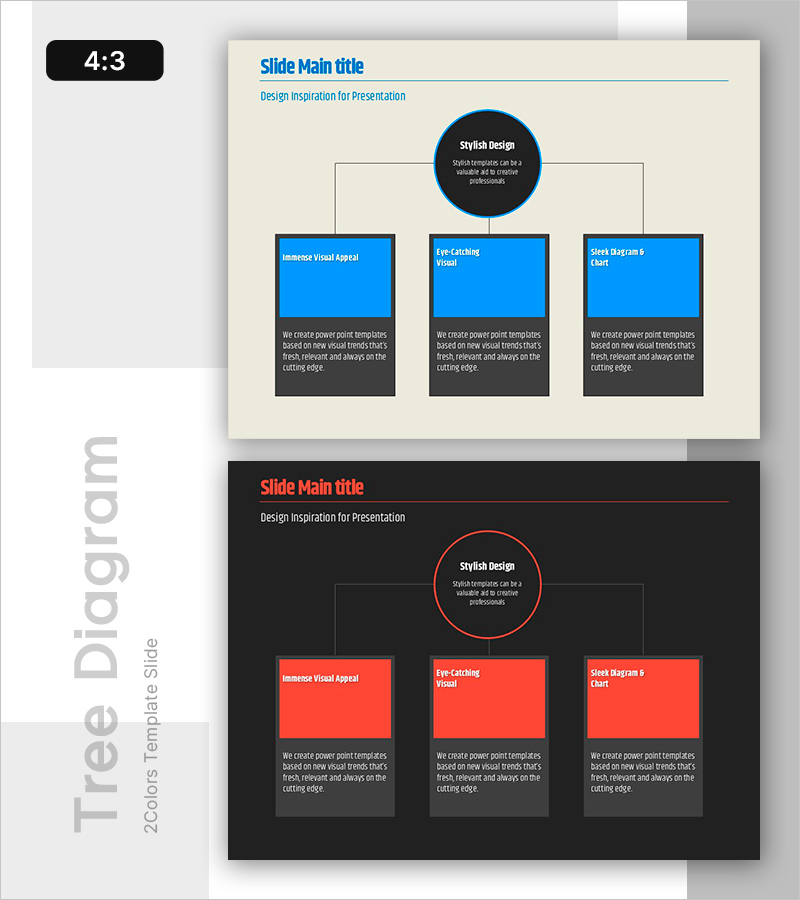
A closed-form diagram PowerPoint slide with a central circular node branching to three lower sections. The cream background contrasts with a dark blue center circle and bright blue and red boxes below, each containing descriptive text areas. This 2-slide template effectively visualizes the relationship between a core concept and three supporting elements for program introductions, project overviews, or strategic frameworks. Fully editable in PPTX format for immediate customization.
Usage Points
-
Main Usage
Visualizes the hierarchical relationship between a core concept (center circle) and three supporting elements (lower boxes). Perfect for program overviews, project components, strategic pillars, or three key service features. Each box provides space for detailed explanations and supporting text.
-
How to Use
Replace the center circle title with your core concept and update the three lower boxes with supporting elements and descriptions. Colors can remain as designed or be customized to match corporate branding. Simply modify text to adapt for program introductions, product features, business divisions, or any three-element framework.
-
Recommended For
Ideal for onboarding presentations, product and service introductions by marketing and planning teams, executive briefings, and consulting proposals requiring strategic framework explanations. Recommended for any presentation needing to balance three key elements or concepts.
-
Slide Structure
Slide 1: Cream background with title area, central dark blue circular node for core concept, and three lower boxes (bright blue and red) for supporting elements with text areas. Slide 2: Identical layout for alternative content. 4:3 aspect ratio, PPTX format, fully editable.
Related Products
-
Beer Tree Structure Chart – A New Paradigm of Data Visualization
#Product/Service Introduction #Technical Approach #Diagram
-
Collaboration Project Progress Information – Harmony of Business and Design
#Product/Service Introduction #Business Management #Diagram
-
Interior Business Main Components Services
#Product/Service Introduction #Diagram #Other
-
Diagram Slide Introducing Interior Design Cases
#Product/Service Introduction #Diagram #Composition
