



Social Network Platform Service Configuration – Centralized Radial Diagram
RB0200020-1_6
- Last Update 09/08/2025
- File Size 0.6MB
- # of Slides 2
- File Format PPTX
- Slide Ratio 4:3
- Color
Keywords
- #Content-Based Slides
- #Design-Based Slides
- #Product/Service Introduction
- #Technical Approach
- #Diagram
- #Features
- #Service Components
- #Spread
- #Radial Diagram
- #4:3
- #radial diagram PowerPoint
- #central network slide template
- #5-node diagram
- #service architecture PowerPoint
- #how to create radial diagram in PowerPoint
About the Product
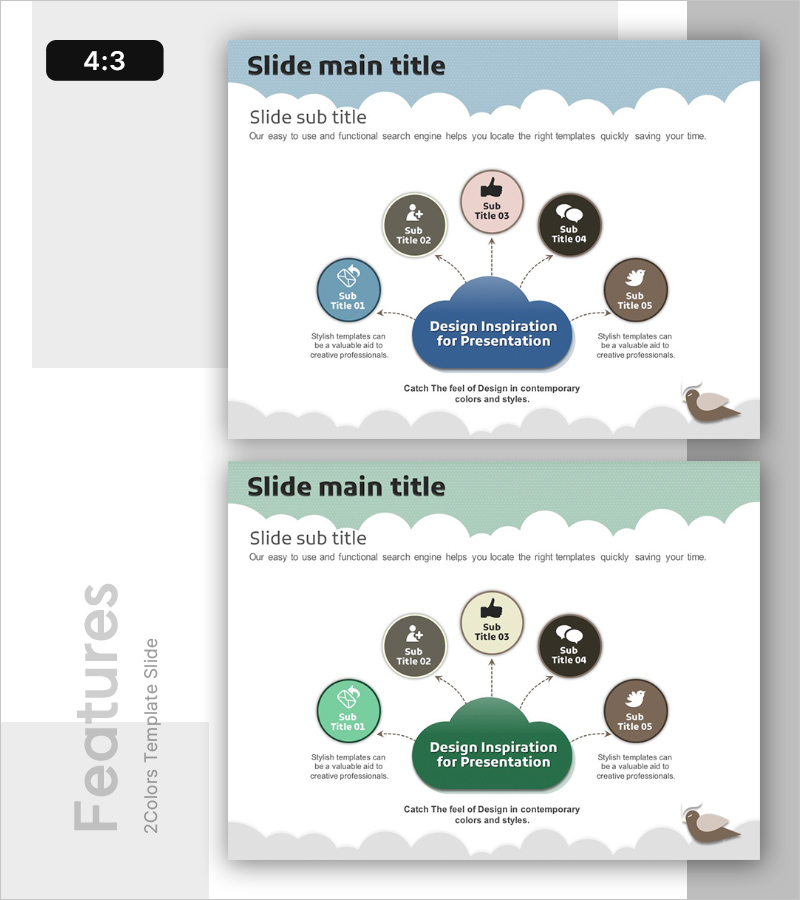
A radial diagram PowerPoint slide featuring a central blue cloud-shaped node connected to five surrounding circular nodes in gray, pink, black, and brown. Each node includes an icon placeholder and text area, with dashed connector lines radiating from the center. This design effectively visualizes hierarchical relationships where a core concept branches into multiple related elements, such as platform services, system architecture, organizational structure, or strategic initiatives. The template includes two slides with blue and green color variations, formatted in 4:3 aspect ratio PPTX for immediate editing and customization.
Usage Points
-
Main Usage
Visualizes information structures where a central concept or entity branches into multiple related components, functions, or stakeholders. Ideal for illustrating social network platforms with core services and connected features, technology architecture with central systems and peripheral modules, organizational hierarchies with core values and implementation strategies, or product ecosystems with interconnected offerings.
-
How to Use
Enter your core concept in the central cloud node (e.g., platform name, system name, core value). Populate the five surrounding nodes with related items such as features, components, strategies, or stakeholders. Double-click node icons and text to edit content. Customize node colors as needed, and insert additional nodes if required for your presentation flow.
-
Recommended For
Technology leaders, product managers, marketing professionals, and executives preparing technical specifications, product introductions, service architecture explanations, organizational structure presentations, marketing strategy decks, or investor pitch materials. Particularly valuable when communicating relationships between a central concept and multiple supporting elements.
-
Slide Structure
Central blue cloud-shaped node (approximately 150px width) positioned at center with five circular nodes (approximately 70px diameter each) arranged around it in cardinal and intercardinal positions. Dashed connector lines link each outer node to the center. Each node contains an icon placeholder and text input area. Bottom section includes descriptive text space. Both slides maintain identical structure with color variation.
Related Products
-

Elegant Diagrams and Charts for Presentations
#Product/Service Introduction #Diagram #Other
-
Cell Phone Characteristics Diagram – Highlighting Innovation
#Product/Service Introduction #Diagram #Features
-
Advantages of Learning Books and Smartphones – Effective Approaches
#Product/Service Introduction #Technical Approach #Text Box
-
App Cable Connection Diagram – Service Structure and Characteristics Design
#Product/Service Introduction #Diagram #Features
