



Elegant Diagrams and Charts for Presentations
RJ0400007_16
- Last Update 05/18/2025
- File Size 0.9MB
- # of Slides 2
- File Format PPTX
- Slide Ratio 16:9
- Color
Keywords
- #Content-Based Slides
- #Design-Based Slides
- #Product/Service Introduction
- #Diagram
- #Other
- #Product/Service Introduction
- #Features
- #Spread
- #Radial Diagram
- #Mockup
- #16:9
- #radial diagram PowerPoint slide
- #device mockup presentation template
- #3-node connection diagram
- #business diagram slide download
- #how to create radial diagram in PowerPoint
About the Product
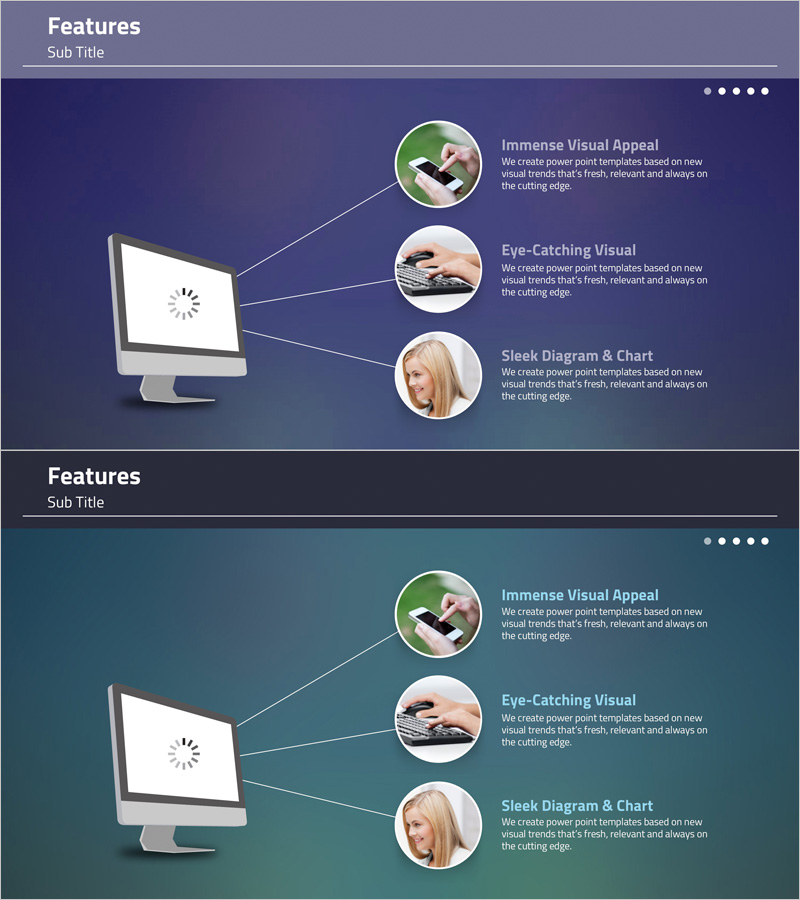
A radial diagram PowerPoint slide featuring a central computer monitor mockup connected to three circular image frames via directional arrows. This multi-purpose slide design uses a dark blue gradient background with white connecting lines and circular image placeholders, making it ideal for product introductions, feature explanations, and business presentations. The 2-slide set includes color variations in dark blue and teal green, allowing you to match your presentation theme. Perfect for visualizing core concepts radiating to three key benefits, features, or strategic pillars in a clean, professional layout.
Usage Points
-
Main Usage
Visualizes a central concept or product radiating to three key elements—features, benefits, strategic pillars, or organizational functions. Ideal for product launches, service overviews, company vision statements, and technical architecture explanations.
-
How to Use
Enter your core title or product name in the central monitor mockup area. Insert relevant images or icons into the three circular frames. Add descriptive text, feature names, or data points next to each node. Customize arrow colors and node styling to match your brand guidelines.
-
Recommended For
Product teams, marketing departments, sales presentations, corporate training materials, vision and strategy slides, service value proposition decks, and technical documentation requiring three-pillar or three-benefit structures.
-
Slide Structure
2-slide set with radial layout. Each slide features a central computer monitor mockup (with loading icon) connected to three circular image frames via directional arrows. Slide 1 uses dark blue gradient background; Slide 2 features teal green gradient for color flexibility.
Related Products
-
Mobile Network Service Introduction and Characteristics – Key to Visual Communication
#Product/Service Introduction #Diagram #Other
-

Product Overview Introduction Slide – Innovative Service Promotion
#Product/Service Introduction #Other #Product/Service Introduction
-

Introduction to 3D Printing Configuration – Expansive Visualization
#Product/Service Introduction #Diagram #Other
-
Infographic Slide Emphasizing Audio Equipment Product Characteristics
#Product/Service Introduction #Diagram #Product/Service Introduction
