



Introduction to Mobile App Services and Features – Trendy Design
RB0200019_4
- Last Update 03/08/2025
- File Size 3.7MB
- # of Slides 2
- File Format PPTX
- Slide Ratio 4:3
- Color
Keywords
- #Content-Based Slides
- #Design-Based Slides
- #Product/Service Introduction
- #Diagram
- #Features
- #Program Introduction
- #Cluster
- #Closed Cluster Diagram
- #4:3
- #closed diagram PowerPoint slide
- #app features presentation template
- #5-node circular diagram
- #mobile app introduction slide
- #service overview PowerPoint
About the Product
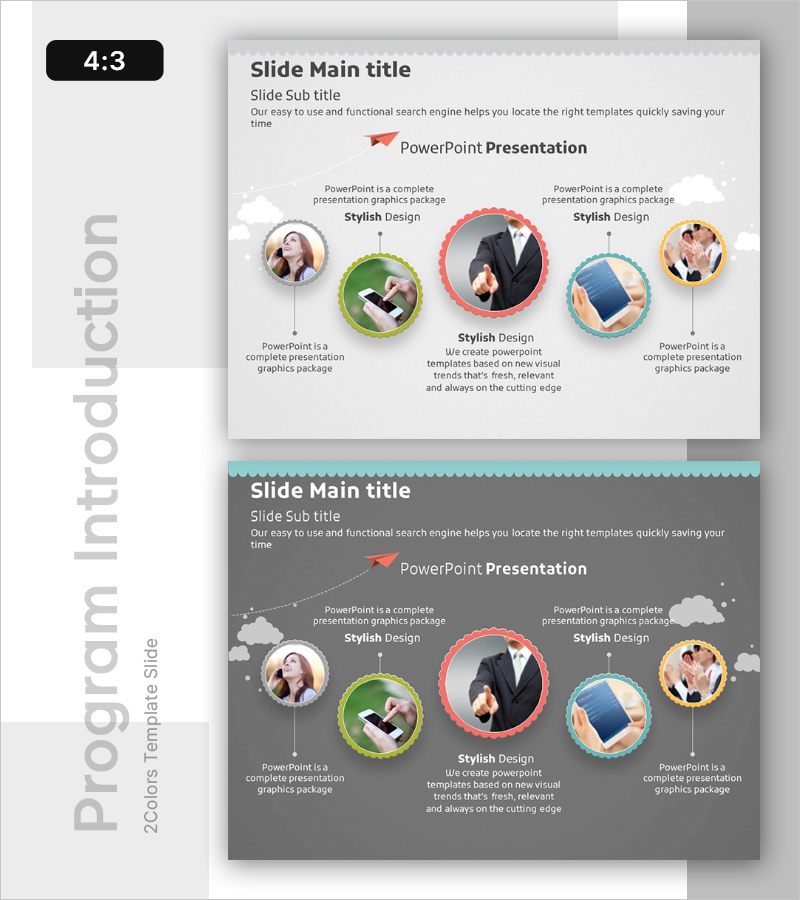
A 2-slide PowerPoint template for presenting mobile app services and key features with visual impact. The closed-loop diagram features 5 circular nodes arranged around a central hub, each with space for user images and descriptive text. Color-coded frames in lime green, coral pink, sky blue, and gray tones highlight each element, while arrows and connecting lines show relationships. Ready to use in presentations and fully editable to accommodate app introductions, service features, team structures, customer case studies, and more.
Usage Points
-
Main Usage
Visually present five key features or aspects of a mobile app or web service using a closed-loop diagram structure. The central hub with radiating nodes creates a hierarchical information flow, allowing you to place user profiles, feature icons, and descriptions in each node for comprehensive service presentation from multiple perspectives.
-
How to Use
Insert user images or feature icons into each circular node and add descriptive text in the designated areas. Place your app logo or core message in the central hub to maintain visual cohesion. Customize arrows and connecting lines as needed to adjust information flow and emphasis.
-
Recommended For
Mobile app and SaaS product launches, startup pitch decks, product feature webinars, customer-facing service presentations, team role and responsibility structures, five-step business process explanations, and feature comparison slides.
-
Slide Structure
2-slide set. Slide 1: Light gray background with 5 circular nodes (lime green, coral pink, sky blue, yellow, gray) arranged around a central element in closed-loop formation. Each node includes image placeholder and text input area. Slide 2: Dark gray background version with identical structure but deeper color tones. 4:3 aspect ratio, PPTX format.
Related Products
-
UX UI Program Introduction Slides – Modern Design and Visual Appeal
#Product/Service Introduction #Diagram #Features
-
Media Market Trends – Effective Program Introduction
#Product/Service Introduction #Diagram #Features
-
Introduction of Main Product Features – Visualizing Product Functions with Diagrams
#Product/Service Introduction #Diagram #Features
-
Cluster Diagram Slide Visualizing Technical Characteristics
#Product/Service Introduction #Diagram #Other
