



Mobile Feature Nesting Diagram - Service Composition
RB0100083_5
- Last Update 03/07/2025
- File Size 0.3MB
- # of Slides 2
- File Format PPTX
- Slide Ratio 4:3
- Color
Keywords
- #Content-Based Slides
- #Design-Based Slides
- #Product/Service Introduction
- #Technical Approach
- #Diagram
- #Composition
- #Service Architecture Diagram
- #Cluster
- #Inclusive Cluster Diagram
- #4:3
- #nesting diagram PowerPoint
- #hierarchical structure slide template
- #service composition diagram
- #feature analysis PowerPoint slide
- #3-layer nesting structure presentation
About the Product
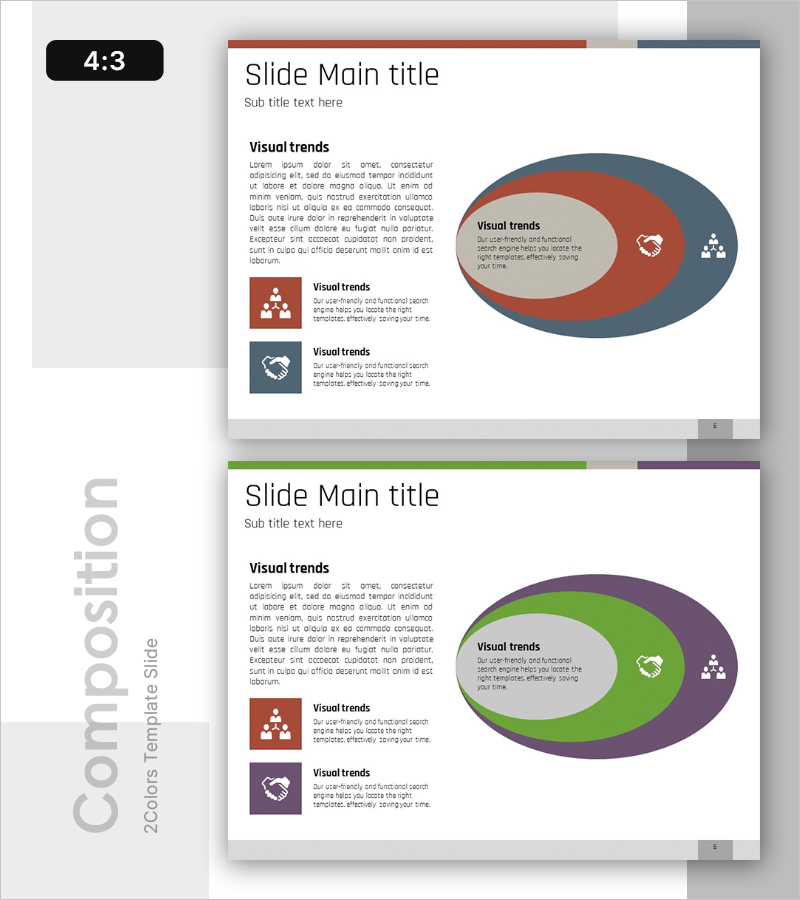
A PowerPoint slide template that visualizes mobile service features through a three-tier nesting structure. The diagram uses concentric ellipses to show hierarchical relationships, expanding from core functionality at the center to peripheral features. The design employs a rust red, steel blue, and beige color palette to distinguish each layer, with icons and text labels enhancing information clarity. This slide is ready for immediate use in business presentations including service architecture, feature analysis, and organizational hierarchy visualization.
Usage Points
-
Main Usage
Designed to clearly illustrate the hierarchical relationship between core and peripheral features of mobile apps and services. The concentric nesting structure enables intuitive communication of feature priorities and interdependencies at a glance.
-
How to Use
Apply this slide in product introduction, feature analysis, organizational structure, and service mapping presentations. Customize the text and icons in each layer to match your service characteristics, and adjust the color scheme to align with your corporate brand identity.
-
Recommended For
Ideal for mobile app developers, IT startups, and digital service companies presenting at investor pitches, product launches, and internal planning meetings. Product managers, development teams, and marketing professionals benefit from its clear feature structure visualization.
-
Slide Structure
Two-slide composition with header area (title and subtitle) and main content section. The center features three concentric ellipses forming the nesting diagram. Left side displays three icons with text descriptions; right side shows the large nesting diagram in a two-column layout.
Related Products
-
Diagram of Five Core Learning Elements – Visualization of Technical Aspects
#Product/Service Introduction #Technical Approach #Diagram
-
Men's Styling Item Recommendation – Contemporary Vibe
#Product/Service Introduction #Technical Approach #Diagram
-
Introduction and Configuration of Network Firewall Service – Effective Data Protection Perspective
#Product/Service Introduction #Diagram #Product/Service Introduction
-
Stepwise Action Plan Built Like a Staircase – A New Approach to Business Management
#Product/Service Introduction #Business Management #Diagram
