



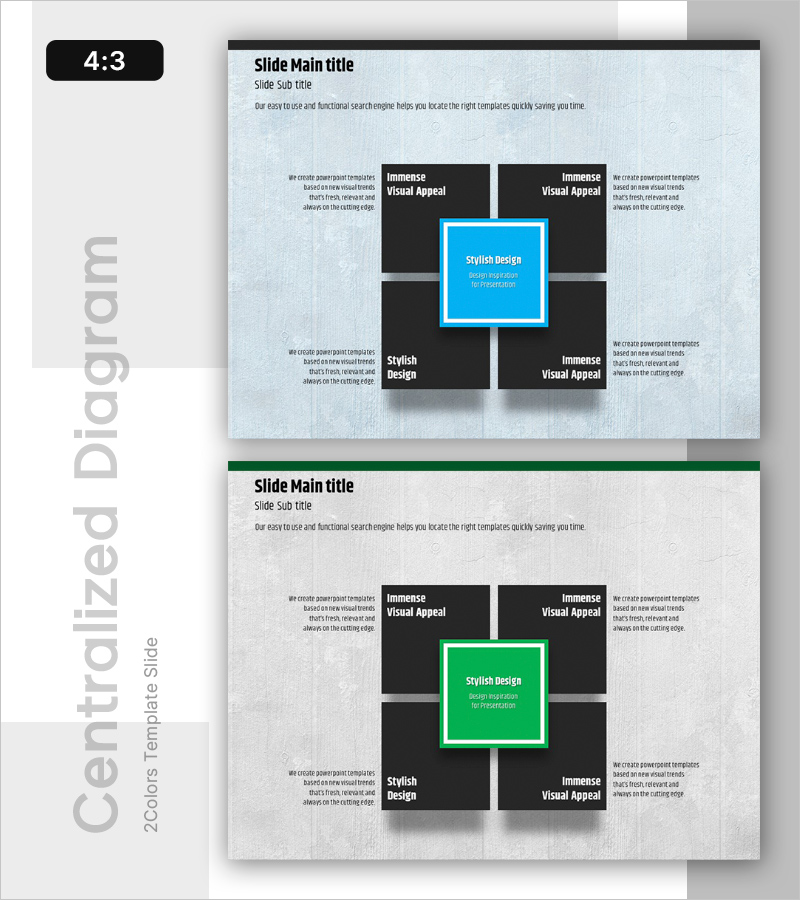
Overview of 4 Key Strategic Components
RB0100031_8
- Last Update 03/04/2025
- File Size 3MB
- # of Slides 2
- File Format PPTX
- Slide Ratio 4:3
- Color
Keywords
- #Content-Based Slides
- #Design-Based Slides
- #Company Introduction
- #Business Vision and Strategy
- #Diagram
- #Business Areas
- #Core Competencies
- #Spread
- #Centralized Diagram
- #4:3
- #centered 4-element diagram PowerPoint
- #strategic framework slide template
- #business strategy diagram
- #core elements presentation
- #how to create strategic diagram in PowerPoint
About the Product
A centered 4-element diagram PowerPoint slide designed for strategic planning and business presentations. The layout features a central highlighted box surrounded by four black rectangular elements in a symmetrical arrangement on a light gray background. Two color versions are provided with bright blue and green accent boxes, allowing flexible customization for different presentation contexts. The 4:3 ratio, 2-slide template is ready to use immediately and can be adapted for business strategy, core competency analysis, vision statements, and organizational planning presentations.
Usage Points
-
Main Usage
Visualizes the relationship between a central strategic element and four surrounding components for business planning, organizational strategy, and competency frameworks. Ideal for executive presentations, investor pitches, and internal strategy alignment meetings where clear emphasis on core elements is essential.
-
How to Use
Enter your core strategy or objective in the central highlighted box, then add supporting elements (vision, strategy, capabilities, execution, etc.) in the four surrounding rectangles. Customize text content to match your organization's context and adjust colors to align with corporate branding guidelines.
-
Recommended For
Executives, strategy managers, business planners, consultants, and educators presenting strategic frameworks, business plans, organizational restructuring, and core competency initiatives. Particularly effective when presenting four key elements that require balanced emphasis and clear hierarchical relationships.
-
Slide Structure
2-slide template with light gray background. Each slide features four black rectangular boxes (two top, two bottom) arranged symmetrically around a central highlighted box. The central box is emphasized in bright blue (slide 1) or green (slide 2), with dedicated text input areas in each element for customization.
Related Products
-
Folder Template Area Diagram
#Company Introduction #Business Vision and Strategy #Diagram
-
Circular Growth: Visualizing Continuous Expansion
#Company Introduction #Business Vision and Strategy #Diagram
-
Programming Diffusion Diagram – Delivering Business Vision and Strategy
#Company Introduction #Business Vision and Strategy #Diagram
-
Operational Quality Management System Presentation Template – Visualizing Business Strategy
#Company Introduction #Business Vision and Strategy #Diagram
