



Group Brainstorming with Experts – The Start of Creative Collaboration
RM0900009_10
- Last Update 03/04/2025
- File Size 43.5MB
- # of Slides 2
- File Format PPTX
- Slide Ratio 16:9
- Color
Keywords
- #Content-Based Slides
- #Design-Based Slides
- #Technical Approach
- #Customer Success Stories
- #Diagram
- #Service Implementation Plan
- #Customer Testimonials and Feedback
- #Spread
- #Decentralized Diagram
- #16:9
- #radial diagram PowerPoint
- #group discussion slide template
- #team collaboration presentation
- #central diagram PPT
- #brainstorming slide design
- #4-direction connection diagram
About the Product
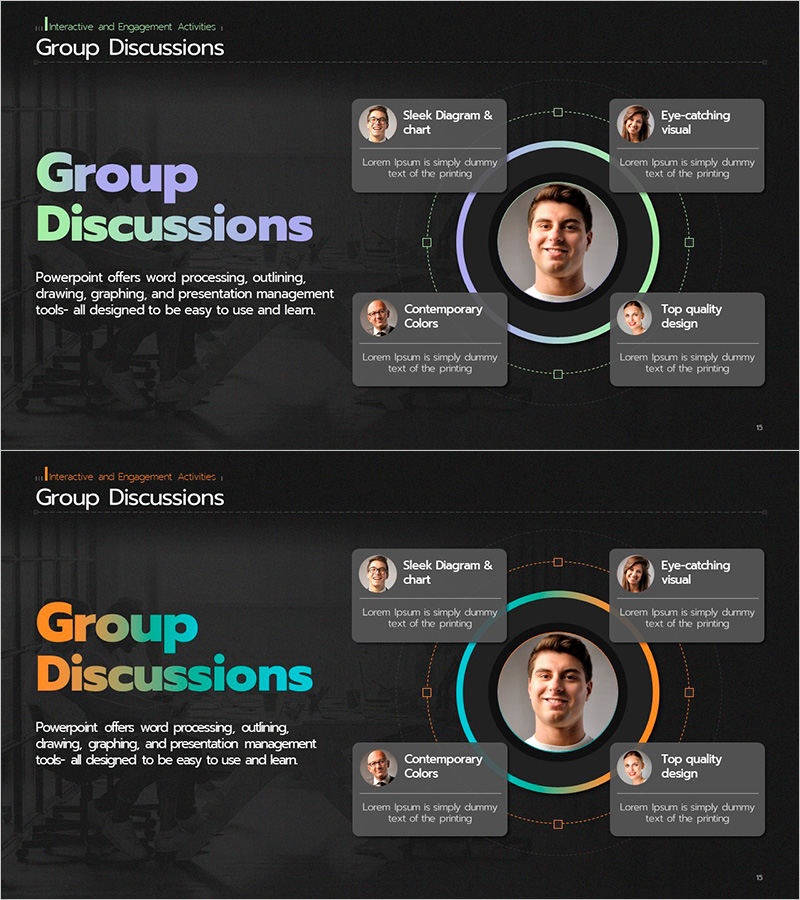
A radial diagram PowerPoint slide featuring a central portrait surrounded by four team members positioned in cardinal directions. The dark background is enhanced with colorful curved connector lines in blue, green, orange, and purple, each highlighting a team member's profile photo and text area. This design effectively communicates the roles and contributions of group brainstorming participants. The 2-slide set includes a title slide and diagram slide, optimized for 16:9 widescreen format. Ideal for team collaboration presentations, customer success case studies, organizational introductions, and interactive engagement activities.
Usage Points
-
Main Usage
Designed to visually represent team member roles and interdependencies with a central leader or key person at the hub. The four surrounding cards emphasize team contributions and connectivity, making it ideal for group brainstorming sessions, collaborative projects, and organizational introductions where team cohesion and diversity need to be effectively communicated.
-
How to Use
Insert a leader or key person's photo in the central circular area, then add team member information (name, role, responsibility) to each of the four directional cards. Customize the curved connector line colors by role or department to enhance visual hierarchy. Expand text areas to include each team member's key achievements or insights, creating a comprehensive team overview.
-
Recommended For
Team leaders, project managers, HR professionals, marketing strategists, and consultants presenting team structures and collaboration frameworks. Suitable for new employee onboarding, team building workshops, customer success case presentations, organizational restructuring briefings, and partner introductions.
-
Slide Structure
Slide 1: Title slide with 'Group Discussions' heading and descriptive text. Slide 2: Central circular portrait area (1 node) + four directional cards (each with profile photo and text box) + curved connector lines in blue, green, orange, and purple linking center to all four cards. 16:9 widescreen format, PPTX file.
Related Products
-
Camping Isometric Work Process Diagram – Deriving Business Strategy
#Business Vision and Strategy #Technical Approach #Diagram
-
Tool Icons and Diffusion Diagrams – Visualizing Technical Processes
#Operational Plan #Technical Approach #Diagram
-
Summary of Key Strategic Measures – Non-Centralized Diagram
#Business Vision and Strategy #Technical Approach #Diagram
-
Connection Diffusion Composite Diagram for Service Operations
#Technical Approach #Diagram #Service Operation Plan
