



As Is To Be Diagram – Visual Tool for Business Strategy
RM0600002_19
- Last Update 02/23/2025
- File Size 1.1MB
- # of Slides 2
- File Format PPTX
- Slide Ratio 16:9
- Color
Keywords
- #Content-Based Slides
- #Design-Based Slides
- #Business Strategy
- #Business Management
- #Diagram
- #Implementation Plan
- #Cluster
- #Closed Cluster Diagram
- #16:9
- #As Is To Be diagram
- #current vs. future comparison PowerPoint
- #comparison diagram slide
- #business strategy presentation
- #two-stage contrast diagram
About the Product
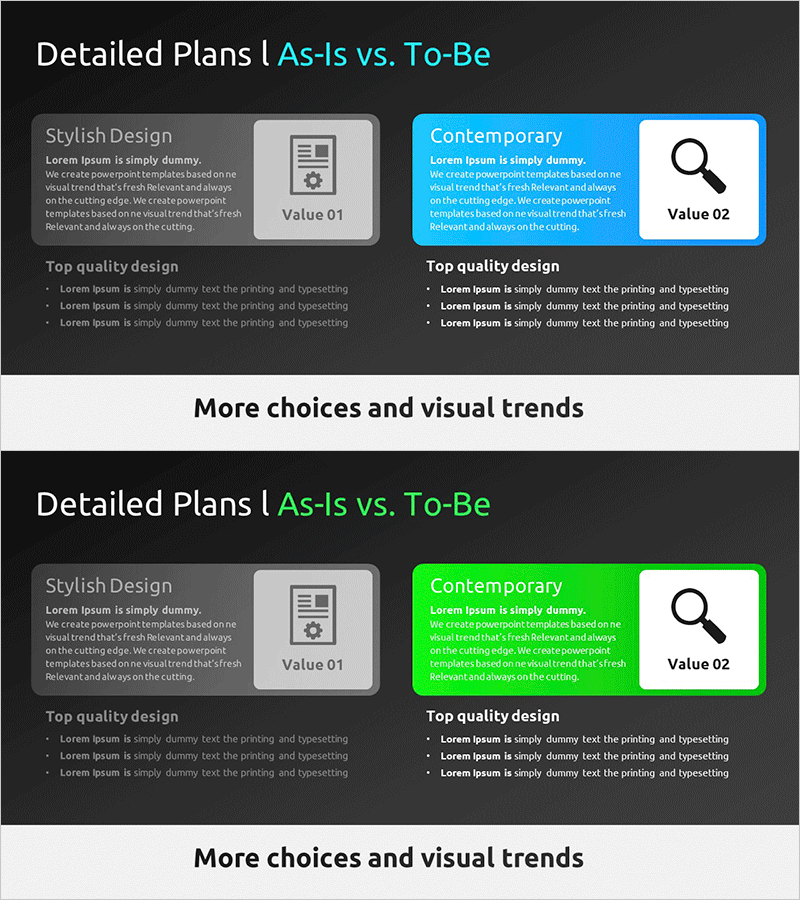
A closed-form comparison diagram PowerPoint slide that visually contrasts current state (As Is) with future vision (To Be). The slide features a two-stage structure with a gray box on the left and a blue box on the right, each accommodating title, description, and icon elements. Ideal for business strategy presentations, organizational transformation initiatives, and project goal-setting scenarios where current analysis and future objectives must be presented simultaneously. Available in 16:9 widescreen PPTX format with full editability—customize colors, text, and layout to match your corporate branding and presentation needs.
Usage Points
-
Main Usage
Clearly visualizes the gap between current state (As Is) and future target (To Be) using a left-right contrast structure. Effectively communicates strategic transformation, organizational improvement plans, and project enhancement proposals in executive briefings, change management initiatives, and vision-setting presentations.
-
How to Use
Enter current state information (title, description, icon) in the left gray box and future vision content in the right blue box. Each text element and icon is independently editable, and color schemes can be customized to align with corporate branding. Apply to executive presentations, team meetings, client proposals, and strategic planning sessions.
-
Recommended For
Executives, strategy teams, project managers, organizational development specialists, management consultants, and marketing planners presenting business transformation, organizational restructuring, system migration, and process innovation. Particularly effective for change management communications and future vision alignment meetings where the gap between current and desired states must be clearly articulated.
-
Slide Structure
Two-slide deck featuring a closed-form comparison layout. Each slide displays two side-by-side boxes—left gray box (Value 01, Stylish Design) and right blue box (Value 02, Contemporary)—arranged symmetrically. Each box contains dedicated areas for title, descriptive text, and icon placement. Bottom section includes 'Top quality design' area for supplementary information and supporting details.
Related Products
-
4-Step Stair Diagram – Clear Visualization of Business Strategies
#Business Strategy #Business Management #Diagram
-
Four Color Infographic Template Closed Diagram – Business Implementation Strategy
#Business Strategy #Business Management #Diagram
-
Detailed Plan Diagram – Strategy and Management
#Business Strategy #Business Management #Diagram
-
Key Events Roadmap – Business Strategy and Diagram Utilization
#Business Strategy #Business Management #Diagram
