



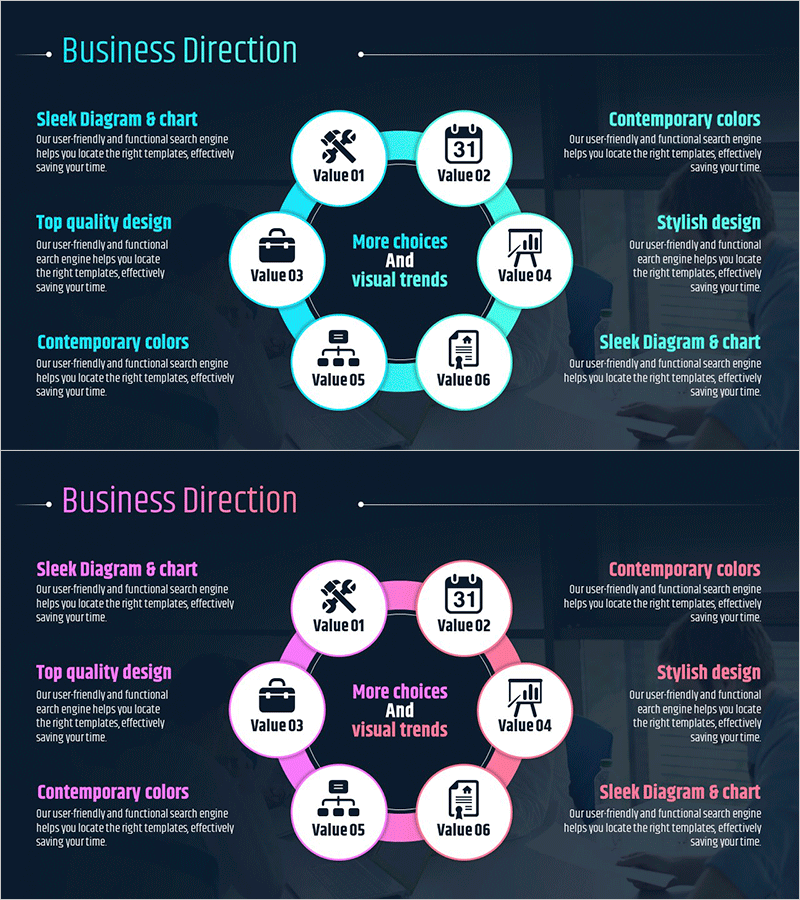
Business Connections Circular Diagram – Business Goals and Strategies
RM0500007_19
- Last Update 02/21/2025
- File Size 2.2MB
- # of Slides 2
- File Format PPTX
- Slide Ratio 16:9
- Color
Keywords
- #Content-Based Slides
- #Design-Based Slides
- #Business Vision and Strategy
- #Diagram
- #Business Strategy
- #Business Goals
- #Cluster
- #Spread
- #Chain Diagram
- #Decentralized Diagram
- #16:9
- #circular diagram PowerPoint
- #radial diagram slide template
- #6-node diagram presentation
- #business connection diagram
- #business strategy PPT slide
About the Product
A 6-node radial circular diagram PowerPoint slide designed to visualize business goals and strategies. The layout features a central core message surrounded by six satellite nodes arranged in a radial pattern, each containing an icon and editable text field. The design uses a dual-tone color scheme of cyan and pink, bringing a contemporary aesthetic to business presentations. The 2-slide set provides both cyan and pink variations, allowing you to select the version that matches your brand colors. Optimized for 16:9 widescreen format, all elements are fully editable, enabling you to input content and deploy immediately without design modifications.
Usage Points
-
Main Usage
Position your organization's core objective at the center and connect six related strategies or execution items in a radial pattern to communicate business direction at a glance. Ideal for executive briefings, business plan presentations, and strategic planning sessions where complex business relationships need intuitive visual explanation.
-
How to Use
Enter your core objective (e.g., business vision, strategic goal) in the central node, then populate the six surrounding nodes with detailed strategies, action items, or performance metrics. Customize each node's icon to match your category, and adjust colors to emphasize key areas. Choose between the cyan or pink version to align with your presentation tone.
-
Recommended For
Executive and C-level business strategy presentations, management-level strategic planning meetings, investor pitches on business direction, organizational restructuring and goal-sharing sessions, quarterly or annual objective presentations for marketing, sales, and operations departments.
-
Slide Structure
One central primary node positioned at the hub, with six satellite nodes arranged radially around it in clockwise order. Each node consists of a circular background, an icon, and an editable text field. Cyan or pink connecting lines link the center to each outer node. Both slides maintain identical structure with color variation only.
Related Products
-

Three Routes Toward Innovation – Business Goals and Strategy Diagram
#Business Vision and Strategy #Diagram #Business Strategy
-
Key Focus Areas for Service Delivery – Effective Business Objectives Presentation
#Business Vision and Strategy #Diagram #Business Strategy
-
Coffee Imprint Diagram – Visualizing Business Strategy
#Business Vision and Strategy #Diagram #Business Strategy
-
Successful Business Strategy Diagram – Connecting Business Objectives
#Business Vision and Strategy #Diagram #Business Strategy
