



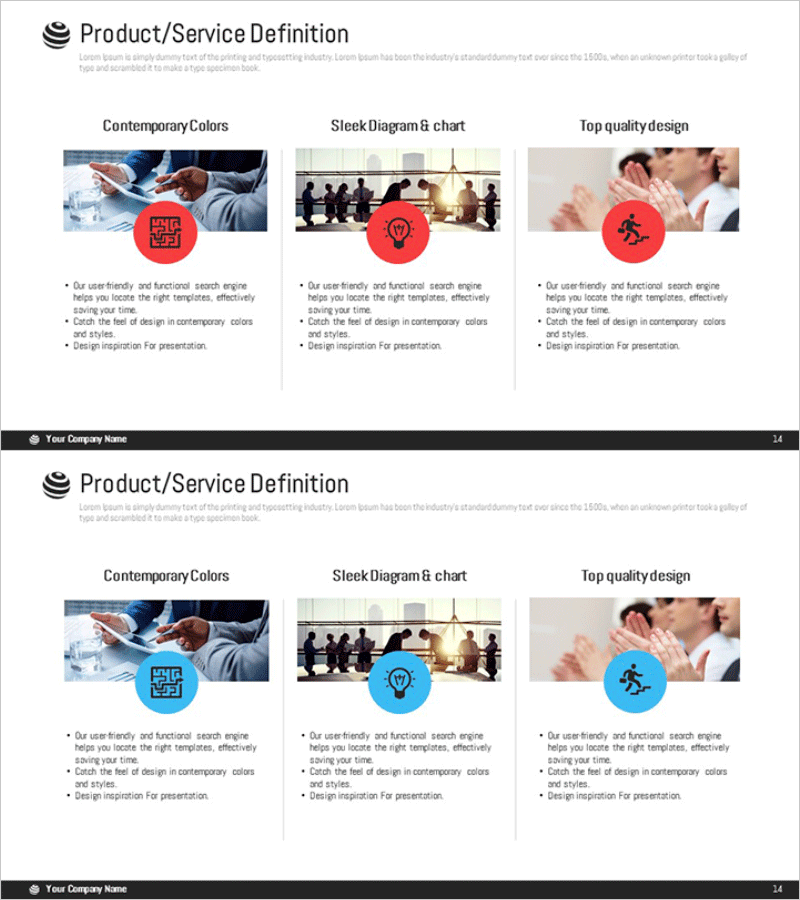
Program Introduction Closed Diagram – Clear Structure and Communication
RM0400006_13
- Last Update 02/16/2025
- File Size 1.6MB
- # of Slides 2
- File Format PPTX
- Slide Ratio 16:9
- Color
Keywords
- #Content-Based Slides
- #Design-Based Slides
- #Product/Service Introduction
- #Diagram
- #Product/Service Introduction
- #Program Introduction
- #Cluster
- #Closed Cluster Diagram
- #16:9
- #closed cluster diagram PowerPoint
- #relationship diagram slide template
- #program introduction presentation
- #service structure diagram
- #how to create cluster diagram in PowerPoint
About the Product
A closed cluster diagram PowerPoint slide designed to clearly communicate program structure and service relationships. The diagram features a central concept surrounded by three related sections arranged in a circular layout, each highlighted with circular icons in red, blue, and gray tones. This 2-slide presentation template is optimized for 16:9 widescreen format and enables step-by-step explanation of program features and operational methods. Fully editable in PPTX format, it's ideal for corporate briefings, employee onboarding, project kickoff meetings, and service introduction presentations.
Usage Points
-
Main Usage
Visually represents the relationship between a program's core concept and related areas, enhancing audience comprehension. The closed structure effectively explains complete systems, processes, or organizational hierarchies, while the center-focused layout emphasizes key messages and creates visual clarity.
-
How to Use
Enter the program name in the central circular icon and add key features, operational methods, or expected outcomes in the three surrounding sections. Customize text and colors to match your organization's brand guidelines, then use in corporate presentations, training sessions, or project briefings.
-
Recommended For
Recommended for HR and training professionals presenting employee onboarding programs, marketing teams explaining service structures, and project leaders presenting program overviews. Suitable for any presentation requiring clear communication of organizational processes, systems, or service relationships.
-
Slide Structure
2-slide template featuring a closed cluster diagram with central core and three surrounding nodes on the first slide, with a color variation (red, blue, gray tone alternatives) on the second slide. Each node includes a circular icon and editable text area, optimized for 16:9 widescreen presentation format.
Related Products
-

Introducing Differentiated Product Services – Infographic Slide to Enhance Business Efficiency
#Product/Service Introduction #Diagram #Product/Service Introduction
-
Introduction to Business Key Programs – Impactful Cluster Diagram
#Product/Service Introduction #Diagram #Product/Service Introduction
-
Key Details Slide - Elegant Diagram Utilization
#Product/Service Introduction #Diagram #Product/Service Introduction
-
Daily Diagrams with Exercise – Healthy Lifestyle
#Product/Service Introduction #Diagram #Product/Service Introduction
