



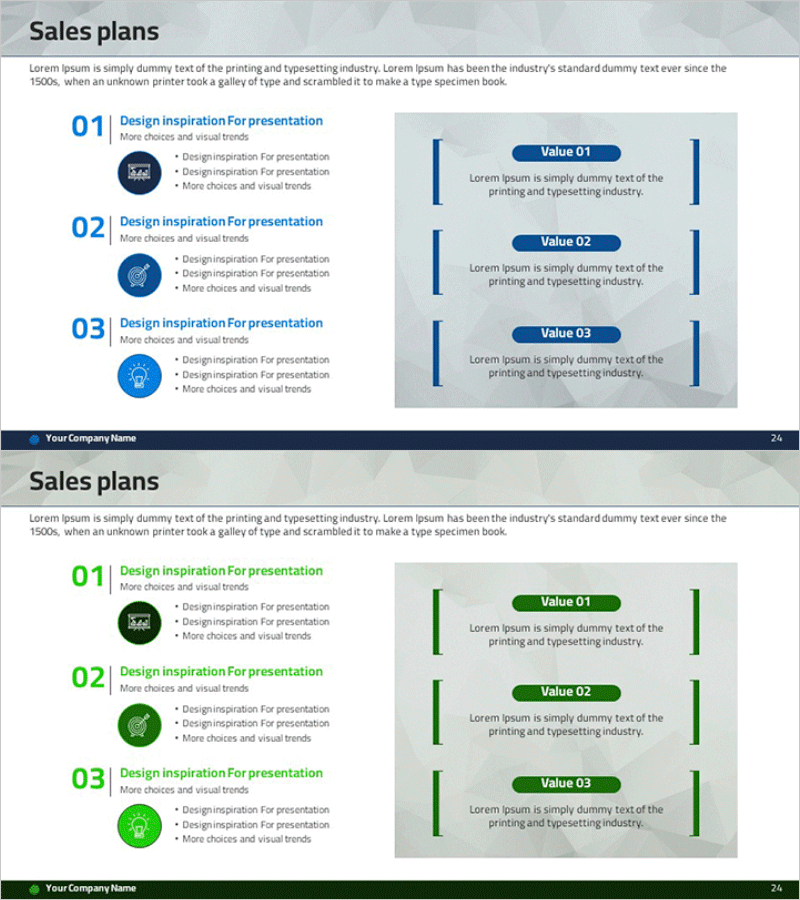
Pricing Strategy & Goal Setting Slides
RM0400005_23
- Last Update 02/15/2025
- File Size 3MB
- # of Slides 2
- File Format PPTX
- Slide Ratio 16:9
- Color
Keywords
- #Content-Based Slides
- #Design-Based Slides
- #Business Management
- #Marketing Plan and Strategy
- #Diagram
- #Execution Plan
- #Pricing Strategy
- #Cluster
- #Closed Cluster Diagram
- #16:9
- #closed cluster diagram PowerPoint
- #pricing strategy slide template
- #goal setting diagram
- #business relationship chart
- #nested diagram PowerPoint
- #how to create cluster diagram in PowerPoint
About the Product
A closed cluster diagram PowerPoint slide that visualizes pricing strategy and goal setting through nested zones. This presentation template features three overlapping areas that clearly express relationships and hierarchies between key elements. The design combines a dark blue background with white typography and colored icons to emphasize information layers. Instantly applicable for marketing plans, business management reports, and strategy presentations where complex concept structures need explanation. The 2-slide set provides multiple color themes (blue and green) that can be customized to match your corporate brand identity.
Usage Points
-
Main Usage
This closed cluster diagram is designed to visually express complex relationships and hierarchies in pricing strategy, goal setting, and business management. The nested zone structure intuitively conveys the inclusion relationships between core elements and detailed items, enhancing clarity in marketing plans and strategy presentations.
-
How to Use
Enter your strategy elements into the text areas on the slide and adjust colors to match your corporate brand. Modify the icons and labels in each zone to apply to your specific business context. Use this diagram during presentations to explain each hierarchical layer and their relationships step by step.
-
Recommended For
Marketing managers, business strategists, and planning teams presenting pricing policies, goal setting, and business plans will find this template ideal. It works well for investor pitch decks, executive reports, and team meetings where complex concept structures need clear explanation.
-
Slide Structure
The 2-slide set provides dark blue and green color themes. Each slide features three nested closed zones arranged with a central core element at the center, expanding outward through external layers. Each zone includes icons and text input fields for immediate customization and editing.
Related Products
-
Set Up a Product Sales Plan – Effective Business Management Slide
#Business Management #Marketing Plan and Strategy #Diagram
-
Painting Tools Diagram – Visualization of Clusters and Connections
#Business Management #Operational Plan #Diagram
-
Blue Chain Diagram – Strategic Mindset for Business Initiatives
#Business Strategy #Business Management #Diagram
-
Pizza Recipe Slide – Business Strategy and Cluster
#Business Strategy #Business Management #Diagram
