



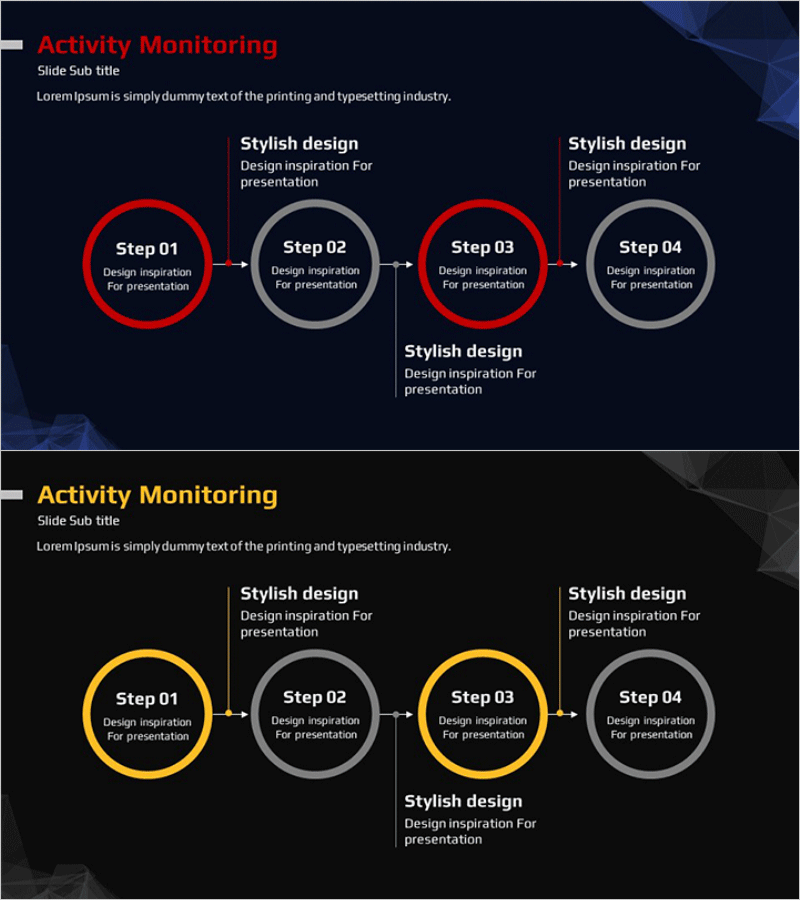
Step-by-step Schedule STEP 4 Linear Diagram – Business Strategy
RM0400001_31
- Last Update 02/14/2025
- File Size 0.4MB
- # of Slides 2
- File Format PPTX
- Slide Ratio 16:9
- Color
Keywords
- #Content-Based Slides
- #Design-Based Slides
- #Business Strategy
- #Business Management
- #Operational Plan
- #Diagram
- #Step-by-Step Schedule Plan
- #Implementation Plan
- #Flow
- #Linear Flow
- #16:9
- #linear diagram PowerPoint
- #4-step process slide
- #step-by-step schedule template
- #business strategy diagram
- #process flow PowerPoint slide
About the Product
A 4-step linear diagram PowerPoint slide designed to visualize business strategy and operational planning. The design uses contrasting red and gray colors to distinguish key steps from supporting phases, with circular nodes and arrow connectors that clearly represent process flow. Each step includes dedicated text areas for descriptions, making it ready for immediate use in presentations and planning documents. The 16:9 widescreen format with 2-slide layout allows flexible customization for various presentation scenarios.
Usage Points
-
Main Usage
Ideal for visualizing business strategy, operational planning, project timelines, and phased implementation plans. The 4 sequential steps are represented as circular nodes connected by arrows, clearly communicating process flow and progression.
-
How to Use
Enter step titles (Step 01–04) in the circular nodes and add descriptions in the text areas below each step. Use the red accent color to highlight critical milestones and gray for supporting phases. Customize text and colors to match your presentation theme.
-
Recommended For
Executive reports, business plans, marketing strategy presentations, project proposals, organizational restructuring plans, and new business initiative pitches. Particularly effective for strategy, planning, and operations teams presenting to senior management.
-
Slide Structure
2-slide set. Slide 1: Red accent version with Steps 01 & 03 in red, Steps 02 & 04 in gray. Slide 2: Yellow accent version with Steps 01 & 03 in yellow, Steps 02 & 04 in gray. Each slide features 4 circular nodes, 3 arrow connectors, and 4 text description areas.
Related Products
-
Marketing Promotion Plan Flow Diagram - Efficient Business Strategy
#Business Strategy #Business Management #Operational Plan
-
5-Step Linear Circle Diagram – Business Strategy
#Business Strategy #Business Management #Operational Plan
-
Global Business Presentation with Circular Flow Diagram
#Business Strategy #Business Management #Operational Plan
-

Healthcare Process Flow PowerPoint – 4-Step Linear Diagram
#Business Strategy #Business Management #Operational Plan
