



Global Enterprise Company Overview – Cluster Design
RM0300008_4
- Last Update 02/09/2025
- File Size 8.7MB
- # of Slides 2
- File Format PPTX
- Slide Ratio 16:9
- Color
Keywords
- #Content-Based Slides
- #Design-Based Slides
- #Company Introduction
- #Business Introduction
- #Diagram
- #Company Overview
- #Business Overview
- #Cluster
- #Closed Cluster Diagram
- #16:9
- #cluster diagram PowerPoint
- #closed-form diagram slide
- #organizational structure chart
- #business relationship diagram PPT
- #company overview slide template
About the Product
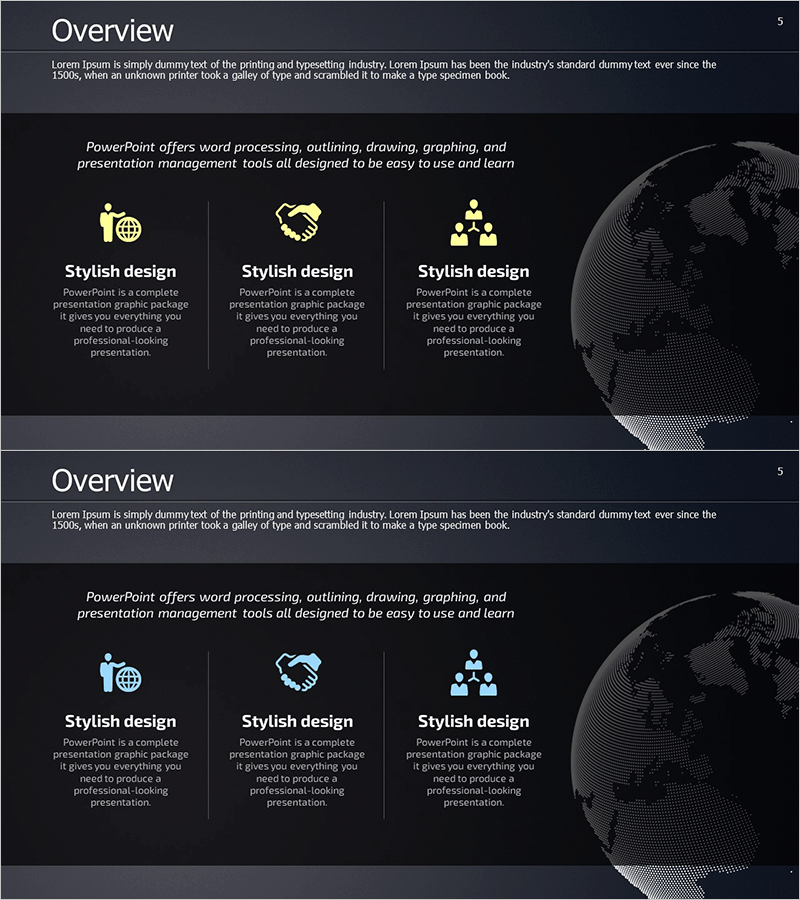
A 3-node cluster diagram PowerPoint slide that visualizes organizational structure and business relationships for global enterprises. The closed-form layout features a central hub connected to three surrounding nodes, ideal for company overview presentations and business domain interactions. Designed with a dark background, yellow icons, and white typography for strong contrast, this presentation slide is ready to use in corporate introductions, business overviews, and strategic planning decks. The 2-slide PPTX template in 16:9 widescreen format is fully editable, allowing you to customize colors, text, and node labels to match your presentation needs.
Usage Points
-
Main Usage
Visualize organizational structure, business divisions, and inter-departmental relationships using a centralized cluster diagram to clearly communicate how core business elements interact in company overview presentations.
-
How to Use
Insert this slide into the organizational structure section of corporate presentations, business overview decks, or strategic planning materials. Place your main concept in the central node and key business areas or departments in the surrounding nodes to show hierarchical relationships.
-
Recommended For
Corporate executives, marketing teams, strategic planning departments, and investor relations professionals preparing presentations that need to emphasize organizational structure and business domain connectivity.
-
Slide Structure
Two-slide template featuring the first slide with three yellow icons (global, partnership, organization) arranged in a closed-form cluster around a central point, and the second slide with light blue icons in the same layout. Each node includes editable text areas for customized information input.
Related Products
-
Corporate Business Overview and Growth Strategy – Data Cluster Design
#Company Introduction #Business Introduction #Diagram
-
Stable Company Overview Slides – Fundamentals of Business
#Company Introduction #Business Introduction #Diagram
-
Square Diagram for Effective Company Presentation – Cluster Format
#Company Introduction #Business Introduction #Diagram
-
Introduction to Green Red Product Service – Business Insight
#Company Introduction #Business Introduction #Diagram
