



List of Proposal Program Introductions – Intuitive and Stylish Diagrams
RM0200016_4
- Last Update 02/06/2025
- File Size 0.3MB
- # of Slides 2
- File Format PPTX
- Slide Ratio 16:9
- Color
Keywords
- #Content-Based Slides
- #Design-Based Slides
- #Company Introduction
- #Product/Service Introduction
- #Diagram
- #Company Overview
- #Program Introduction
- #Cluster
- #Closed Cluster Diagram
- #16:9
- #closed cluster diagram PowerPoint
- #status comparison slide template
- #6-item comparison PPT
- #proposal presentation diagram
- #how to create cluster diagram in PowerPoint
About the Product
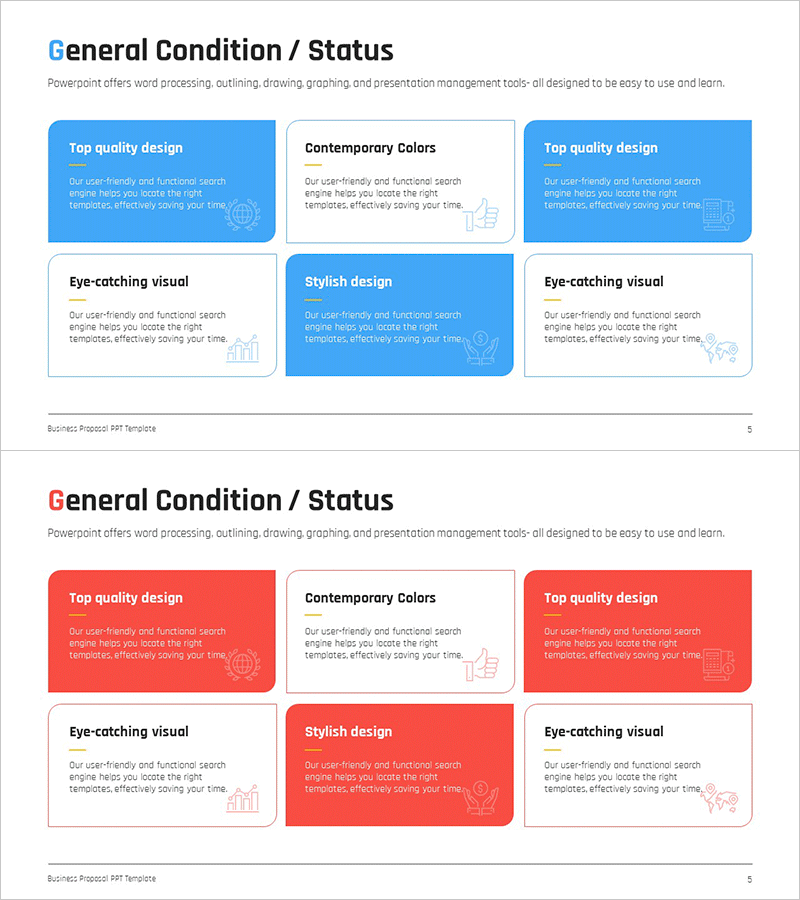
A closed cluster diagram PowerPoint slide optimized for proposal presentations and program introductions. This 2-slide set features six emphasis boxes arranged in a central cluster pattern, with blue and red background colors for visual distinction. Each box provides space for item titles and descriptions, enabling intuitive comparison of statuses, conditions, and characteristics. The layout includes a clear title area at the top and dedicated text zones for detailed explanations. Delivered in 16:9 widescreen PPTX format with fully editable boxes, colors, and text fields for immediate presentation use.
Usage Points
-
Main Usage
Designed for proposal presentations, program introductions, and business plan pitches where multiple items, options, or conditions need simultaneous comparison and emphasis. The central cluster layout clearly expresses relationships and priorities among items.
-
How to Use
Enter your presentation topic in the title area at the top. Fill the six boxes with item names and descriptions. Use blue boxes for positive or recommended items and red boxes for alerts or emphasis, or customize colors as needed. All text and colors are fully editable.
-
Recommended For
Ideal for proposal writers, program planners, marketing professionals, and business development specialists presenting comparative analysis of multiple options or statuses. Recommended for executive briefings, client proposals, and team meeting materials.
-
Slide Structure
2-slide template. Each slide features a title area at the top and six closed cluster boxes arranged in a symmetric 3-left/3-right pattern. Each box contains dedicated spaces for item titles and explanatory text, with blue and red color coding for visual categorization.
Related Products
-
Business Company Overview – Systematic Information Delivery
#Company Introduction #Product/Service Introduction #Diagram
-
Triangle Pattern Wide Table PPT Template – Ideal for Company and Service Introduction
#Company Introduction #Product/Service Introduction #Diagram
-
Introduction of Future Technology Business Project – Diagrams of Innovation and Growth
#Company Introduction #Product/Service Introduction #Diagram
-
Research and Development Overview Diagram – Innovation and Progress
#Company Introduction #Product/Service Introduction #Diagram
