



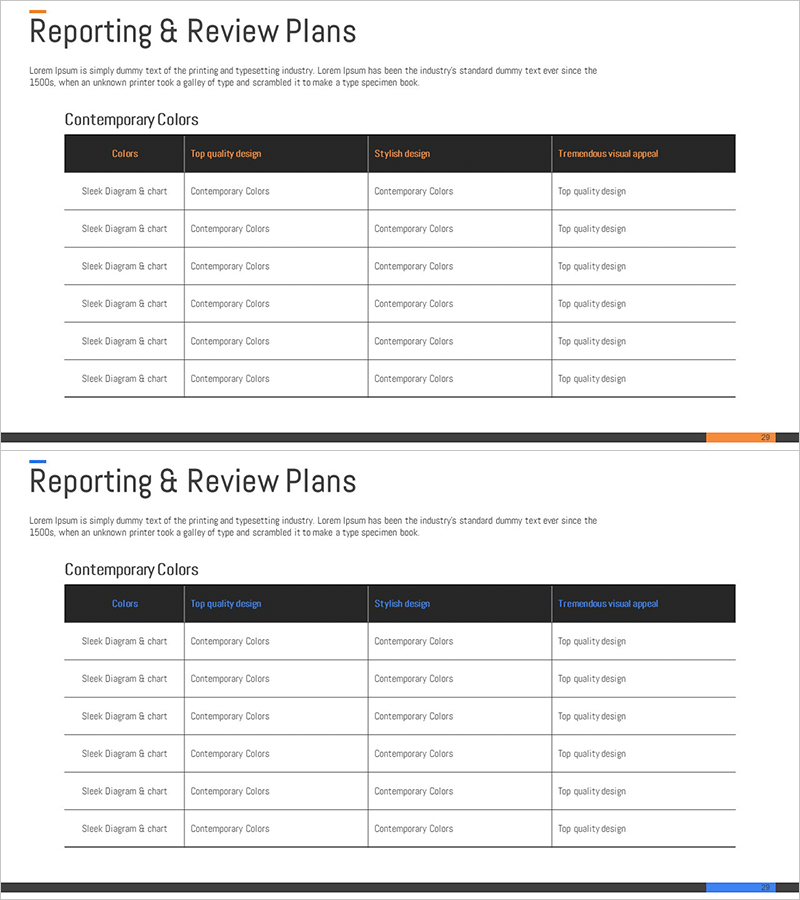
Report and Review Plan Table – Efficient Business Management
RM0200004_28
- Last Update 02/02/2025
- File Size 0.2MB
- # of Slides 2
- File Format PPTX
- Slide Ratio 16:9
- Color
Keywords
About the Product
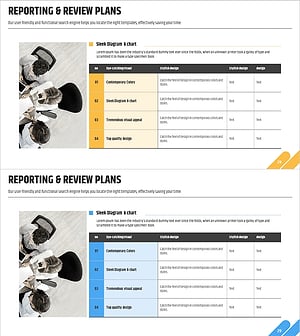
A 4-column comparison table PowerPoint slide designed for business management and performance review presentations. The dark header with white text areas ensures excellent information readability, while 6 data entry rows allow systematic organization of multiple items. This PPT slide is optimized for clearly communicating key metrics and action plans in reports, business plans, and performance review presentations. Created in 16:9 widescreen format for seamless integration into modern presentation environments.
Usage Points
-
Main Usage
Systematically organize and compare business management status, quarterly performance reviews, project progress tracking, and departmental goal achievement. The clear dark header separation emphasizes information hierarchy, making it suitable for decision-support materials and executive briefings.
-
How to Use
Enter evaluation criteria in each column header (Colors, Top quality design, Stylish design, Tremendous visual appeal), then fill in review subjects (Sleek Diagram & chart, etc.) and corresponding details in the 6 data rows. Add color codes or icons for enhanced visual emphasis.
-
Recommended For
Ideal for executive reporting, business performance review meetings, quarterly business plan presentations, project management reports, and departmental performance evaluation materials. Recommended for CFOs, project managers, business planning teams, and operations managers.
-
Slide Structure
Composed of a dark header row (4 columns) plus 6 data entry rows. Each cell supports text input, enabling clear information comparison at row-column intersections. Provided in 2-slide versions with color variations (dark and blue accent themes).
Related Products
-
Review Checklist – Business Management
#Business Management #Diagram #Execution Plan
-
Business Report Analysis Table – A Solution for Efficient Management and Review
#Business Management #Diagram #Execution Plan
-
Reporting & Review Plan Slide – Step-by-Step
#Business Management #Diagram #Text Box
-
Proposal Review Plan Items – Visualizing Data with Diagrams
#Business Management #Diagram #Execution Plan
