



Reporting & Review Plan Slide – Step-by-Step
RM0200008_29
- Last Update 02/03/2025
- File Size 1.2MB
- # of Slides 2
- File Format PPTX
- Slide Ratio 16:9
- Color
Keywords
- #Content-Based Slides
- #Design-Based Slides
- #Business Management
- #Diagram
- #Text Box
- #Execution Plan
- #Reporting and Review Plan
- #Table
- #Speech Bubble
- #16:9
- #reporting and review plan PowerPoint
- #step-by-step timeline slide
- #3-phase progress presentation
- #business status report slide
- #project review PPT template
About the Product
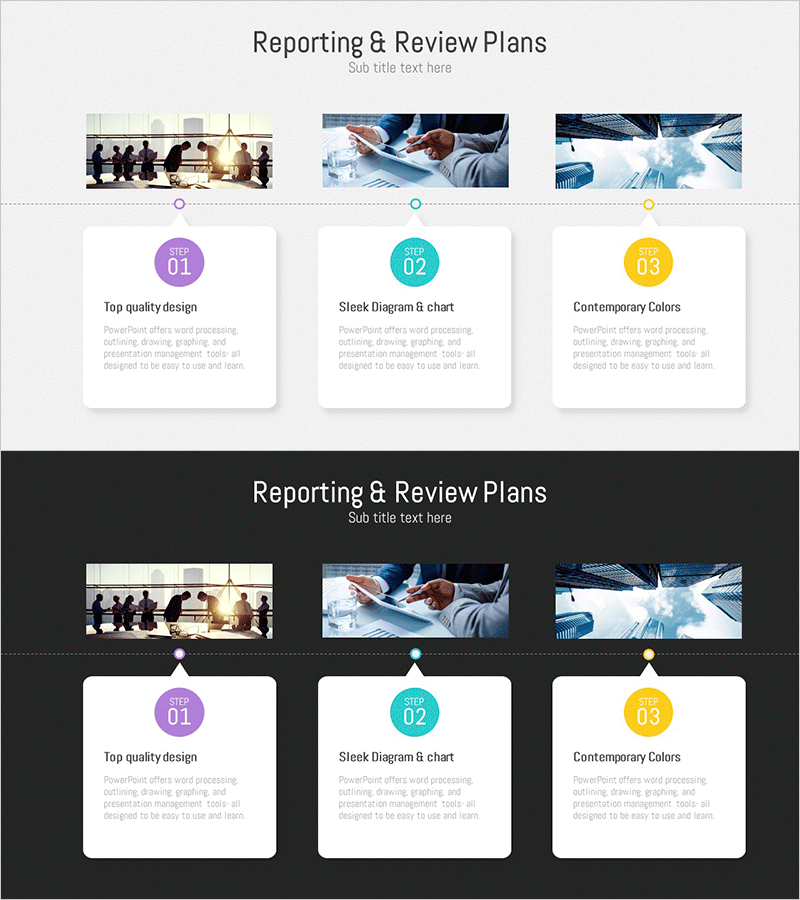
A PowerPoint slide designed for reporting business progress and conducting step-by-step reviews. The layout features three color-coded cards (purple, cyan, yellow) arranged in a timeline format, each with a dedicated text area for detailed information. The upper section displays three business-related images (meeting, workflow, data analysis) to enhance visual credibility and engagement. This presentation slide template is ready to use for project status updates, business reviews, and stakeholder communications. Easily customize the text and images to match your reporting needs.
Usage Points
-
Main Usage
This slide enables you to structure and communicate business progress across distinct phases, making it ideal for periodic status reports and milestone reviews. The timeline format visualizes progression over time, while color-coded cards help audiences quickly identify each phase's status and importance at a glance.
-
How to Use
Enter phase names (e.g., Planning, Execution, Review) in the title area of each color card, then fill in the text section below with key achievements, metrics, or issues for that phase. Replace the top images with visuals relevant to your presentation context while maintaining the overall layout consistency for a professional report.
-
Recommended For
Project managers, team leads, and executives can use this slide for quarterly reviews, monthly status meetings, business performance presentations, and stakeholder updates. It works particularly well for multi-phase projects, milestone tracking, and progress communication across organizational levels.
-
Slide Structure
The slide consists of an upper image section (three photos arranged horizontally) and a lower card section (three color-coded cards with step numbers, titles, and text input areas). A dotted timeline connects the cards to show progression. The 2-slide set accommodates multiple reporting scenarios and review topics.
Related Products
-
Project Report and Review Plan – Professional Approach
#Business Management #Diagram #Execution Plan
-
Report and Review Plan Table – Efficient Business Management
#Business Management #Diagram #Execution Plan
-
Project Review Plan - Effective Business Management
#Business Management #Diagram #Execution Plan
-
Report and Review Record Table – Efficient Business Management
#Business Management #Diagram #Execution Plan
