



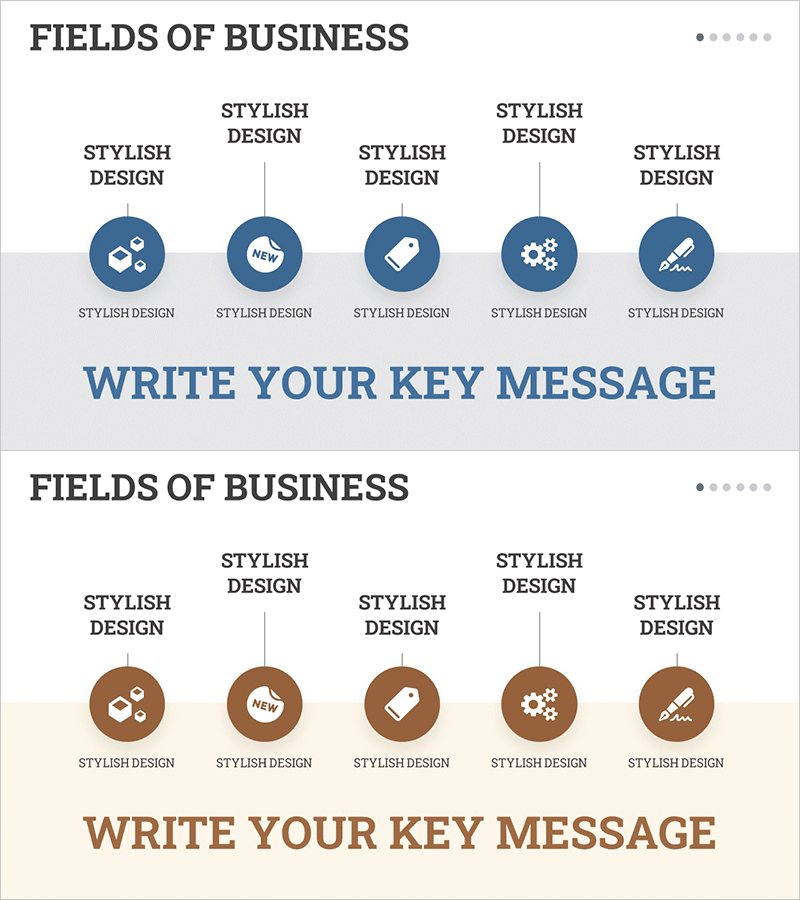
Clustering Diagram Slide for Interior Business Program Overview
RM0100019_7
- Last Update 01/31/2025
- File Size 0.9MB
- # of Slides 2
- File Format PPTX
- Slide Ratio 16:9
- Color
Keywords
- #Content-Based Slides
- #Design-Based Slides
- #Product/Service Introduction
- #Business Introduction
- #Diagram
- #Program Introduction
- #Business Areas
- #Cluster
- #Closed Cluster Diagram
- #16:9
- #clustering diagram PowerPoint
- #5-item diagram slide
- #business field analysis presentation
- #closed-form diagram template
- #business overview PPT slide
About the Product
A closed-form clustering diagram PowerPoint slide that presents business fields through five categorized items at a glance. The structure radiates from a central concept to five circular nodes, with icons and text clearly expressing the components of a business program. Against a dark blue background, white circular nodes and connecting lines emphasize information hierarchy, making it ideal for service introductions and business structure explanations across interior design, construction, manufacturing, and other industries. The 2-slide set offers multiple color variations (blue and brown) to match your presentation tone.
Usage Points
-
Main Usage
Optimized for visually expressing a business program's core fields through five categorized items. The radial structure from center to periphery clearly conveys information hierarchy, making it ideal for explaining business structures in interior design, construction, manufacturing, and service industries.
-
How to Use
Enter your core business name in the central circular node and add each field's services, products, or functions in the five surrounding nodes. Customize icons for each area to enhance visual consistency, and adjust text size and color to control emphasis levels.
-
Recommended For
Recommended for business introductions, service portfolio presentations, organizational structure and business field analysis, and business overview sections in proposals and company profiles. Suitable for executive briefings, client meetings, investor presentations, and professional business presentations.
-
Slide Structure
2-slide set featuring dark blue and brown background versions. Each slide contains one central circular node and five surrounding nodes connected by relationship lines. Each node includes icon areas and text input fields for immediate editing and customization.
Related Products
-
Business Program Introduction Slides – Visualizing Program Structure
#Product/Service Introduction #Business Introduction #Diagram
-
Business Area Introduction Slides – Effective and Visual Presentation
#Product/Service Introduction #Business Introduction #Diagram
-

Baby and Toddler Products Business Area – Infused With Care and Love
#Product/Service Introduction #Business Introduction #Diagram
-
Diagram for Description by Business Program – Conveying Connectivity and Clarity
#Product/Service Introduction #Business Introduction #Diagram
