



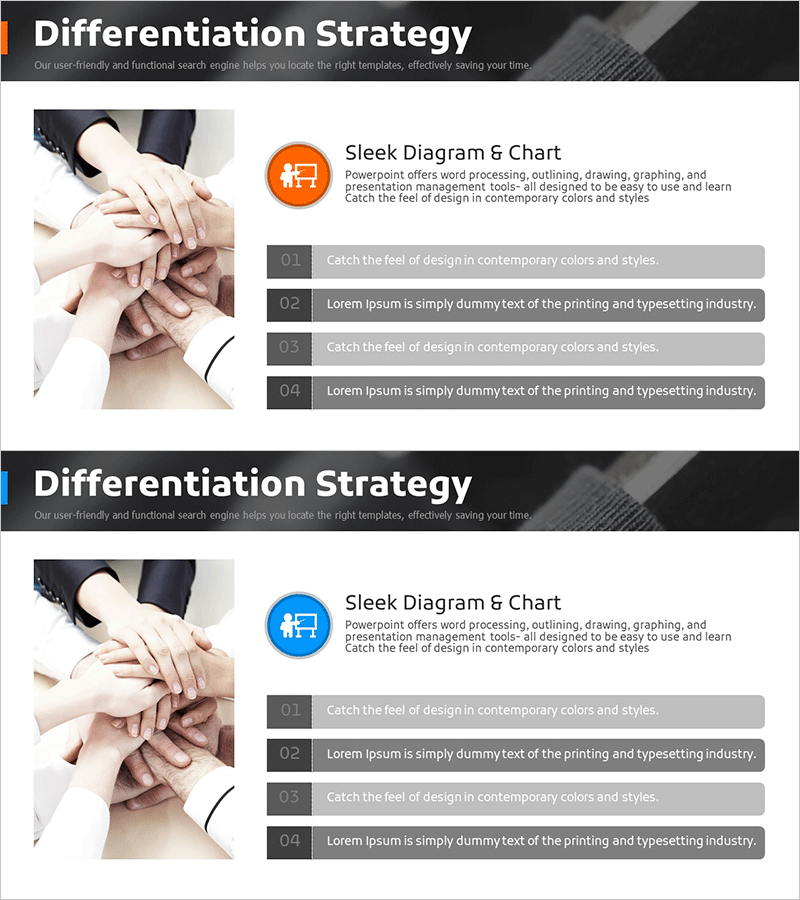
Business Differentiation Strategy Diagram – Comprehensive Marketing Strategy
RM0100015_18
- Last Update 01/29/2025
- File Size 4.5MB
- # of Slides 2
- File Format PPTX
- Slide Ratio 16:9
- Color
Keywords
- #Content-Based Slides
- #Design-Based Slides
- #Product/Service Introduction
- #Marketing Plan and Strategy
- #Diagram
- #Differentiation Strategy for Products/Services
- #Marketing Strategy
- #Cluster
- #Closed Cluster Diagram
- #16:9
- #closed-form diagram PowerPoint
- #differentiation strategy slide
- #integrated structure template
- #marketing strategy diagram
- #business strategy PowerPoint slide
About the Product
A closed-form diagram PowerPoint slide that visualizes business differentiation strategy with a central core message surrounded by four integrated sections. This slide design enables simultaneous representation of marketing strategy, competitive advantage, customer value, and execution plan. The two-tone color scheme of orange and blue highlights key elements, with designated text input areas in each section for immediate editing. The 2-slide set is ready to use across various presentation scenarios and business contexts.
Usage Points
-
Main Usage
Clearly communicates corporate differentiation strategy to executives, marketing teams, and sales departments through integrated visual representation. The relationship between central core and four sections is instantly comprehensible, making it effective for strategy formulation, review, and organizational communication.
-
How to Use
Input marketing strategy, competitive advantage, customer value, and execution plan into each section's text box to create a customized strategy presentation. Maintain existing template styling while modifying content only, ensuring consistent and professional presentation materials.
-
Recommended For
Ideal for executives, strategy teams, marketing departments, and business development teams in board meetings, strategy presentations, investor briefings, and internal training sessions. Particularly effective when explaining new business ventures, product differentiation, and market positioning strategies.
-
Slide Structure
2-slide set with each slide featuring a central circular core message surrounded by four sections connected in a closed-form structure. Orange accent color and blue background create visual hierarchy, with numbered indicators and text input spaces provided in each section for easy customization.
Related Products
-
4 Steps to a Chess Themed Marketing Strategy
#Product/Service Introduction #Marketing Plan and Strategy #Diagram
-
Diagram Slide for Business Strategies
#Product/Service Introduction #Marketing Plan and Strategy #Diagram
-
Security Service Differentiation Strategy PowerPoint Template
#Product/Service Introduction #Marketing Plan and Strategy #Diagram
-
Fountain Pen Ink Marketing Strategy Slide
#Product/Service Introduction #Marketing Plan and Strategy #Diagram
