



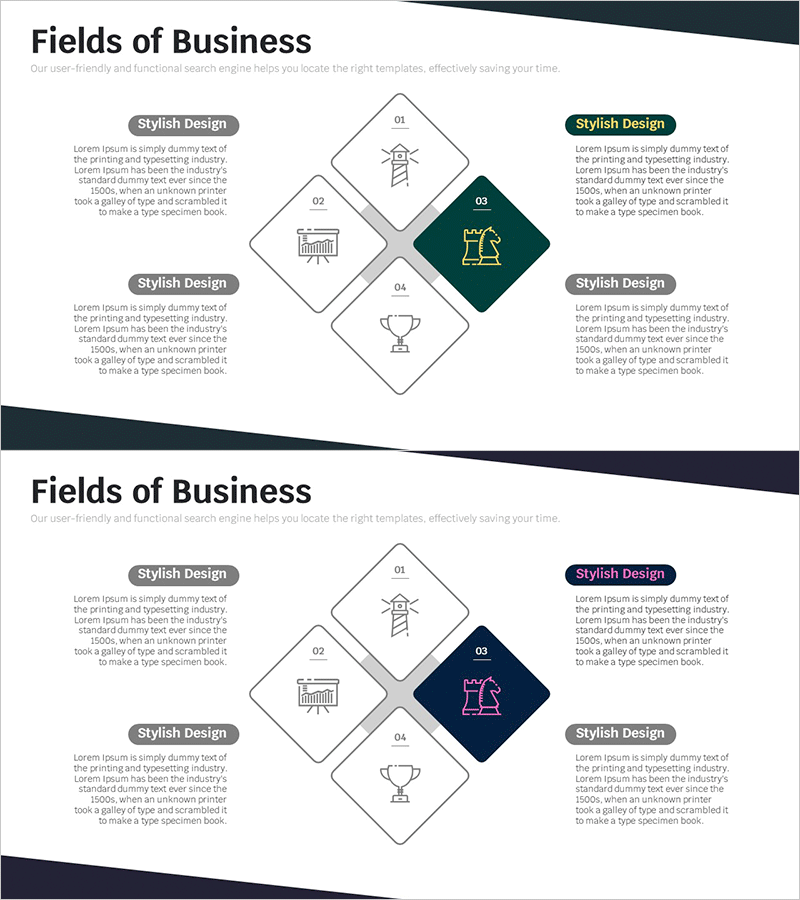
Business Area Round Square Diagram – Business Introduction
RM0100014_7
- Last Update 01/29/2025
- File Size 0.2MB
- # of Slides 2
- File Format PPTX
- Slide Ratio 16:9
- Color
Keywords
- #Content-Based Slides
- #Design-Based Slides
- #Product/Service Introduction
- #Business Introduction
- #Diagram
- #Program Introduction
- #Business Areas
- #Spread
- #Decentralized Diagram
- #16:9
- #central diagram PowerPoint
- #4-section business diagram
- #business area analysis slide
- #business domain PowerPoint template
- #diagram slide design
About the Product
A central-type diagram PowerPoint slide that visualizes business areas across four sections with clear hierarchical structure. Featuring dark green accent color and business icons, this presentation template effectively communicates distinct business domains. Ideal for business introductions, area analysis, and organizational structure presentations. The 16:9 widescreen format includes 2 slides with fully editable text and icon elements for quick customization and immediate deployment in corporate presentations.
Usage Points
-
Main Usage
Visualizes key business domains or operational areas across four balanced sections arranged around a central point. The symmetrical layout emphasizes equal importance of each area, making it ideal for business introductions and strategic planning presentations where clear domain differentiation is essential.
-
How to Use
Insert into business plans, company profiles, or strategy presentations in the business area overview section. Customize each section box with relevant business domain names and replace icons to match your industry. Adjust colors as needed to align with corporate branding guidelines.
-
Recommended For
Executives presenting business strategy, marketing professionals introducing new business lines, HR specialists explaining organizational structure, and startup founders pitching investment portfolios. Suitable for C-level presentations and stakeholder communications.
-
Slide Structure
Four rounded square boxes positioned symmetrically around a central point (top, bottom, left, right). The right-center box features dark green background with yellow icon for emphasis, while the other three boxes use white background with black icons. Each box includes numbered labels (01-04) and text areas, with implicit arrow connections to the center.
Related Products
-
Asset Management Business Area Diagram – Cluster and Connection
#Product/Service Introduction #Business Introduction #Diagram
-
Diffusion Diagram of Scientific Research Fields – The Power of Connection
#Business Introduction #Diagram #Business Areas
-
Visualizing Business Areas with Square Diffusion Diagram
#Business Introduction #Operational Plan #Diagram
-
Medical Treatment Area Diagram – Vision and Strategy
#Business Introduction #Business Vision and Strategy #Diagram
