



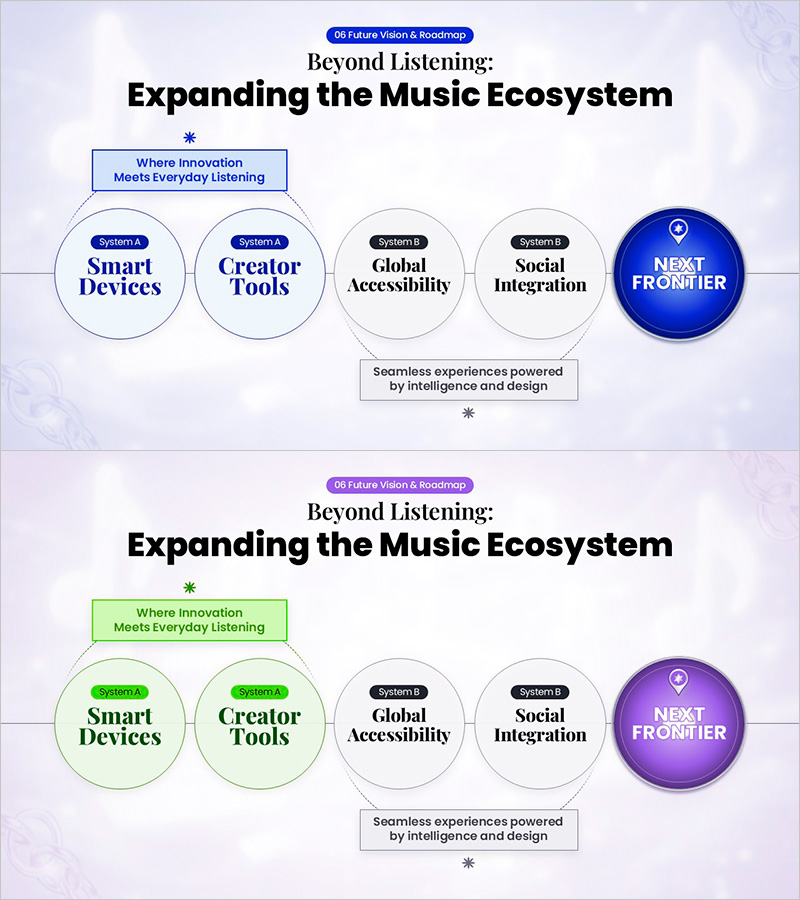
Future Vision Ending Slide for Expanding the Music Platform Ecosystem
RM0700018_6
- Last Update 12/22/2025
- File Size 15.7MB
- # of Slides 2
- File Format PPTX
- Slide Ratio 16:9
- Color
Keywords
- #Content-Based Slides
- #Design-Based Slides
- #Business Vision and Strategy
- #Business Strategy
- #Diagram
- #Business Strategy
- #Marketing Plan
- #Cluster
- #Chain Diagram
- #16:9
- #connected diagram PowerPoint
- #node connection slide template
- #platform ecosystem expansion diagram
- #business roadmap PPT
- #strategy flowchart presentation
About the Product
A 2-slide PowerPoint presentation visualizing music platform ecosystem expansion strategy. Five circular nodes (Smart Devices, Creator Tools, Global Accessibility, Social Integration, Next Frontier) are arranged in a linear connection structure to illustrate phased expansion strategy. Available in two color versions—blue and green—with each node containing system classification and key messaging areas. Ideal for future vision presentations, service roadmap explanations, and business ecosystem development strategy decks ready for immediate use.
Usage Points
-
Main Usage
Communicate phased platform ecosystem expansion strategy visually. Five core systems (Smart Devices, Creator Tools, Global Accessibility, Social Integration, Next Frontier) are represented in linear connection structure, clarifying each stage's role and interconnectivity.
-
How to Use
Use as closing slide or strategy summary section in future vision presentations, service roadmap explanations, and business ecosystem development strategy decks. Edit node text to match your strategy and deliver integrated vision to audience.
-
Recommended For
Executive presentations for music and streaming platform companies, investor relations materials, client proposals from strategy consulting firms, technology company future roadmap presentations, and digital ecosystem development project planning presentations.
-
Slide Structure
2-slide layout. First slide features blue-toned background with 5 circular nodes arranged left-to-right in linear connection, final node highlighted in emphasis color (blue). Second slide provides identical structure in green color scheme for color option flexibility. Each node includes system label and key message text input area.
Related Products
-
Business Strategy Silhouette Diagram
#Business Vision and Strategy #Marketing Plan and Strategy #Diagram
-
International Trade Business Strategy Diagram – Global Business Growth
#Business Vision and Strategy #Marketing Plan and Strategy #Diagram
-
Circular Gradient Diagram for Business Goals Visualization – Connecting Strategies
#Business Vision and Strategy #Diagram #Business Strategy
-
Business Objectives Analysis Table Diagram – Analyze All Business Goals
#Business Vision and Strategy #Diagram #Business Strategy
