



Creative Technology Hexagonal Diagram - Business Introduction and Technology Status
RJ0500039_9
- Last Update 08/27/2025
- File Size 1.1MB
- # of Slides 2
- File Format PPTX
- Slide Ratio 16:9
- Color
Keywords
- #Content-Based Slides
- #Design-Based Slides
- #Business Introduction
- #Technical Approach
- #Diagram
- #Technological Status
- #Research and Development
- #Spread
- #Centralized Diagram
- #16:9
- #hexagon diagram PowerPoint
- #radial diagram slide
- #central diagram template
- #6-item diagram
- #diagram PowerPoint slide design
About the Product
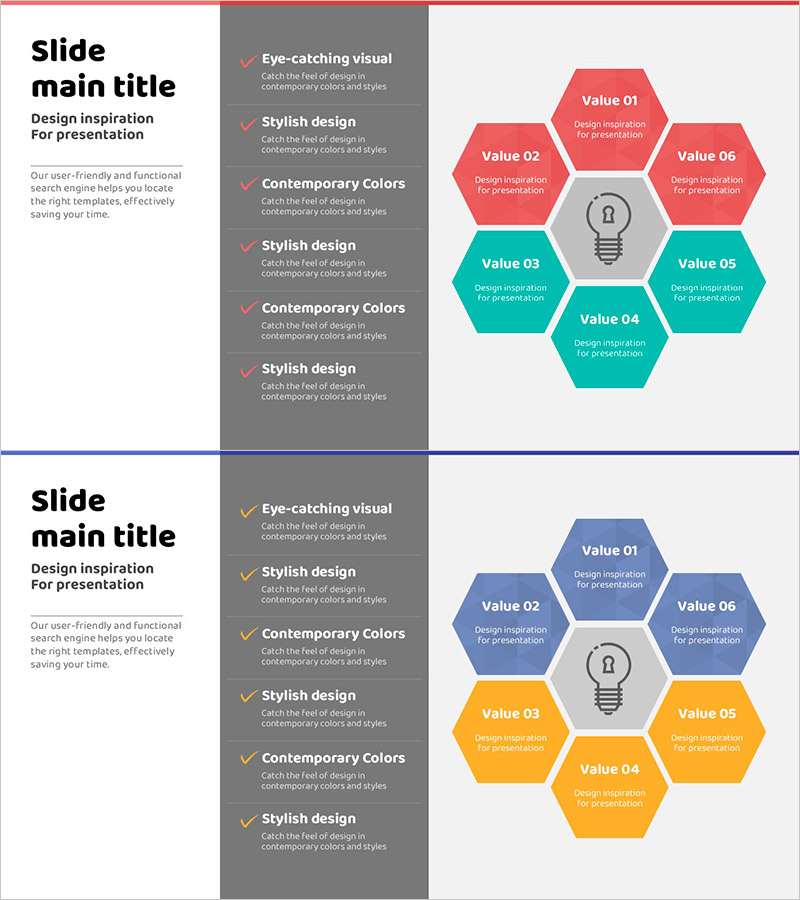
A radial diagram PowerPoint slide featuring a central core element surrounded by six hexagons representing related items. The design uses three color schemes—red, blue, and teal—with editable text fields in each hexagon for titles and descriptions. This layout effectively communicates the relationship between a central concept and six supporting elements, making it ideal for business introductions, technology overviews, product features, and service structures. Delivered in 16:9 widescreen format, PPTX file type, with 2 slides ready for immediate customization.
Usage Points
-
Main Usage
Visualizes hierarchical relationships between a central concept and six supporting elements. The radial structure radiates from the core outward, making it ideal for explaining business strategies, technology stacks, product capabilities, service offerings, and organizational frameworks in a comprehensive manner.
-
How to Use
Enter item names and descriptions in each hexagon's text box. Customize colors by importance level or category, or maintain a unified color scheme. Add animations to create a cascading effect from center to periphery, enhancing visual engagement during presentations.
-
Recommended For
Recommended for business strategists, marketing professionals, technology leaders, and product managers presenting strategies, features, and structural components. Suitable for investor pitches, product launches, technical seminars, organizational overviews, and cross-functional business presentations.
-
Slide Structure
Features a central circular icon or text area with six hexagons positioned radially—top, bottom, left, right, top-left, and top-right. Slide 1 uses red and teal color schemes; Slide 2 features blue and orange, providing flexibility for different presentation contexts and visual preferences.
Related Products
-
Trend and Status Analysis Slide – Blue Orange Diagram
#Business Management #Technical Approach #Diagram
-
Eco-friendly Business Project Reporting and Review Plan – Innovative Technology and Future-Oriented Approach
#Technical Approach #Diagram #Research and Development
-
Camera Focus Diagram – Innovative Technology Presentation
#Product/Service Introduction #Business Introduction #Diagram
-
Plotting Paper Diagram Template – Business & Technology Overview
#Business Introduction #Technical Approach #Technological Status
