



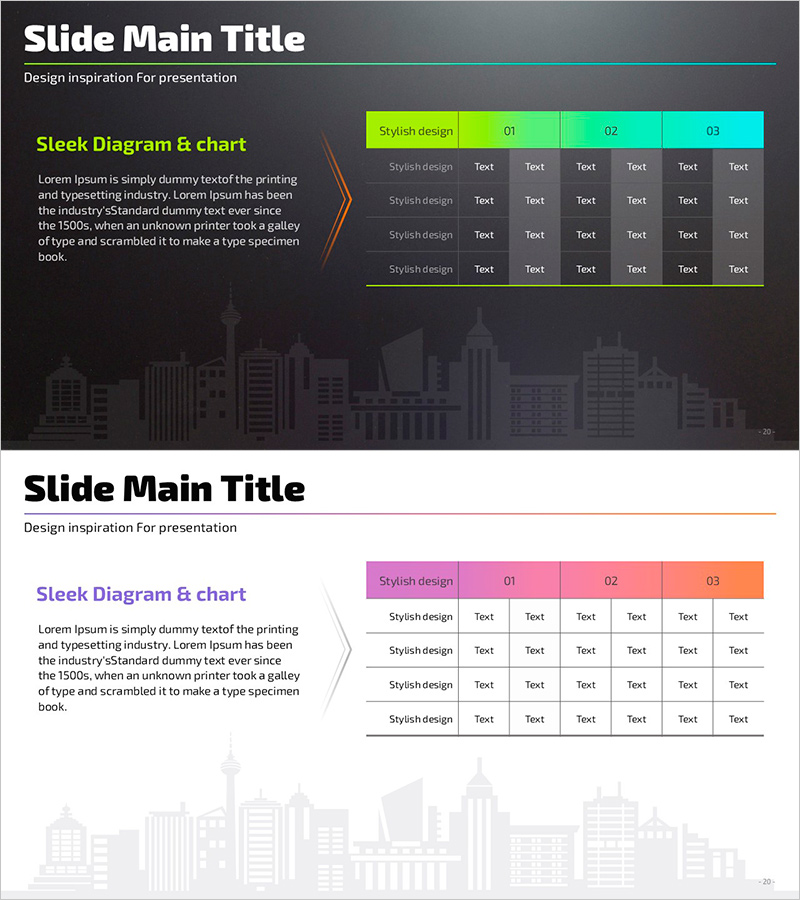
Table and Analytical Text – Stylish Diagram Slide
RJ0900020_19
- Last Update 08/21/2025
- File Size 6.2MB
- # of Slides 2
- File Format PPTX
- Slide Ratio 16:9
- Color
Keywords
About the Product
A table diagram PowerPoint slide designed to organize and compare business data systematically. Features a high-contrast table structure with lime, mint, and cyan gradient headers on a dark background, optimized for numerical comparisons, item categorization, and multi-factor analysis. The 2-slide set includes both dark and light background themes, allowing you to match your presentation tone. Each cell is formatted as an editable text field for immediate data input and customization. Ideal for business reports, analytical presentations, market research findings, and comparative analysis decks.
Usage Points
-
Main Usage
Visualizes quantitative data, feature comparisons, competitive analysis, and time-series performance in tabular format, enabling audiences to grasp information at a glance. Strengthens credibility and clarity in data-driven sections of reports, proposals, and analytical presentations.
-
How to Use
Enter category names in header cells and comparison subjects (products, time periods, regions) in rows, then populate data cells. The color-coded headers clarify category distinctions, allowing you to emphasize importance or progression. Choose between dark or light background themes based on your presentation environment and design preference.
-
Recommended For
Financial analysts, marketing managers, management consultants, project managers, and executives preparing quarterly reports, market analysis, performance reviews, and business proposals. Particularly effective for data-driven decision-making meetings and stakeholder presentations.
-
Slide Structure
2-slide set, each featuring a 4-row (including header) × 7-column table diagram with lime, mint, and cyan gradient headers and editable text cells. First slide uses dark background; second uses light background for flexible theme matching.
Related Products
-
Origami Presentation Template Section Schedule – Business Progress Management
#Business Management #Operational Plan #Diagram
-
Dot Patterns Wide Presentation Template – Cluster Diagram
#Product/Service Introduction #Diagram #Product/Service Introduction
-
Colors Theme Presentation Template Table – Financial Planning and Performance
#Financial Plans and Performance #Diagram #Sales and Revenue
-
Infinite Energy Wide PPT Diagram – Product Introduction and Marketing Strategy
#Product/Service Introduction #Marketing Plan and Strategy #Diagram
