



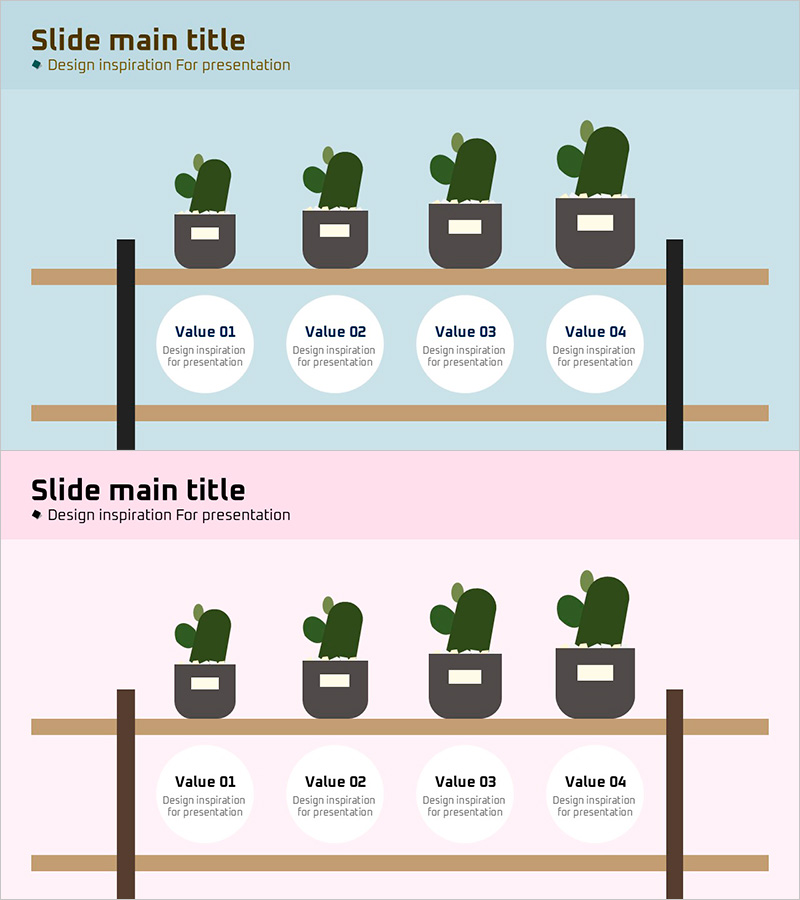
Circular Text Box and Cactus on Shelf Slide
RJ0900016_26
- Last Update 08/20/2025
- File Size 0.1MB
- # of Slides 2
- File Format PPTX
- Slide Ratio 16:9
- Color
Keywords
- #Content-Based Slides
- #Design-Based Slides
- #Product/Service Introduction
- #Operational Plan
- #Diagram
- #Text Box
- #Features
- #Composition
- #Organizational Structure and Staffing Plan
- #Cluster
- #Closed Cluster Diagram
- #16:9
- #circular text box PowerPoint slide
- #4-item circle diagram template
- #text box slide design
- #cactus plant presentation
- #closed-form diagram PowerPoint
- #how to create circular text boxes in PowerPoint
About the Product
A PowerPoint slide featuring four circular text boxes arranged below a decorative shelf display with potted cacti. The design combines light blue and pink backgrounds with tan wooden shelves, black support brackets, and green cacti to create a cohesive visual layout. Each circular box is labeled Value 01 through Value 04 and provides editable text areas for your content. This 16:9 ratio, 2-slide template is ready to use in presentations for displaying four-step processes, core values, key comparison points, or main objectives with an organic, approachable aesthetic.
Usage Points
-
Main Usage
Presents four key concepts, values, or process steps using circular text boxes arranged in a balanced layout. The cactus and shelf motif adds visual interest and a friendly, creative tone to business presentations, making complex information more engaging and memorable.
-
How to Use
Replace the placeholder text (Value 01–04) with your actual content such as core values, strategic pillars, performance metrics, or process phases. Choose between light blue or pink background versions to match your presentation theme. All elements including cactus colors and shelf positioning are fully editable in PowerPoint.
-
Recommended For
Ideal for marketing strategy presentations, business proposals, educational seminars, and company overview decks where four main points need emphasis. Works well for startups, educational institutions, lifestyle brands, and creative organizations seeking a friendly yet professional presentation style.
-
Slide Structure
Two-slide template in 16:9 widescreen format. Each slide features four potted cacti positioned on shelves at the top, two tan wooden shelves in the middle section, and four circular text boxes (Value 01–04) arranged vertically below. The layout balances visual elements with clear text input areas for easy customization.
Related Products
-
Description of Healthy Diet Ingredients – Cluster Diagram
#Product/Service Introduction #Operational Plan #Diagram
-
Denim PPT Keyword Box
#Product/Service Introduction #Operational Plan #Diagram
-
Collection of Advantages and Configurations PowerPoint Template – Operational Plan and Cluster
#Product/Service Introduction #Operational Plan #Diagram
-

Hexagonal Text Box with Icons – Visual Explanation Focus
#Product/Service Introduction #Diagram #Text Box
