



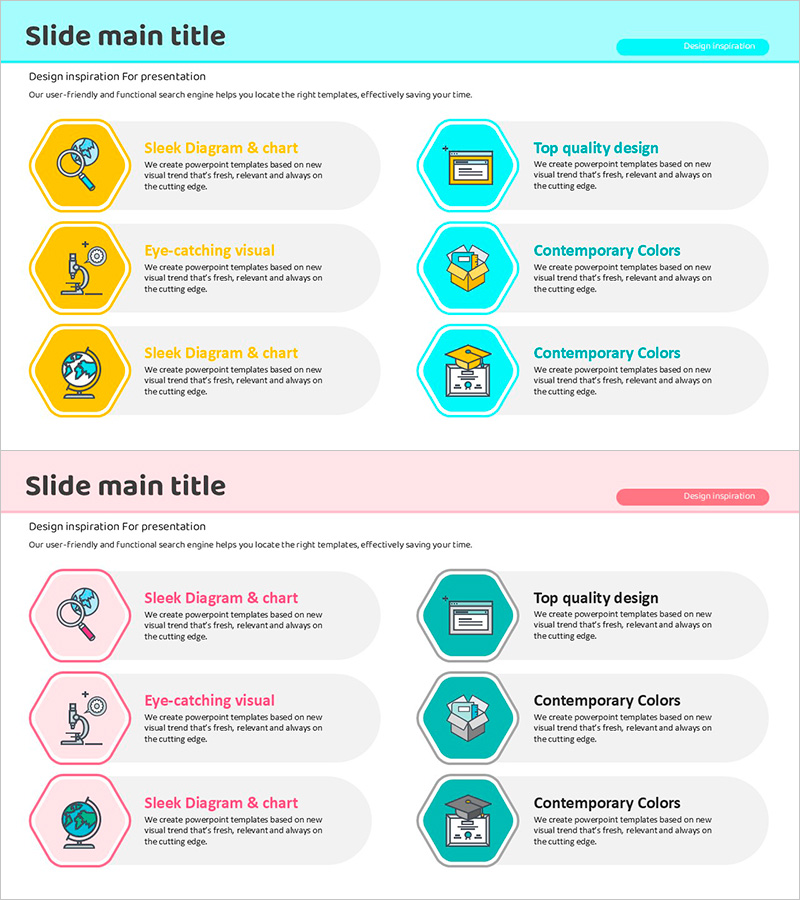
Hexagonal Text Box with Icons – Visual Explanation Focus
RJ0500035_8
- Last Update 10/07/2025
- File Size 0.4MB
- # of Slides 2
- File Format PPTX
- Slide Ratio 16:9
- Color
Keywords
- #Content-Based Slides
- #Design-Based Slides
- #Product/Service Introduction
- #Diagram
- #Text Box
- #Features
- #Composition
- #Cluster
- #Closed Cluster Diagram
- #Rounded Rectangle Text Box
- #16:9
- #rounded rectangle text box PowerPoint
- #hexagonal icon slide template
- #text box diagram PowerPoint
- #6-item comparison slide
- #icon emphasis presentation
- #visual explanation slide design
About the Product
A 2-slide PowerPoint presentation combining hexagonal and rounded rectangle text boxes with icon integration. The design features yellow and cyan hexagonal boxes with icons on the left, paired with rounded rectangle information boxes on the right. Each item uses a visual icon to highlight the topic while accompanying text provides detailed explanation, enhancing readability and visual hierarchy. Perfect for comparing and explaining six key elements such as company vision, service features, or core values in a single presentation slide.
Usage Points
-
Main Usage
Simultaneously present six items using icons and text boxes to enhance audience visual comprehension. Effectively communicate company core values, service features, product benefits, team roles, and other structured information in a cohesive layout.
-
How to Use
Enter icon and title in left hexagonal boxes, then add detailed descriptions in right rounded rectangle boxes. Maintain the yellow and cyan color scheme or customize with corporate brand colors. Apply to company profiles, proposals, marketing plans, and strategic presentations.
-
Recommended For
Ideal for marketing teams presenting product features, sales teams creating client proposals, executives delivering strategy presentations, HR teams introducing organizational structure, and planning teams outlining project overviews. Recommended for any presentation requiring visual alignment of six or more information points.
-
Slide Structure
2-slide layout with 3 hexagonal text boxes (with icons) on the left and 3 rounded rectangle boxes on the right per slide, arranged in 2-column format. Designed in 16:9 widescreen ratio for modern presentation environments.
Related Products
-

Graphic Template for Goal Setting – Cluster and Closed Diagram
#Product/Service Introduction #Diagram #Text Box
-
Speech Concept: Item Diagram Slide Template – Business Strategy Presentation
#Product/Service Introduction #Business Strategy #Diagram
-
Tool Product/Service Overview Template – Stylish Cluster Design
#Product/Service Introduction #Diagram #Features
-
A Representative Plant of Autumn - Cluster Diagram Slide
#Product/Service Introduction #Diagram #Features
