


Architecture Diagram Priorities – Benefits and Technical Status
RJ0900009_22
- Last Update 08/18/2025
- File Size 0.1MB
- # of Slides 2
- File Format PPTX
- Slide Ratio 16:9
- Color
Keywords
- #Content-Based Slides
- #Design-Based Slides
- #Product/Service Introduction
- #Business Introduction
- #Diagram
- #Text Box
- #Benefits and Advantages
- #Technological Status
- #Cluster
- #Chain Diagram
- #Rectangle Text Box
- #16:9
- #trapezoid diagram PowerPoint
- #priority diagram slide template
- #4-level hierarchy diagram
- #technical status presentation
- #benefits comparison slide
- #how to create priority diagram in PowerPoint
About the Product
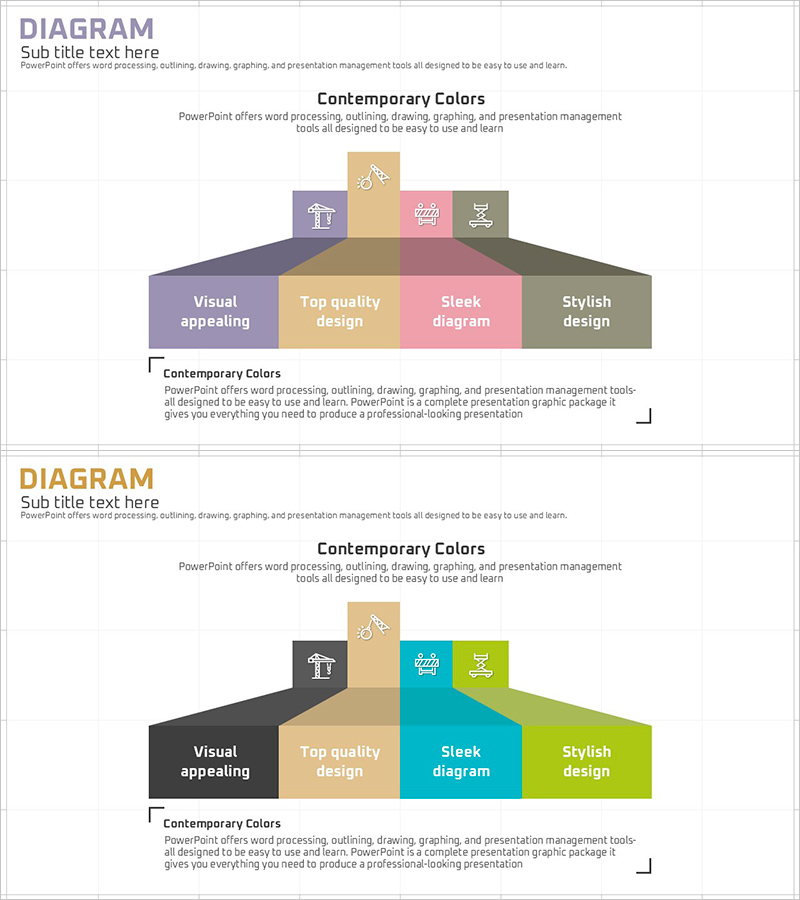
A trapezoid diagram PowerPoint slide that visualizes 4-level priorities with a hierarchical structure expanding from top to bottom. This presentation template uses four distinct colors—purple, beige, pink, and gray—to differentiate each section, with icons and text labels ensuring visual clarity. The slide effectively communicates priority frameworks, technical status, and benefit analysis in architecture, technology, and strategy presentations. Fully editable PPT slide template for professional business and technical communications.
Usage Points
-
Main Usage
Visualizes priority frameworks and hierarchical information with a trapezoid structure that expands from core concepts to detailed technical elements. Enables simultaneous comparison of characteristics and benefits across multiple levels while maintaining clear visual hierarchy.
-
How to Use
Use in technology presentations, strategy planning meetings, and architecture project proposals to explain priority criteria and technical status. Edit text labels and icons in each section to customize content for your specific presentation needs.
-
Recommended For
Architects, technology managers, project managers, and strategy planners presenting priority-based technical information to stakeholders. Suitable for technical seminars, investor presentations, and internal status reports.
-
Slide Structure
2-slide set featuring a purple-based trapezoid diagram with 4 levels on the first slide and a teal-and-lime variation on the second. Each level includes 4 icons and text labels. Delivered in 16:9 widescreen format with full editing capability.
Related Products
-
Modern Blue Presentation Diagram – Product/Service Features and Benefits
#Product/Service Introduction #Diagram #Features
-
Effective Business Transformation Strategy with Road Template
#Product/Service Introduction #Business Vision and Strategy #Diagram
-
Business Analysis with Doughnut Chart – Dawn City Theme
#Product/Service Introduction #Business Introduction #Diagram
-
Rainbow Paper Presentation Template Infographic Elements
#Product/Service Introduction #Business Vision and Strategy #Diagram