



Circular Diagram Slide Visualizing Construction Process and Strategy
RJ0900009_12
- Last Update 08/18/2025
- File Size 0.1MB
- # of Slides 2
- File Format PPTX
- Slide Ratio 16:9
- Color
Keywords
- #Content-Based Slides
- #Design-Based Slides
- #Operational Plan
- #Diagram
- #Production and Technology Development Strategy
- #Business Processes
- #Flow
- #Spread
- #Circular Flow
- #Centralized Diagram
- #16:9
- #circular diagram PowerPoint
- #4-step cycle diagram
- #process flow PowerPoint slide
- #radial diagram template
- #workflow visualization PPT
About the Product
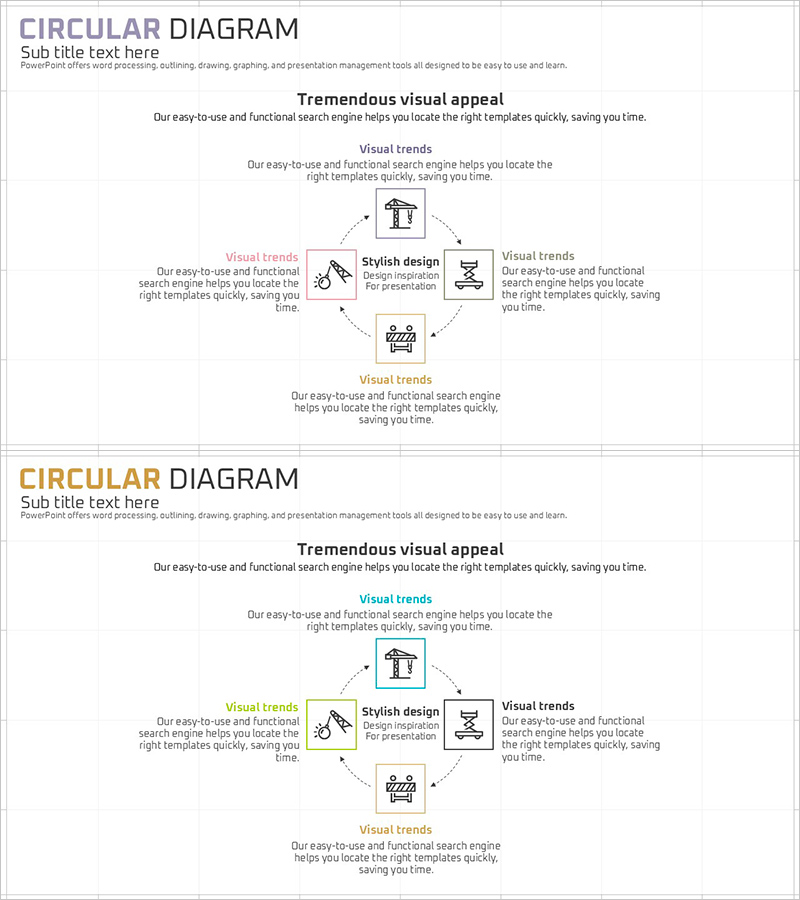
A circular diagram PowerPoint slide with a central concept and four nodes connected clockwise, ideal for visualizing construction processes, workflow cycles, operational plans, and strategic initiatives. Each node features an icon and text area, with dotted arrows clearly showing the relationships between stages. The restrained gray-tone color scheme and white background emphasize professionalism, while the 16:9 widescreen format with 2 slides allows flexible customization for various presentation scenarios. Instantly applicable to business, construction, and management presentations.
Usage Points
-
Main Usage
Visualizes a 4-stage cyclical process emanating from a central concept. Ideal for representing construction project cycles (planning→design→construction→evaluation), marketing campaign loops (strategy→execution→measurement→improvement), organizational operational planning, and continuous improvement workflows. The radial layout emphasizes the interconnected nature of sequential steps.
-
How to Use
Enter stage names and descriptions in each node's text area, and replace icons to match your presentation topic. Colors can be customized to corporate brand guidelines, and dotted arrow styles and thickness are fully editable. The 2-slide format allows you to repeat the diagram or create variations to emphasize different stages or highlight specific phases of your process.
-
Recommended For
Construction and building project management presentations, manufacturing production process explanations, consulting firm strategy and execution planning, educational institution operational planning, marketing team campaign cycle visualization, executive organizational management reports, and business process documentation across industries.
-
Slide Structure
One central icon (construction tools, etc.) positioned at the center with four nodes arranged at top, right, bottom, and left positions. Each node contains a rectangular frame with an icon and text area. Dotted arrows extend from the center to each node, creating a circular flow pattern. Gray-tone background with white text provides strong contrast. Two slides feature identical structure with optional color variations for emphasis.
Related Products
-
Game System Diagram for Visualizing Operational Plans – Streamlining Processes Efficiently
#Operational Plan #Diagram #Production and Technology Development Strategy
-

Logistics Management System Diagram – Effective Operation Planning
#Operational Plan #Diagram #Production and Technology Development Strategy
-
Agricultural Aftercare and Maintenance Strategy Circular Icon
#Operational Plan #Diagram #Production and Technology Development Strategy
-
Cosmetics Circulation System Infographic PowerPoint
#Operational Plan #Diagram #Business Processes
