



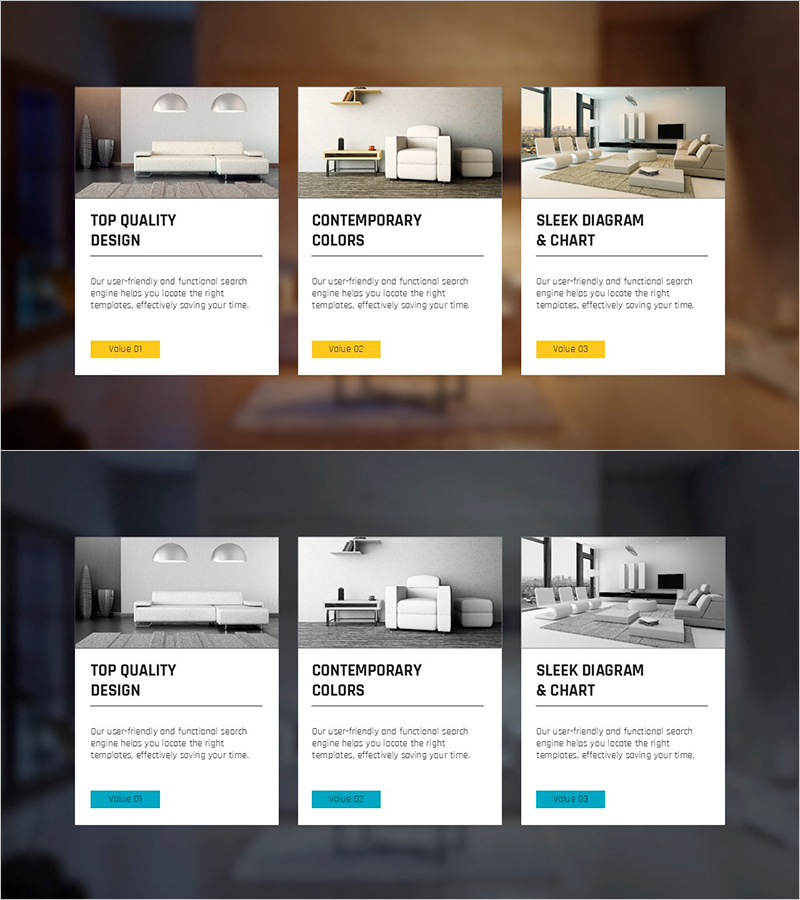
3 Interior Type Boxes Slide – Emphasizing Design and Quality
RJ0900005_28
- Last Update 08/17/2025
- File Size 9.6MB
- # of Slides 2
- File Format PPTX
- Slide Ratio 16:9
- Color
Keywords
- #Content-Based Slides
- #Design-Based Slides
- #Product/Service Introduction
- #Diagram
- #Product/Service Introduction
- #Cluster
- #Closed Cluster Diagram
- #16:9
- #closed box diagram PowerPoint
- #3-item comparison slide
- #interior product presentation template
- #box diagram slide design
- #product type comparison PPT
About the Product
A closed-box diagram PowerPoint slide designed to compare and present three types of interior products or services side by side. Each box functions as an independent section with an image area at the top and a text area below for title and description. The layout uses warm beige, white, and gray tones with black typography and yellow accent buttons to establish clear information hierarchy. This 2-slide set is ready to use for product introductions, service comparisons, and design portfolio presentations.
Usage Points
-
Main Usage
Ideal for presenting three product types, categories, or options at equal visual weight. The closed-box structure creates clear separation between items, while distinct image and text zones ensure organized information layout. Perfect for side-by-side comparisons without hierarchical ranking.
-
How to Use
Insert representative images in the top area of each box, add type names in the title field (e.g., Modern, Classic, Minimal), and enter feature descriptions in the text area. Customize the yellow button with CTA text such as 'Learn More' or 'Select'. The 16:9 aspect ratio is optimized for widescreen presentations.
-
Recommended For
Interior design and architecture product showcases, design agency portfolio presentations, furniture and lighting company product catalogs, real estate development option comparisons, interior design proposal style selection sections, home decor and construction material presentations.
-
Slide Structure
2-slide set. Each slide contains 3 equally-sized closed boxes arranged horizontally. Within each box: top section (approximately 60%) for images, bottom section (approximately 40%) for title, description, and button. Background features light-tone gradient, text in black sans-serif font, and yellow accent buttons for consistent visual hierarchy.
Related Products
-
Presentation Template of Traditional House Roof – Capturing Korea's Beauty
#Product/Service Introduction #Diagram #Product/Service Introduction
-
Summer Vacation Template Closure Diagram – Capture the Joy of Summer
#Product/Service Introduction #Diagram #Product/Service Introduction
-
Introduction to Business Key Programs – Impactful Cluster Diagram
#Product/Service Introduction #Diagram #Product/Service Introduction
-
Introduction to Trade Business Transportation – Cluster Diagram
#Product/Service Introduction #Diagram #Product/Service Introduction
