



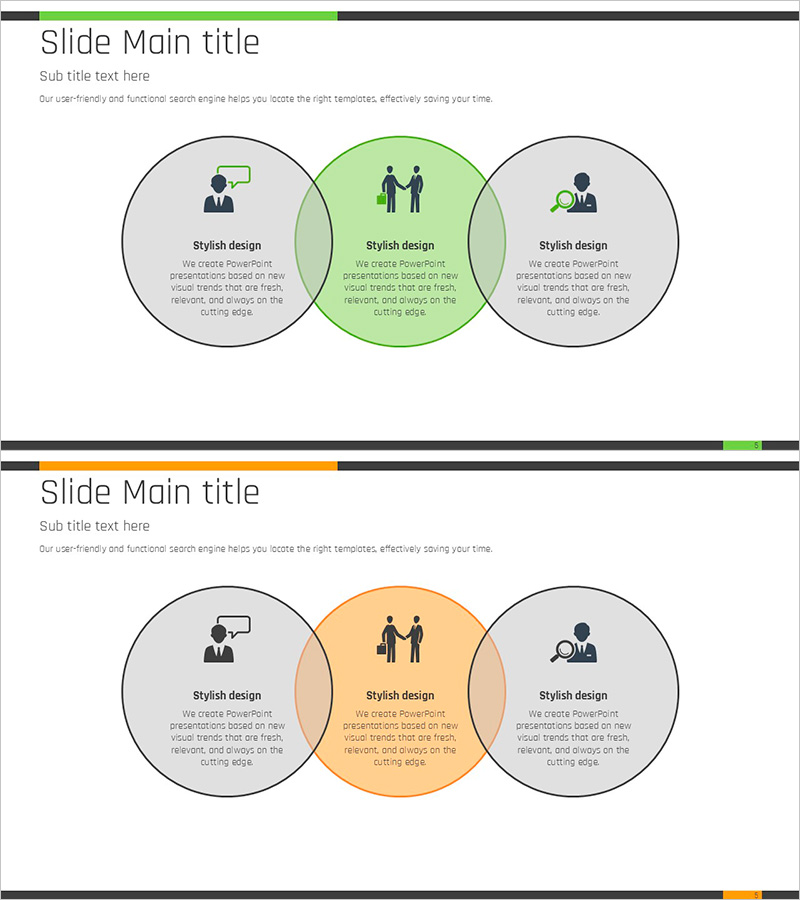
Communication and Analysis Overlap Diagram
RJ0900002_4
- Last Update 08/16/2025
- File Size 0.1MB
- # of Slides 2
- File Format PPTX
- Slide Ratio 16:9
- Color
Keywords
- #Content-Based Slides
- #Design-Based Slides
- #Business Vision and Strategy
- #Marketing Plan and Strategy
- #Diagram
- #Business Strategy
- #Marketing Strategy
- #Cluster
- #Combination Diagram
- #16:9
- #overlap diagram PowerPoint
- #3-circle Venn diagram slide
- #intersection diagram template
- #business strategy diagram
- #communication analysis PowerPoint slide
About the Product
A three-circle overlap diagram PowerPoint slide that visually represents the intersection of three concepts such as communication, analysis, and strategy. Each circle features an independent area and a central intersection zone, making it ideal for illustrating how multiple business elements interact and collaborate. The slide deck consists of 2 slides in 16:9 widescreen format with color-coded emphasis on the central intersection area. Fully editable and ready to use in presentations, strategic planning documents, and business proposals. Perfect for executives, strategists, and marketing professionals who need to communicate complex relationships and synergies.
Usage Points
-
Main Usage
Visualizes the relationships, intersections, and interactions between three concepts or elements. Effectively demonstrates collaboration areas between departments in business strategy, or shows the intersection of target audience, product features, and market opportunities in marketing strategy.
-
How to Use
Enter concept names or item titles in each circle, and place key messages or results in the central intersection area. Use color emphasis to highlight the important intersection zone. Add explanatory text to each area according to your presentation flow. Ideal for strategy presentations, marketing planning, and organizational collaboration discussions.
-
Recommended For
Strategy planners, marketing managers, executives, consultants, and project managers presenting strategic plans, marketing proposals, strategic reports, and investment pitches. Suitable for business plans, marketing strategies, performance reports, and investor presentations.
-
Slide Structure
2-slide deck featuring three circles intersecting at the center. First slide emphasizes green color, second slide uses orange accent, providing diverse color combinations. Each circle includes icons and text input areas for customized content creation and easy editing.
Related Products
-
Creative Science Experiment Overlapping Diagram – Strategic Marketing Use
#Business Vision and Strategy #Marketing Plan and Strategy #Diagram
-
AI Business Strategy Diagram – A Visual Solution for Effective Business Execution
#Business Vision and Strategy #Marketing Plan and Strategy #Diagram
-
Visualizing Business Strategies with Triangular Overlap and Nested Diagrams
#Business Vision and Strategy #Marketing Plan and Strategy #Diagram
-
Chromosome Theme Business Strategy Diagram
#Business Vision and Strategy #Marketing Plan and Strategy #Diagram
