



Dental Care Diagram – Effective Information Delivery
RJ0800019_29
- Last Update 08/04/2025
- File Size 3.5MB
- # of Slides 2
- File Format PPTX
- Slide Ratio 16:9
- Color
Keywords
- #Content-Based Slides
- #Design-Based Slides
- #Product/Service Introduction
- #Text Box
- #Composition
- #Program Introduction
- #Speech Bubble
- #16:9
- #dental care PowerPoint slide
- #medical diagram presentation
- #healthcare PPT template
- #medical icons slide
- #how to create a dental care presentation in PowerPoint
About the Product
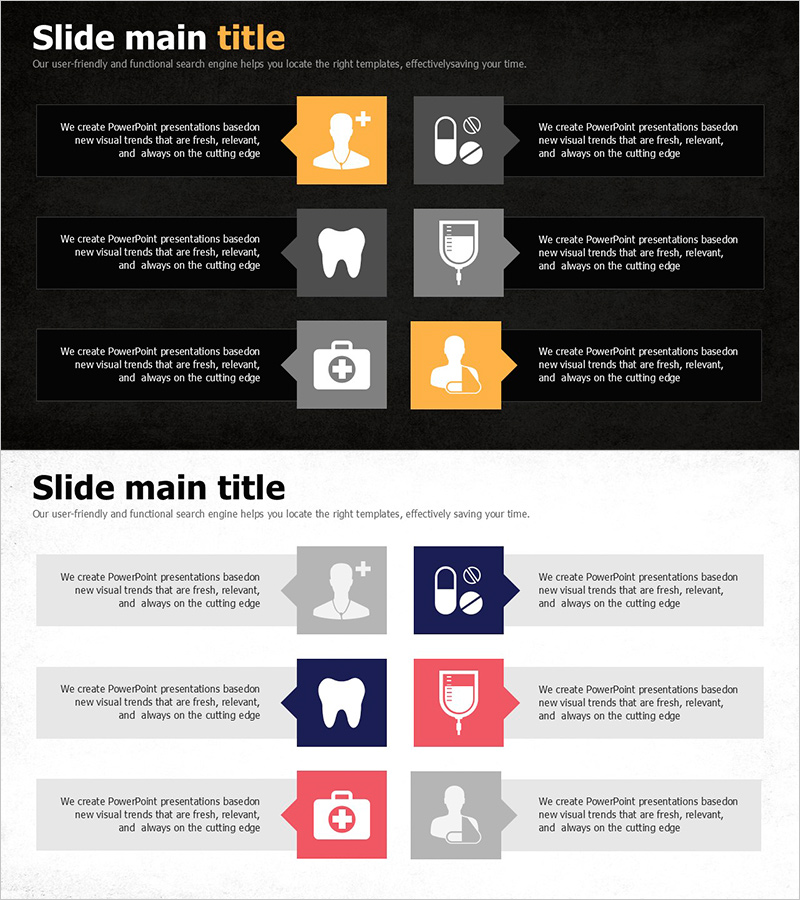
A healthcare-optimized dental care diagram PowerPoint slide featuring 2 slides with black background and orange-gray accent colors. The layout presents 6 medical icons (healthcare provider, medication, tooth, blood bag, medical kit, patient) in left-right symmetrical arrangement, maximizing information clarity. Each icon is paired with a text area for describing key elements of dental care programs. Ideal for healthcare institutions, health education presentations, and dental marketing pitches that require immediate deployment.
Usage Points
-
Main Usage
Visually communicate core elements of dental care programs, medical services, and health education through a structured diagram. The 6 medical icons arranged symmetrically enable audiences to grasp each component's role and relationship at a glance.
-
How to Use
Deploy in healthcare institution, dental clinic, and public health presentations for program introduction, service structure explanation, and patient education. Insert descriptive text in the designated areas next to each icon to enhance audience comprehension and engagement.
-
Recommended For
Healthcare marketing teams, dentists, health educators, medical consultants, and hospital executives presenting to patients, partners, and investors. Particularly effective when program components require clear visual explanation and structured information hierarchy.
-
Slide Structure
2-slide set with symmetrical left-right layout featuring 6 medical icons (black, orange, gray color mix) positioned with dedicated text input areas beside each icon. Black background with orange accent elements creates visual hierarchy and focus.
Related Products
-
Program Configuration Connection Diagram – Innovative Service Introduction
#Product/Service Introduction #Diagram #Composition
-
Photo Correction Service Slide – Modern Design
#Product/Service Introduction #Diagram #Composition
-
Cardiopulmonary Endurance Program Slide – Contemporary Design
#Product/Service Introduction #Composition #Program Introduction
-
Program Introduction Diagram - Efficiency and Functionality at a Glance
#Product/Service Introduction #Diagram #Composition
