



A Step-by-Step Strategy – Effective Use of Diagrams
RJ0800011_10
- Last Update 08/02/2025
- File Size 0.3MB
- # of Slides 2
- File Format PPTX
- Slide Ratio 16:9
- Color
Keywords
About the Product
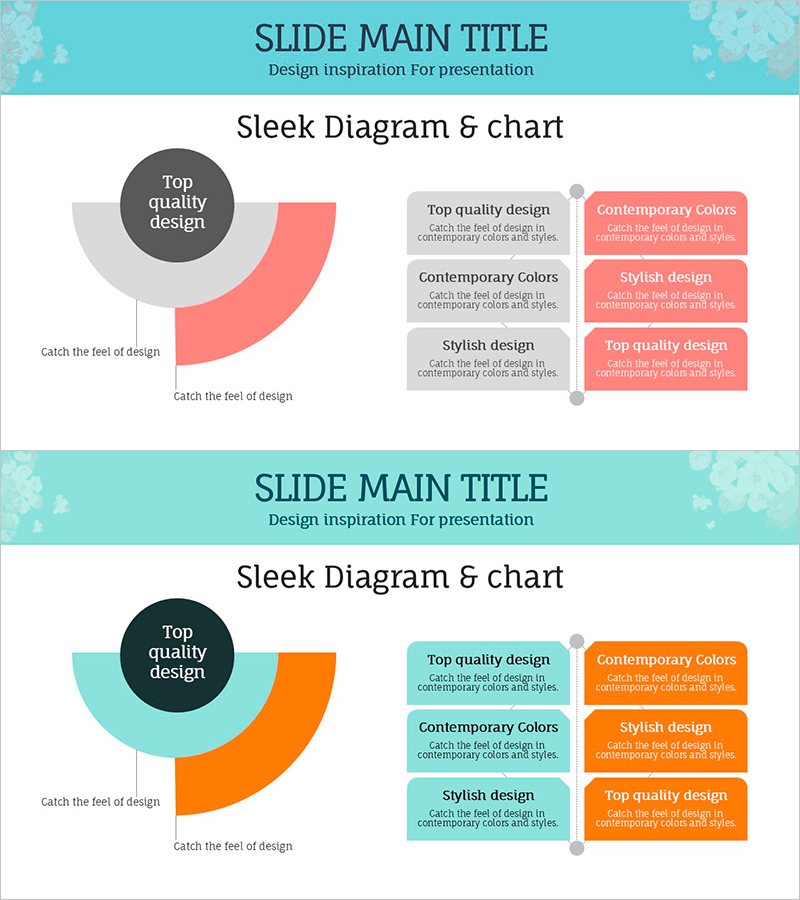
A circular diagram PowerPoint slide designed to visualize business strategy development and step-by-step implementation processes. The diagram features a central core concept with three stages connected in a circular flow pattern, allowing you to input detailed content for each stage in dedicated text boxes. The contrasting color palette of coral pink and turquoise blue creates strong visual emphasis, while gray background boxes and connecting lines clarify information hierarchy. The 2-slide set offers two color variations, enabling you to select the version that best matches your presentation context and brand identity. Delivered in 16:9 widescreen PPTX format, fully editable in all modern PowerPoint versions.
Usage Points
-
Main Usage
Clearly visualize business strategy development, project implementation phases, and cyclical process flows. The three-stage circular structure is ideal for representing strategy-execution-evaluation-improvement cycles, strategic planning frameworks, and iterative business processes.
-
How to Use
Enter your core concept (e.g., strategy, objective, core value) in the central circle. Fill in each of the three stage boxes with relevant details and descriptions. Use the color variations to distinguish categories or represent priority levels. Text size and font are fully customizable to match your presentation style.
-
Recommended For
Executive strategy presentations, marketing campaign strategy explanations, project management phase reviews, educational seminars demonstrating cyclical learning models, organizational improvement initiatives, and innovation process visualization.
-
Slide Structure
2-slide set. Each slide contains one central dark gray circular node, three stage boxes (coral pink or turquoise blue), three gray information boxes, connecting lines, and directional arrows. Slide 1 emphasizes coral pink; Slide 2 emphasizes turquoise blue for flexible color selection.
Related Products
-

Representative & Top Team Member Profiles Slide Template
#Company Introduction #Diagram #Introduction of Executives
-
Competitor Comparison Analysis Table – Visualizing Market Analysis
#Market and Competitor Analysis #Diagram #Graph
-
Business Differentiation Strategy Table – An Effective Tool for Market Competitiveness
#Business Vision and Strategy #Market and Competitor Analysis #Marketing Plan and Strategy
-
Car Wide Slide Template – Emphasizing Safety and Efficiency
#Risk Management and Regulatory Compliance #Diagram # Risk Management Strategy
