



The Reason for Going on a Trip – Business Strategy Slide
RJ0600100_24
- Last Update 07/18/2025
- File Size 3.6MB
- # of Slides 2
- File Format PPTX
- Slide Ratio 16:9
- Color
Keywords
- #Content-Based Slides
- #Design-Based Slides
- #Business Vision and Strategy
- #Diagram
- #Business Strategy
- #Business Goals
- #Cluster
- #Closed Cluster Diagram
- #16:9
- #closed cluster diagram PowerPoint
- #3-node circular diagram slide
- #business strategy diagram template
- #icon diagram PPT
- #how to create cluster diagram in PowerPoint
About the Product
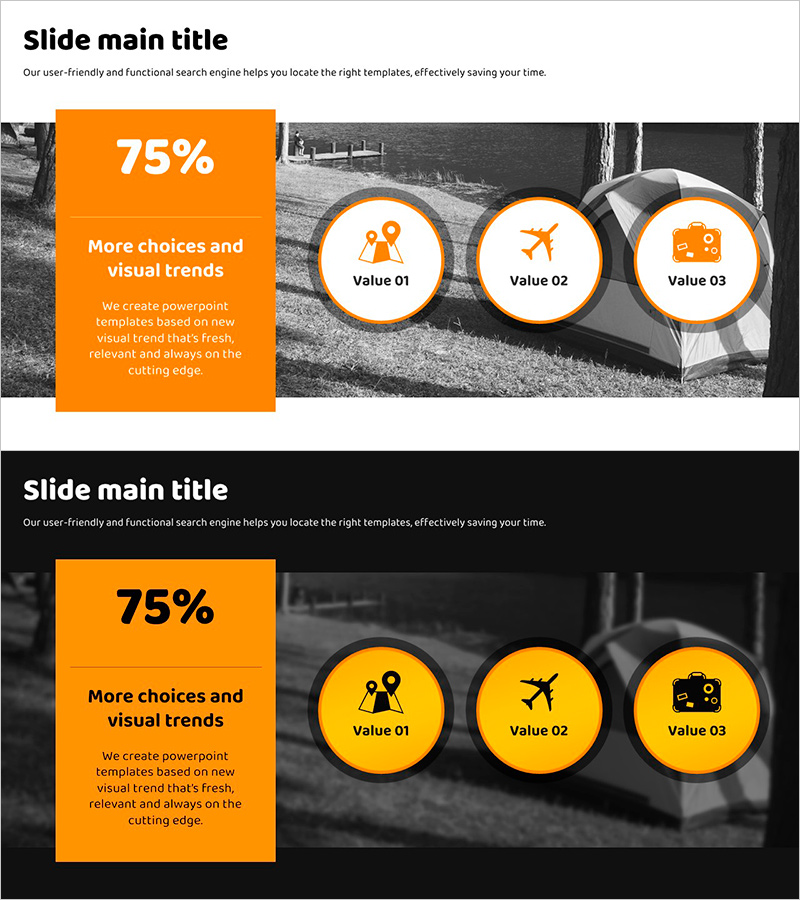
A closed-cluster diagram PowerPoint slide that organizes business strategy and core values into three key items. The main message (including a 75% metric) is positioned in a large orange box on the left, while three circular nodes on the right represent detailed elements. The contrast between the black-and-white background image and orange accent color creates strong visual focus. Each circular node features an icon (person, airplane, suitcase) to intuitively convey the travel and business theme. The 2-slide set offers multiple color variations (orange and yellow) for flexible presentation adaptation. Delivered as a 16:9 widescreen PPTX file ready for immediate editing and use.
Usage Points
-
Main Usage
This closed-cluster structure clearly expresses the relationship between a central core message and three supporting elements. Ideal for presenting business strategy, core values, product features, or three pillars of service. Combining quantitative metrics (75%) with qualitative messaging enhances persuasiveness and audience engagement.
-
How to Use
Enter the core message and metric in the left orange box, then populate the three right-side circular nodes with item names and icons. Swap the background image or select a color variation (orange or yellow) to match your presentation theme. Text size and icons are fully customizable to your needs.
-
Recommended For
Executive reports, business strategy presentations, product launch events, marketing proposals, and organizational vision-sharing sessions. Suitable for travel, tourism, and event industries, as well as general business documents emphasizing three core values or pillars.
-
Slide Structure
2-slide set. Slide 1: Orange background with three circular nodes (white border, orange icons). Slide 2: Yellow background with identical structure. Each slide features a large left box (text and metric input area) and three right-side nodes (icon and label input areas) for flexible customization.
Related Products
-
Core Product Strategy Slide - Effective Business Goal Communication
#Business Vision and Strategy #Diagram #Business Strategy
-
Business Goals Aligned with Trip Outcomes – Strategic Success
#Business Vision and Strategy #Diagram #Business Strategy
-
Visualization of Architectural Project Vision – Value-Centric Diagram
#Business Vision and Strategy #Diagram #Business Strategy
-
Data Analysis Business Goals – Vision and Strategy
#Business Vision and Strategy #Diagram #Business Strategy
