



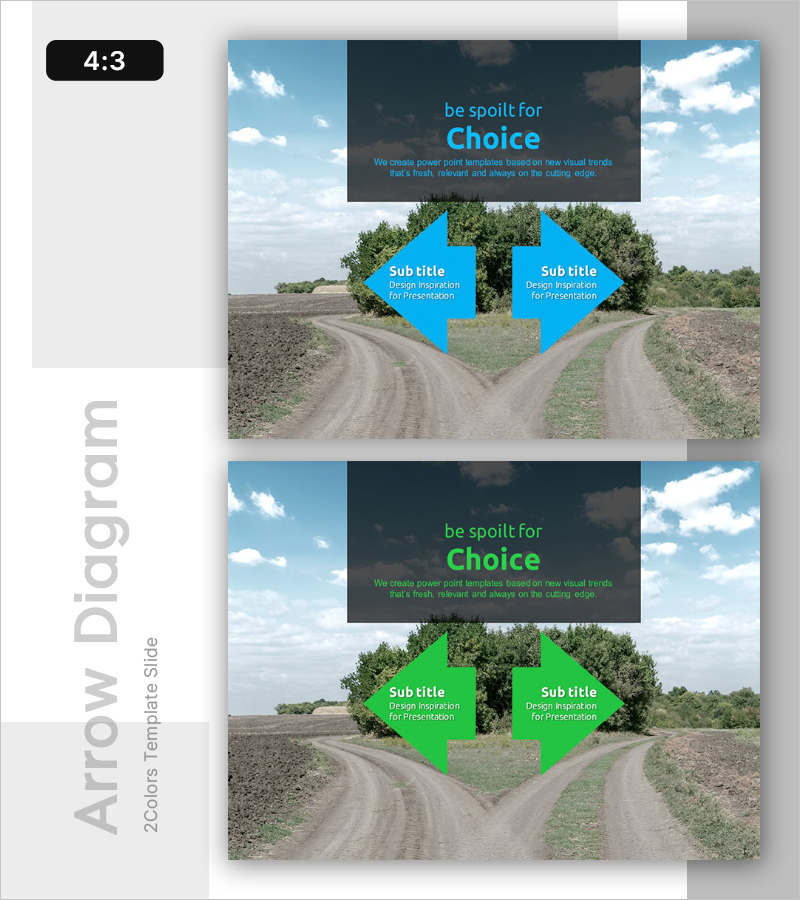
Crossroads of Choice – Presenting Business Strategy and Marketing Direction
RL0100032_4
- Last Update 01/20/2025
- File Size 2.7MB
- # of Slides 2
- File Format PPTX
- Slide Ratio 4:3
- Color
Keywords
About the Product
A 2-slide PowerPoint presentation template for presenting business direction and marketing strategy. The slides feature a dual-arrow diagram overlaid on a rural landscape background, enabling visual comparison of two alternative paths. Available in two color versions—cyan and green—each arrow contains editable subtitle and description areas. This presentation slide effectively highlights decision points and strategic choices in business strategy decks, marketing proposals, and investor pitches.
Usage Points
-
Main Usage
This slide presents two alternative paths in business strategy or marketing decisions, guiding stakeholders toward informed decision-making. The dual-arrow diagram clearly contrasts each option's characteristics, while the cyan and green color variants allow flexible adaptation to presentation context and brand guidelines.
-
How to Use
Enter choice labels and descriptive text in each arrow section. Add your main topic in the header area and key value propositions for each option in the subtitle sections. Switch between color versions to maintain visual consistency with your presentation theme and corporate branding.
-
Recommended For
Recommended for executive presentations on strategic direction, marketing team pitches on campaign strategy selection, startup founder investor pitches explaining business direction rationale, and corporate strategy workshops comparing alternative business models or market approaches.
-
Slide Structure
Two-slide layout with header section (title and descriptive text), two dual-directional arrows (left and right), and editable subtitle areas within each arrow. Background image transparency and shape layering ensure text readability while maintaining visual impact.
Related Products
-
Learn the Truth - Attractive Business Presentation Template
#Emotional Messages
-
Future Outlook Analysis Graph – Visualizing Market Trends and Opportunities
#Emotional Messages
-
Broken Line Comparison Analysis Graph – Visualizing Market Competitiveness
#Emotional Messages
-
Tell the Truth Template Ending Cover
#Emotional Messages
