



Legal Litigation Diagram – Visualizing Legal Processes
RJ0600076_19
- Last Update 07/10/2025
- File Size 0.9MB
- # of Slides 2
- File Format PPTX
- Slide Ratio 16:9
- Color
Keywords
- #Content-Based Slides
- #Design-Based Slides
- #Business Vision and Strategy
- #Diagram
- #Core Competencies
- #Business Background and Necessity
- #Spread
- #Centralized Diagram
- #16:9
- #circular diagram PowerPoint
- #legal litigation PowerPoint slide
- #4-stage process diagram
- #legal presentation slide
- #diagram PPT template
About the Product
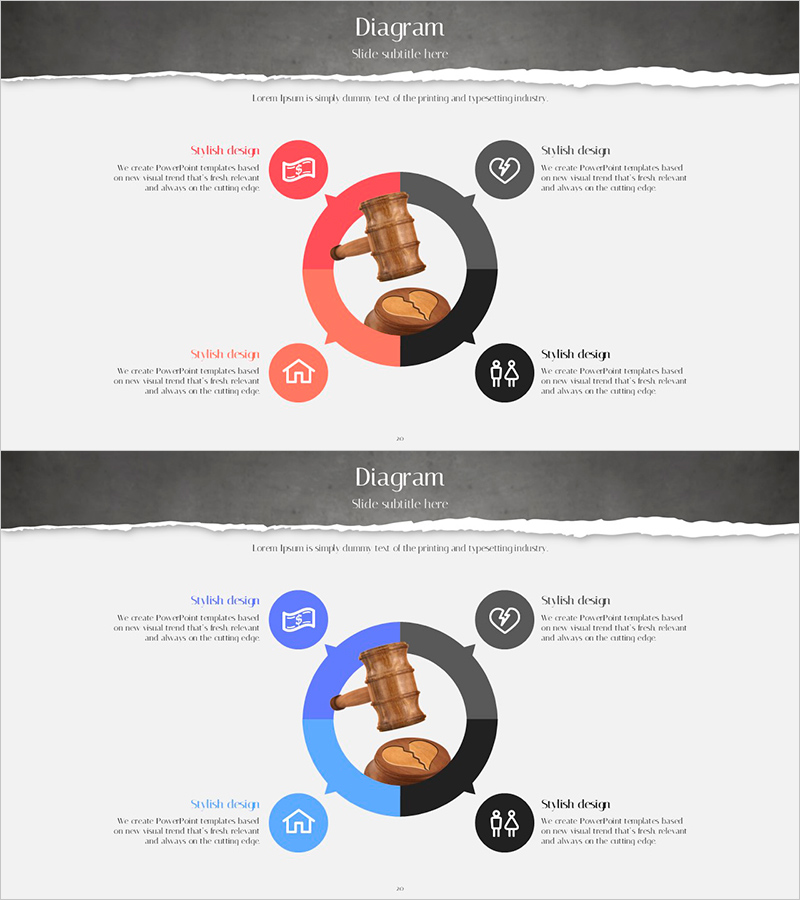
A PowerPoint slide that visualizes legal litigation procedures through a 4-stage circular diagram structure. The design features legal-related icons (judge's gavel and scales of justice) at the center, surrounded by four circular nodes in red and black tones to clearly convey the cyclical flow of legal processes. Each stage includes text areas and icons to emphasize key components of legal procedures, making it immediately applicable to business presentations, legal consulting materials, and corporate training resources. The 2-slide set provides multiple color combinations (red, blue, and black) so you can select the design that best matches your presentation context.
Usage Points
-
Main Usage
Clearly communicate the cyclical flow of legal procedures, litigation processes, and business workflows by dividing them into four stages. The central legal icons combined with surrounding nodes emphasize key elements of legal procedures, while stage-specific text areas simplify complex legal concepts for your audience.
-
How to Use
Use in client presentations for law firms, corporate legal departments, and consulting companies. Add legal procedure names (filing, hearing, judgment, appeal, etc.) to each node and insert detailed explanations in text areas to walk through legal processes step by step. Customize color combinations to match different presentation contexts and audiences.
-
Recommended For
Legal professionals, corporate legal teams, legal consultants, business analysts, and project managers. Recommended for presentations requiring explanation of legal procedures, business process improvements, or organizational circular structures.
-
Slide Structure
2-slide set. Each slide features a circular diagram with legal-related icons (judge's gavel and scales) at the center and four circular nodes arranged around it. The first slide uses red and black dual tones, while the second slide provides a blue and black variation. Each node includes icon placeholders and text input areas where you can add legal stage names and descriptions.
Related Products
-
Diagram Visualizing Key Growth Areas – Business Vision and Strategy
#Product/Service Introduction #Business Vision and Strategy #Diagram
-
Triangle Pattern Infographic Slide Template
#Product/Service Introduction #Business Vision and Strategy #Diagram
-

Modern Infographic Slide - Inspiration and Communication
#Business Vision and Strategy #Core Competencies #Business Background and Necessity
-
Visualizing Business Strategy with Idea Derivation Diagram
#Business Vision and Strategy #Diagram #Business Strategy
