



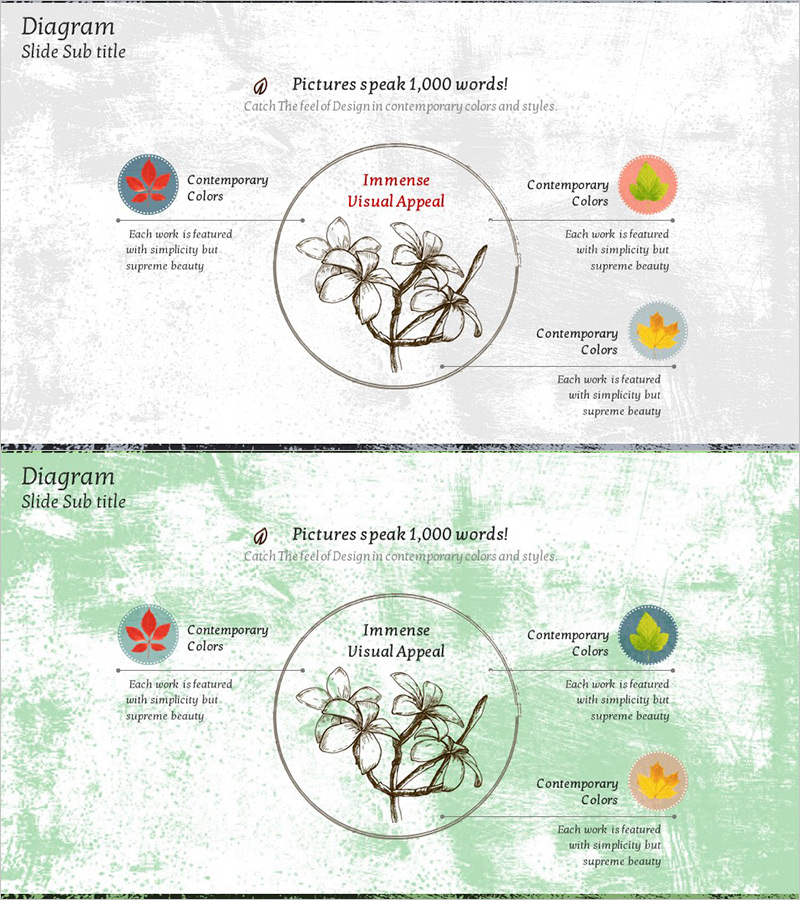
Maple Leaf Distribution and Promotion Strategy Diagram – Maximizing Business Impact with Clusters
RJ0600028_30
- Last Update 06/28/2025
- File Size 5.8MB
- # of Slides 2
- File Format PPTX
- Slide Ratio 16:9
- Color
Keywords
- #Content-Based Slides
- #Design-Based Slides
- #Product/Service Introduction
- #Diagram
- #Product/Service Introduction
- #Composition
- #Cluster
- #Spread
- #Chain Diagram
- #Centralized Diagram
- #16:9
- #radial diagram PowerPoint slide
- #3-node cluster diagram
- #center hub PowerPoint template
- #business strategy diagram
- #concept mapping slide template
About the Product
A radial cluster diagram PowerPoint slide featuring a central hub with three nodes extending outward in a balanced radial layout. Each node is marked with a vibrant circular icon in red, yellow, and blue, creating strong visual differentiation. The design uses a gray textured background with a circular border around the center concept, connected by clean lines to each outer node. Ample text areas beneath each node allow for detailed descriptions. The 2-slide set includes both gray and green tone versions, providing flexibility for different presentation sections. This slide template is ideal for explaining how a core strategy or concept branches into three key components, making it perfect for business strategy, distribution, and promotion presentations.
Usage Points
-
Main Usage
This slide effectively communicates how a core concept, strategy, or objective branches into three distinct components or action areas. The radial structure naturally guides the viewer's eye from the center outward, making it ideal for explaining cause-and-effect relationships, hierarchical structures, or categorical breakdowns. Suitable for business strategy presentations, marketing plans, organizational structures, and process analyses.
-
How to Use
Enter your main concept or strategy in the central circular area. Fill in the three outer nodes with supporting details, sub-strategies, or related components. The colored circular icons can be used to denote different categories, priority levels, or departments. Choose between the gray or green background version depending on your presentation's overall color scheme and section flow.
-
Recommended For
Ideal for executives, marketing teams, strategic planning departments, and sales teams presenting core strategies and implementation roadmaps. Works well in business plans, marketing proposals, pitch decks, and investor presentations—particularly in sections covering strategic direction, market analysis, customer segmentation, product positioning, or competitive differentiation.
-
Slide Structure
Two-slide set with identical layouts in different color schemes. Each slide features a central circular hub (for main concept input) connected by lines to three radial nodes, each with a colored icon and text description area. The first slide uses a gray textured background; the second uses a green textured background, allowing you to vary the visual tone across different presentation sections.
Related Products
-
Retirement Planning Element Diagram – Foundations of Financial Planning
#Product/Service Introduction #Diagram #Product/Service Introduction
-

History Unfolded in Masterpieces – Interactive Diagram Slide
#Product/Service Introduction #Diagram #Product/Service Introduction
-
Introduction to Network Service Configuration – Cluster and Connection Diagrams
#Product/Service Introduction #Diagram #Product/Service Introduction
-
Introduction to Food Trucks – Modern Diagram Utilization
#Product/Service Introduction #Diagram #Product/Service Introduction
