



Solution Process Diagram - Business Support and Operational Planning
RJ0600014_19
- Last Update 06/24/2025
- File Size 0.8MB
- # of Slides 2
- File Format PPTX
- Slide Ratio 16:9
- Color
Keywords
- #Content-Based Slides
- #Design-Based Slides
- #Operational Plan
- #Diagram
- #Mitigation Measures
- #Business Support Plan
- #Cluster
- #Combination Diagram
- #Chain Diagram
- #16:9
- #bubble diagram PowerPoint
- #4-node diagram template
- #PowerPoint diagram slide
- #relationship diagram PPT
- #business process diagram slide
About the Product
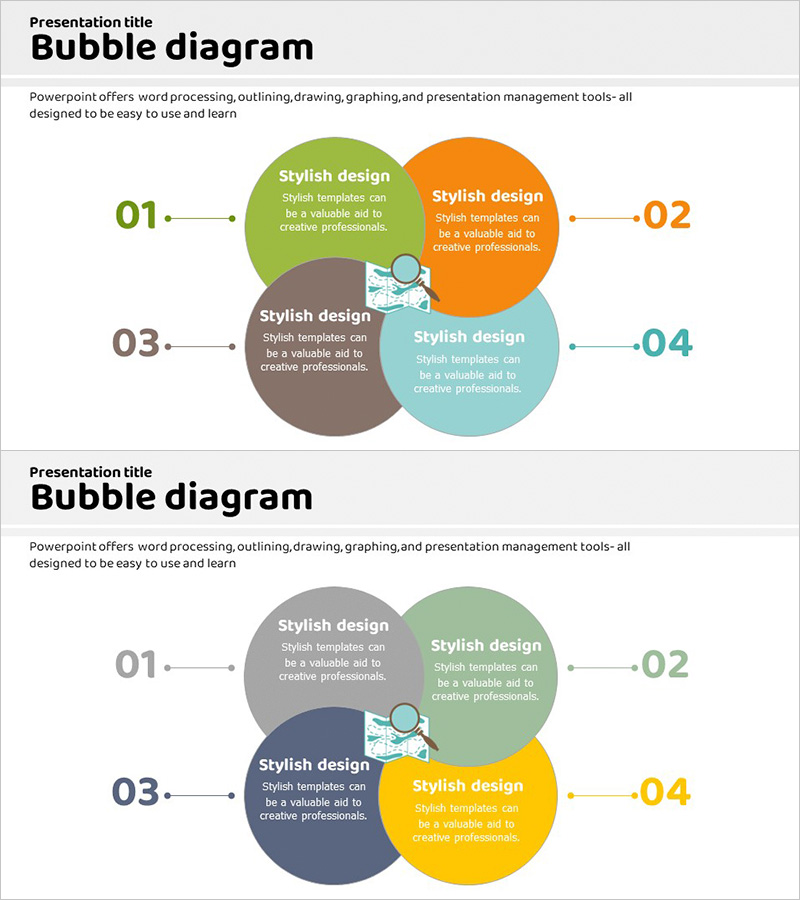
A multi-node bubble diagram PowerPoint slide featuring four circular nodes connected from a central point. The design uses vibrant colors—green, orange, gray, and teal—to distinguish each element, with numbered labels and arrow connectors that clearly show relationships. Each bubble includes space for a title and descriptive text, making it ideal for business strategy presentations, operational planning, solution proposals, and stakeholder communication. The 2-slide deck in 16:9 widescreen format is optimized for modern presentation environments and ready for immediate customization.
Usage Points
-
Main Usage
Designed to visually represent relationships, interactions, and cyclical structures among four key elements. Perfect for illustrating business strategies, operational frameworks, problem-solving approaches, cross-functional collaboration models, and strategic initiatives in a clear, professional manner.
-
How to Use
Double-click each node's title and description text to replace with your own content. Adjust colors using PowerPoint's theme color tools, and freely resize nodes or reposition arrow connectors as needed. Insert into presentations, reports, proposals, or strategic documents for immediate impact.
-
Recommended For
Executives, project managers, consultants, marketing professionals, and educators who need to explain complex concepts visually. Especially effective for strategy development, process improvement initiatives, organizational structure explanations, and relationship analysis presentations.
-
Slide Structure
Two-slide set with four circular nodes arranged in a central connected pattern. Each slide features numbered labels (01–04) and directional arrows. Slide 1 uses green, orange, gray, and teal; Slide 2 offers gray, green, navy, and yellow color variations for flexibility.
Related Products
-
Latest Corporate Technology Development Issues – Innovative Solutions
#Operational Plan #Diagram #Mitigation Measures
-
Traffic Accident Type Diagram – Prevention and Analysis
#Business Vision and Strategy #Operational Plan #Diagram
-
Expected Effect Inclusion Diagram – Visualizing Strategy and Operations
#Operational Plan #Marketing Plan and Strategy #Diagram
-
Nature Protection Follow-Up Maintenance Plan Infographic
#Product/Service Introduction #Operational Plan #Diagram
