



Differentiation Strategy Orange Yellow – Visual Diagram for Product/Service Presentation
RJ0600014_13
- Last Update 06/24/2025
- File Size 1.3MB
- # of Slides 2
- File Format PPTX
- Slide Ratio 16:9
- Color
Keywords
- #Content-Based Slides
- #Design-Based Slides
- #Product/Service Introduction
- #Diagram
- #Product/Service Introduction
- #Differentiation Strategy for Products/Services
- #Cluster
- #Spread
- #Chain Diagram
- #Centralized Diagram
- #16:9
- #radial diagram PowerPoint
- #4-step diagram slide
- #center-point diagram template
- #product introduction PowerPoint
- #differentiation strategy slide
- #orange yellow presentation template
- #how to create radial diagram in PowerPoint
About the Product
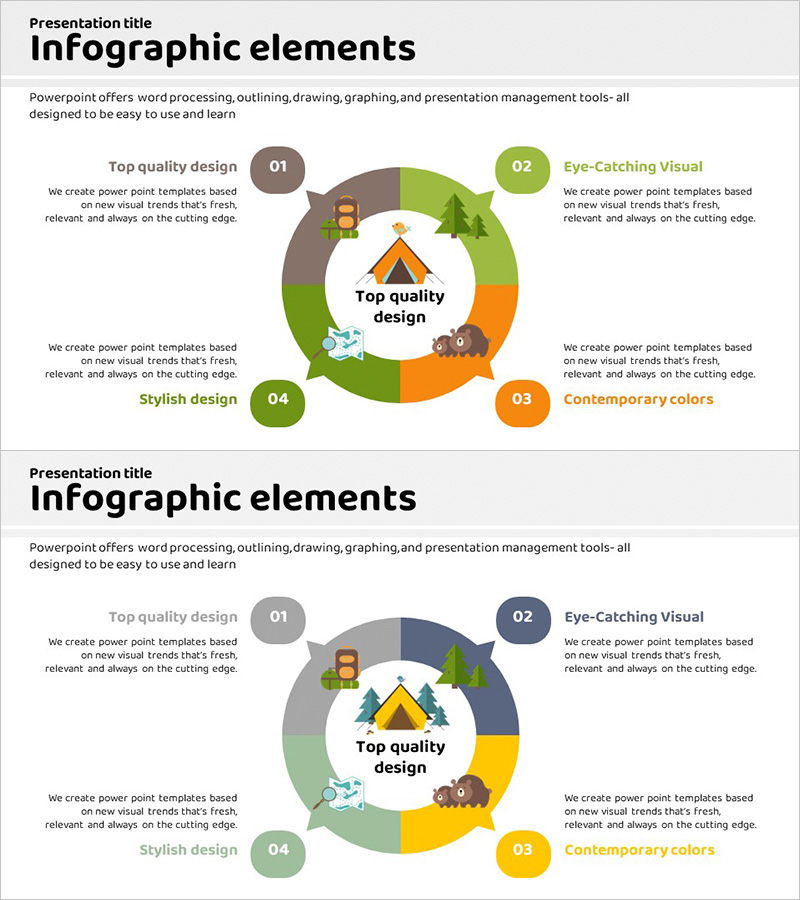
A radial diagram PowerPoint slide featuring a central core message radiating outward to four directional nodes in warm orange and yellow tones. This presentation template uses circular nodes and connecting lines to visually represent product features, service differentiation points, strategic initiatives, and core values. The 2-slide set (16:9 aspect ratio, PPTX format) is ready for immediate use in product introductions, service explanations, differentiation strategies, and vision presentations. Clear icon and text areas enable easy information input, making it ideal for presentation decks, business proposals, and corporate reports.
Usage Points
-
Main Usage
Designed to visualize a central core message with four related elements, features, or strategic pillars simultaneously. Ideal for presenting four key product functions, four service differentiation factors, four business strategy directions, or four core values supporting organizational vision.
-
How to Use
Enter your core message (product name, strategy title, or vision statement) in the central triangle icon area. Fill in the four circular nodes with corresponding details, features, or metrics. The orange, yellow, and gray color scheme is pre-applied, allowing you to modify only the text content and use the slide immediately in presentations without additional design adjustments.
-
Recommended For
Recommended for product team product launch presentations, marketing team strategy briefings, executive vision and strategy communications, sales team client proposals, consultant strategy reports, and startup investor pitch decks.
-
Slide Structure
Two-slide set with identical radial layout. Each slide features four circular nodes positioned at cardinal directions (top, right, bottom, left) around a central triangle icon. Each node includes a number label (01–04) and text input area. The second slide offers a layout variation for diverse presentation approaches. Optimized for 16:9 widescreen format.
Related Products
-
Clothing Product Area Diagram – Emphasizing Style and Quality
#Product/Service Introduction #Diagram #Product/Service Introduction
-
3 Strategy Diagrams – Effective Presentation of Business Vision
#Product/Service Introduction #Business Vision and Strategy #Diagram
-
Product and Service Overview Diagram – Intuitive Connections
#Product/Service Introduction #Diagram #Product/Service Introduction
-

History Unfolded in Masterpieces – Interactive Diagram Slide
#Product/Service Introduction #Diagram #Product/Service Introduction
