



Learning Children and Messages – Slides for Educational Communication
RJ0500029_13
- Last Update 06/15/2025
- File Size 3.2MB
- # of Slides 2
- File Format PPTX
- Slide Ratio 16:9
- Color
Keywords
About the Product
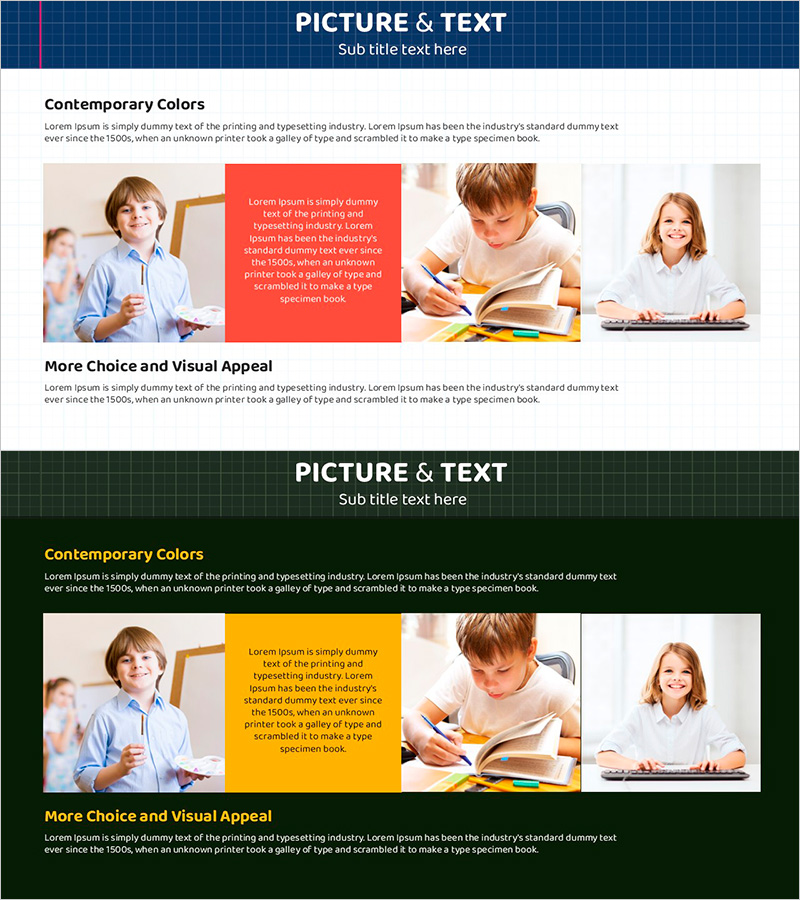
A 2-slide PowerPoint presentation featuring learning children images combined with educational messages. The navy header and white background create a clear information structure suitable for immediate use in educational institutions, training centers, and corporate learning materials. The layout combines left image area, center text box, and right additional image space to visually convey learning situations, student characteristics, and educational outcomes. Available in 16:9 widescreen PPTX format compatible with all presentation environments.
Usage Points
-
Main Usage
Used by educational institutions, training centers, and corporate learning departments to explain learning programs, educational effectiveness, and student achievements. This slide visually demonstrates children's learning experiences while emphasizing educational messages, making it ideal for parent briefings, educational proposals, and educational outcome reports.
-
How to Use
Insert learning scene photos in the left image area and key messages in the center red or yellow text box. Add supplementary learning scenes or student photos in the right image space to represent diverse learning situations. Text box colors and fonts are fully customizable to match your presentation theme.
-
Recommended For
Ideal for educational institution marketing managers, training center directors, corporate learning teams, education consultants, and presenters addressing parents. Effectively conveys both credibility and educational value when introducing learning programs, explaining educational effectiveness, presenting student achievements, and proposing educational services.
-
Slide Structure
2-slide set with each slide divided into three areas: left image (learning scene), center text box (red or yellow background), and right image (additional learning scene). Navy header provides space for titles and subtitles, allowing clear topic separation by section.
Related Products
-
Baby Head Size Analysis Diagram – Maximizing Customer Understanding
#Market and Competitor Analysis #Text Box #Other
-
Flow Diagram Slide for Examination of Trial Witnesses
#Business Strategy #Market and Competitor Analysis #Diagram
-

Communication as Connection Slide – Empathy and Trust Focus
#Market and Competitor Analysis #Customer Success Stories #Text Box
-
Mixed Charts and Customer Analysis – Visualizing Customer Insights
#Market and Competitor Analysis #Financial Plans and Performance #Graph
