



Kids Illustration and 3 Explanation Text Boxes – Friendly Design
RJ0500009_17
- Last Update 06/09/2025
- File Size 0.4MB
- # of Slides 2
- File Format PPTX
- Slide Ratio 16:9
- Color
Keywords
- #Content-Based Slides
- #Design-Based Slides
- #Operational Plan
- #Customer Success Stories
- #Diagram
- #Business Support Plan
- #Customer Cases and Success Stories
- #Cluster
- #Closed Cluster Diagram
- #16:9
- #cluster diagram PowerPoint slide
- #3-item text box slide
- #kids illustration presentation
- #child-friendly PowerPoint template
- #operational plan slide
About the Product
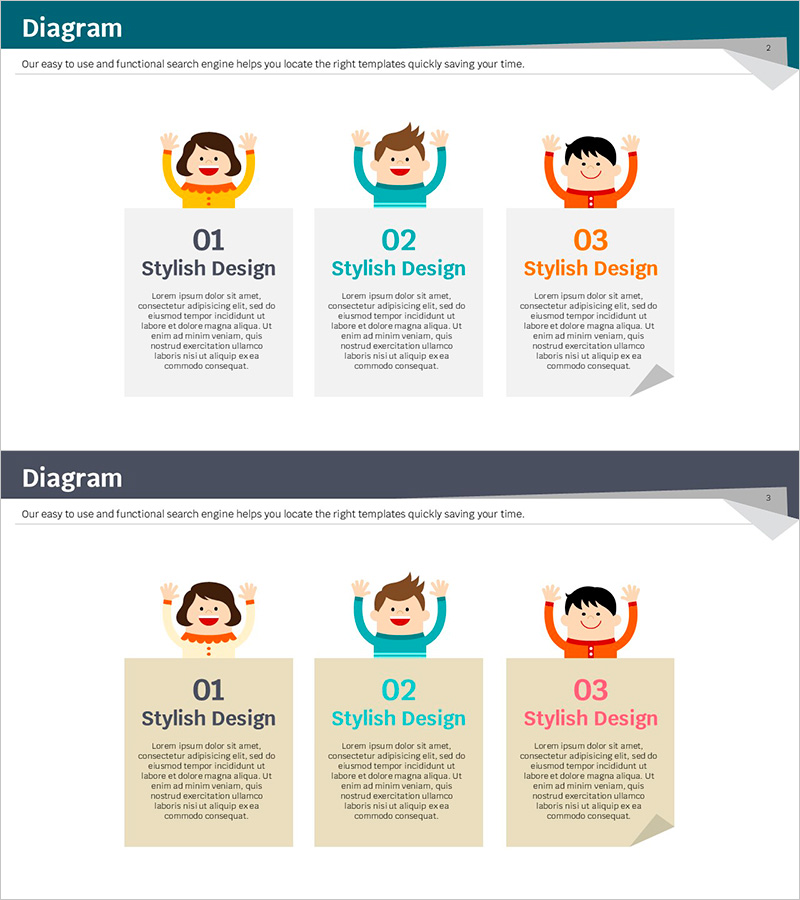
A cluster diagram PowerPoint slide featuring three child character illustrations with corresponding text box areas. The design uses three distinct color tones—yellow, teal, and orange—each representing a separate content section. This 16:9 widescreen 2-slide set is ideal for operational plans, customer success stories, educational materials, and team presentations. Each text box area functions as an independent information cluster, making it perfect for comparing or categorizing three related topics. The layout is fully editable in PowerPoint, allowing you to customize text, colors, and content while maintaining the visual structure and friendly atmosphere.
Usage Points
-
Main Usage
This cluster diagram is designed to present and compare three related topics or items side by side. The child character illustrations serve as visual anchors for each section, making it ideal for explaining operational strategies, customer success cases, educational programs, or service offerings. The bright color palette captures audience attention and creates a positive, approachable impression.
-
How to Use
Enter your topic title and description in each text box area. Align text colors with the corresponding character color (yellow, teal, or orange) to maintain visual consistency. You can present the three items sequentially during your talk or display them simultaneously for comparison. The layout supports both narrative and comparative presentation styles.
-
Recommended For
Recommended for educational institutions, child-focused organizations, operations teams, and marketing departments. Particularly effective for presentations on customer success stories, operational plans, educational seminars, and product introductions where three key points need emphasis. The friendly tone works well for internal reports and external presentations requiring an approachable, engaging style.
-
Slide Structure
2-slide set in 16:9 widescreen format. Each slide features a header area at the top and three independent text box sections below. Yellow, teal, and orange character illustrations are positioned left to right, with gray-background text boxes directly beneath each character. The layout is optimized for modern presentation environments and supports easy content customization.
Related Products
-
Digital Learning Icons and Child's Interview Slide
#Product/Service Introduction #Customer Success Stories #Diagram
-
4 Options Text Box Slide – Operation Plans and Business Support
#Operational Plan #Technical Approach #Diagram
-

Visualizing the Collaborative Process – Cluster Slide
#Business Management #Operational Plan #Diagram
-
Exercise to Build Muscles Slide – Change and Challenge
#Operational Plan #Diagram #Mitigation Measures
