



Contents Slide of Educational Content
RJ0500007_7
- Last Update 06/09/2025
- File Size 1.2MB
- # of Slides 2
- File Format PPTX
- Slide Ratio 16:9
- Color
Keywords
- #Content-Based Slides
- #Design-Based Slides
- #Product/Service Introduction
- #Business Management
- #Diagram
- #Development Plan
- #Reporting and Review Plan
- #Radial Diagram
- #16:9
- #radial diagram PowerPoint
- #hub and spoke diagram
- #educational content slide
- #how to create radial diagram in PowerPoint
- #PowerPoint diagram slide template
About the Product
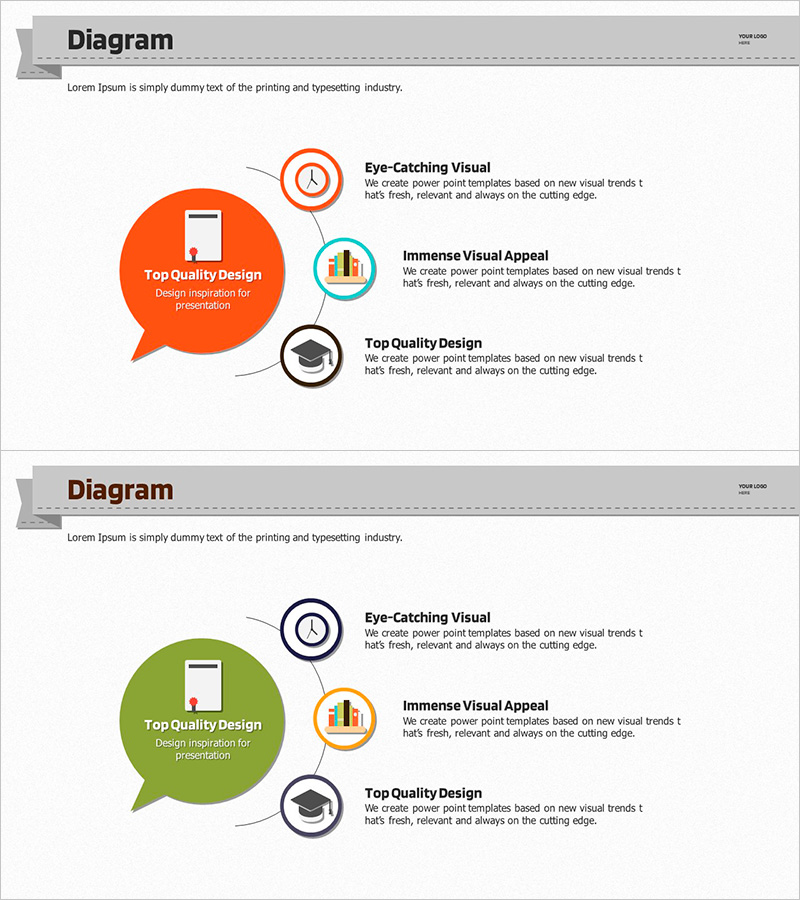
A radial diagram PowerPoint slide featuring a central hub with three items radiating outward through connecting lines. The design uses an orange speech bubble at the center with three circular icons (clock, chart, and graduation cap) positioned around it, making it ideal for visualizing educational content structure and composition. This 2-slide set provides both orange and green color versions with identical layouts, allowing you to choose the version that best fits your presentation context. Delivered in 16:9 widescreen PPTX format, all text and icons are fully editable, enabling you to customize the diagram for various topics and presentation scenarios.
Usage Points
-
Main Usage
Visualize topics where one central concept branches into multiple supporting elements, such as educational programs, business strategies, or product features. The design naturally guides audience attention from the center outward, creating a logical flow that emphasizes the relationship between the main idea and its components.
-
How to Use
Enter your main topic in the central speech bubble and add supporting points to the three circular icons. Double-click text and icons to edit content, and adjust colors and line weights to match your brand guidelines. Apply slide transition animations to create a radiating effect that expands from center to periphery for enhanced visual impact.
-
Recommended For
Educators, project managers, marketing professionals, and consultants presenting educational content structure, business strategies, product overviews, or organizational frameworks. Particularly effective when explaining multiple balanced aspects of a single concept or initiative.
-
Slide Structure
Two-slide set with identical radial layout featuring a central speech bubble (text input area), three circular icons with symbols (clock, bar chart, graduation cap), and connecting lines. Both slides use the same structure with different background colors (orange and green) optimized for 16:9 widescreen format.
Related Products
-
Types and Characteristics of Coffee Beans – Visual Infographic Slide
#Product/Service Introduction #Diagram #Composition
-
3-Stage Procedure for Experimental Goals – Understanding and Execution
#Product/Service Introduction #Business Introduction #Diagram
-
Business Plan Presentation Template Sequence Diagram – Effective Operations Slide
#Business Management #Operational Plan #Diagram
-
Introduction to Medical Benefits and Support - Health and Assistance
#Product/Service Introduction #Technical Approach #Diagram
