



Shapes and Children Education Images Template – Fun Learning Experience
RJ0500001_6
- Last Update 06/08/2025
- File Size 1.6MB
- # of Slides 2
- File Format PPTX
- Slide Ratio 16:9
- Color
Keywords
- #Content-Based Slides
- #Design-Based Slides
- #Product/Service Introduction
- #Diagram
- #Benefits and Advantages
- #Cluster
- #Closed Cluster Diagram
- #16:9
- #closed cluster diagram PowerPoint
- #relationship diagram slide template
- #children education presentation
- #3-topic diagram template
- #how to create cluster diagram in PowerPoint
About the Product
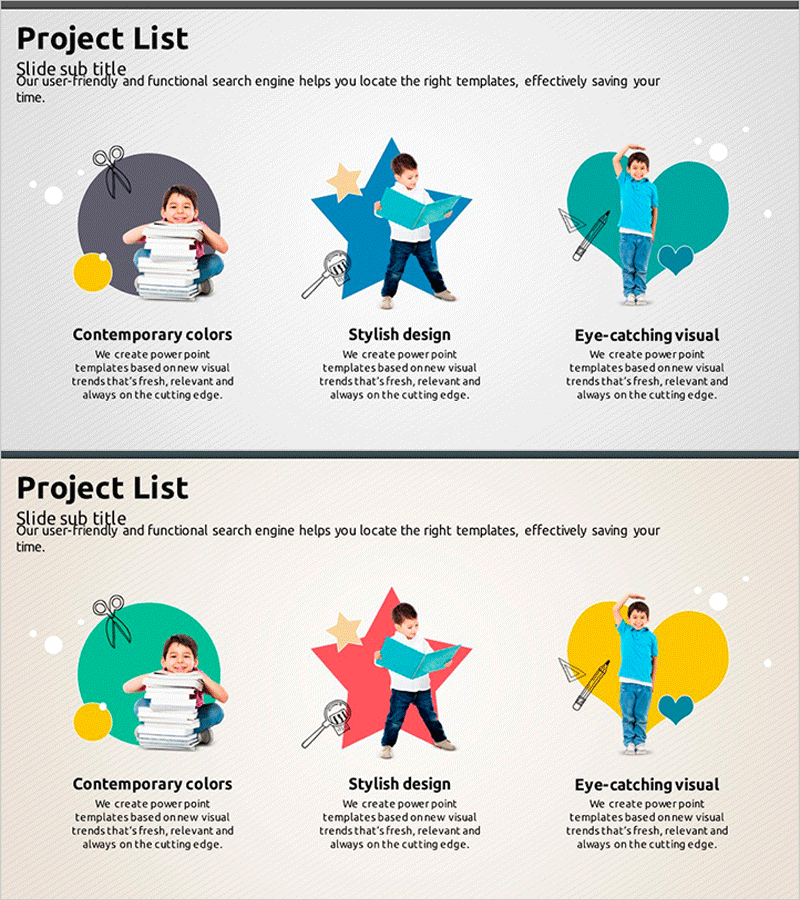
A closed cluster diagram PowerPoint slide designed for children's education presentations. Three circular shapes in gray, blue, and teal backgrounds connect to a central illustration, visualizing relationships and groupings. Each area accommodates text and icons for organizing learning topics by subject. Child characters and decorative elements—stacked books, stars, and hearts—spark curiosity and enhance slide readability. The 2-slide set offers color variations (gray-blue and teal-red-yellow) for immediate use across diverse educational content.
Usage Points
-
Main Usage
Visualize three learning topics, concepts, or activities connected to a central core in children's education presentations. The closed structure maintains independence within each area while preserving overall context, enhancing learner comprehension.
-
How to Use
Enter topic names, descriptions, and icons within each circular shape. Place the core concept in the central illustration area. Choose between two color variations to match presentation tone, and adjust text size and font for your audience's age group.
-
Recommended For
Kindergarten and elementary school teachers, education instructors, parent education program facilitators, child psychology specialists, educational publishers. Ideal for topic classification, concept connection, and activity introduction slides.
-
Slide Structure
2-slide set. Each slide features three closed circular shapes (nodes) connected to a central illustration in a cluster layout. Slide 1: gray, blue, and teal backgrounds / Slide 2: teal, red, and yellow backgrounds. Each circle contains three text input areas; center displays child character and supporting icons.
Related Products
-
Combination of Academic Thinking and Business Strategy - Effective Diagram Template
#Product/Service Introduction #Diagram #Product/Service Introduction
-
Geoscience Target Strategy - Utilizing Cluster and Diffusion Diagrams
#Product/Service Introduction #Business Introduction #Diagram
-
Diffusion Diagram for Water Play – The Importance of Enjoyable Swimming
#Product/Service Introduction #Business Vision and Strategy #Diagram
-
Features of the Convenience Space – Beyond Modern Design Boundaries
#Product/Service Introduction #Business Vision and Strategy #Diagram
