



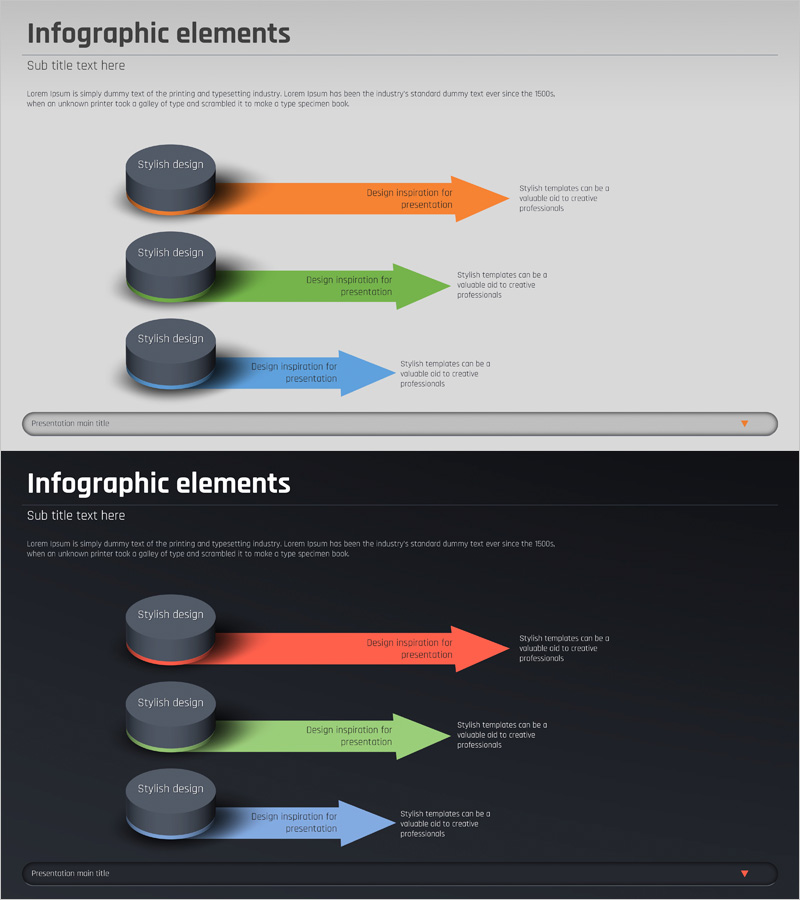
Business Strategy Arrow Diagram – A Powerful Tool for Connecting Vision and Goals
RJ0400026_21
- Last Update 05/24/2025
- File Size 0.2MB
- # of Slides 2
- File Format PPTX
- Slide Ratio 16:9
- Color
Keywords
- #Content-Based Slides
- #Design-Based Slides
- #Business Vision and Strategy
- #Marketing Plan and Strategy
- #Text Box
- #Business Strategy
- #Marketing Objectives
- #Arrow
- #16:9
- #business strategy arrow PPT slide
- #arrow diagram PowerPoint template
- #3-step flow chart slide
- #vision and goals connection diagram
- #strategic flow PowerPoint
About the Product
A 3-step arrow diagram PowerPoint slide that visually connects business vision and goals. This slide combines circular icons with arrow shapes to clearly express strategic flow and progression. The light gray background features three color-coded arrows—orange, green, and blue—to distinguish each stage, with description text areas positioned on the right. The 2-slide set includes both a light background version and a dark background version, allowing you to choose based on your presentation environment. Provided in 16:9 widescreen PPTX format for immediate editing. Ideal for business strategy presentations, marketing planning sessions, and vision-sharing meetings.
Usage Points
-
Main Usage
Optimized for visually expressing the connection between business strategy, vision, and goals. The 3-step arrow structure clearly conveys sequential processes or causal relationships, while color differentiation emphasizes the independence of each stage.
-
How to Use
Use in executive presentations, strategy meetings, marketing planning sessions, and vision-sharing events. Enter strategy stages, goals, and implementation plans in each arrow area, and add detailed explanations in the right-side text boxes. Choose between light and dark background versions based on your presentation venue.
-
Recommended For
Ideal for executives, strategy managers, marketing directors, and business development professionals presenting business direction to senior management, investors, and team members. Particularly effective when explaining phased strategy execution, goal achievement pathways, and vision implementation roadmaps.
-
Slide Structure
The set contains 2 slides. Each slide features 3 circular icons on the left (editable text areas) and 3 color-coded arrows on the right (orange, green, blue), with 3 description text areas arranged along the right edge. One light gray background version and one dark background version are provided.
Related Products
-
AI Robot Service Global Market Target
#Business Vision and Strategy #Marketing Plan and Strategy #Text Box
-
Marketing Goals and Strategies Slide – The Harmony of Blue and Teal
#Business Vision and Strategy #Marketing Plan and Strategy #Diagram
-
Square Frame Presentation Template – Multidirectional Arrow Diagram
#Business Vision and Strategy #Business Strategy #Diagram
-

Typographic Wide Template Icons&Text2 - Business Strategy and Marketing Goals
#Business Vision and Strategy #Operational Plan #Marketing Plan and Strategy
