



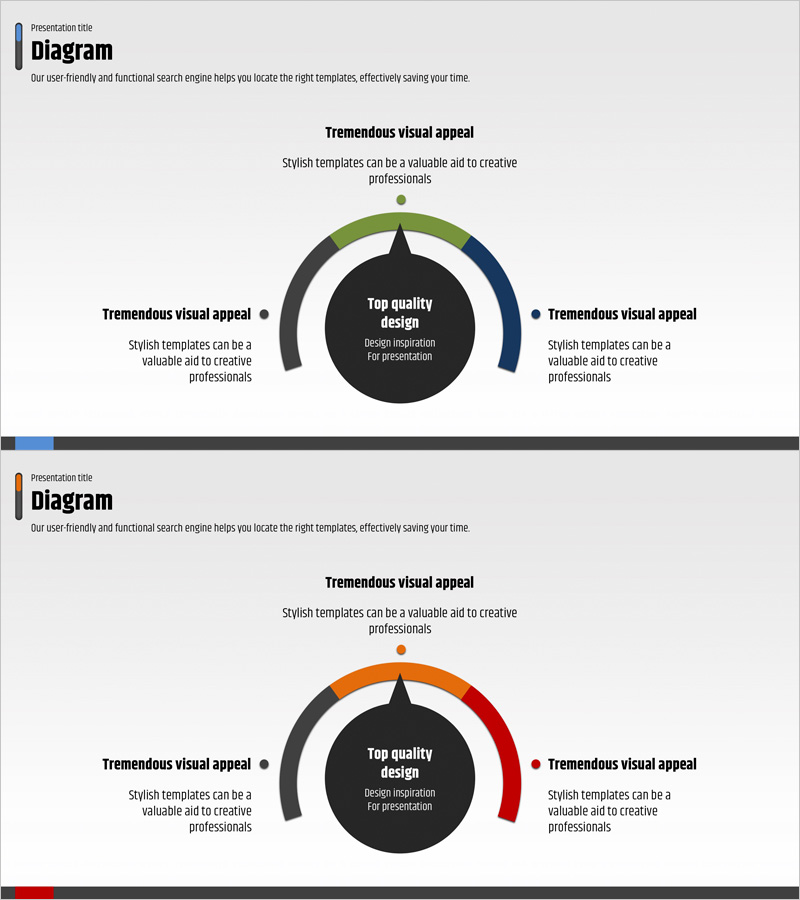
Business Area and Strategy Diagram – Effective Visualization
RJ0400020_10
- Last Update 05/22/2025
- File Size 0.1MB
- # of Slides 2
- File Format PPTX
- Slide Ratio 16:9
- Color
Keywords
- #Content-Based Slides
- #Design-Based Slides
- #Business Introduction
- #Business Vision and Strategy
- #Diagram
- #Business Areas
- #Business Strategy
- #Spread
- #Radial Diagram
- #16:9
- #radial diagram PowerPoint
- #business area analysis slide
- #strategy diagram template
- #3-direction branching diagram
- #how to create radial diagram in PowerPoint
About the Product
A radial diagram PowerPoint slide featuring a central core concept with three directional branches extending outward. This structure is optimized for visualizing business areas, strategic initiatives, and core values with clarity and impact. The design combines a dark background with green, navy, and gray arc elements, complemented by speech bubble text boxes for detailed explanations in each section. The 2-slide set includes color variations in blue and orange-red tones, allowing you to select the version that best matches your presentation theme and audience context.
Usage Points
-
Main Usage
Visualize organizational core concepts, business areas, strategic directions, and management principles by radiating outward from a central hub. Ideal for strategy presentations, business domain explanations, organizational structure visualization, and stakeholder communications where audiences need to grasp relationships between a central idea and multiple supporting elements intuitively.
-
How to Use
Enter your core concept (company name, core value, strategic objective) in the central black circle node. Fill in the three arc sections with supporting details such as business areas, strategic directions, or operational principles. Add supplementary information in the speech bubble text boxes adjacent to each arc to enhance information hierarchy. Choose between the blue-tone or orange-red-tone version based on your presentation context.
-
Recommended For
Executive and strategy team business planning presentations, new employee onboarding organizational structure explanations, investor pitches on business models, marketing team strategy development presentations, and consulting firm client strategy proposals.
-
Slide Structure
2-slide set. Each slide features a dark background with a central black circular node (core concept input area) and three arc sections in green, navy, and gray tones positioned at top, bottom, left, and right. Speech bubble text boxes are placed adjacent to each arc section for detailed explanations. Slide 1 uses blue-tone coloring while Slide 2 features orange-red-tone coloring for visual variety.
Related Products
-
Business Activity Areas Diagram – Strategic Cluster Composition
#Business Introduction #Business Vision and Strategy #Diagram
-
Visual Infographic Slide for Legal Business Activities
#Business Introduction #Business Vision and Strategy #Diagram
-
Mobile App Service Business Area Slide – Innovation and Vision
#Business Introduction #Business Vision and Strategy #Diagram
-
Weather-Based Temperature Analysis Diagram – Area Graph for Competitor Analysis
#Business Vision and Strategy #Marketing Plan and Strategy #Diagram
