



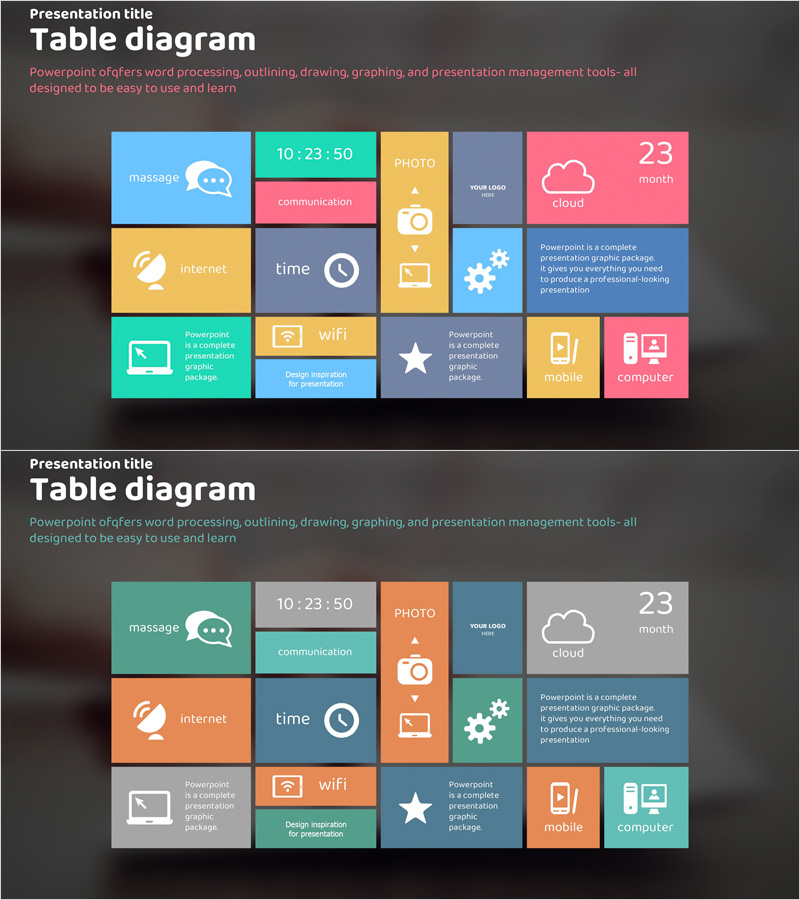
Application Service Contents – Cluster Diagram
RJ0400010_31
- Last Update 05/19/2025
- File Size 1.3MB
- # of Slides 2
- File Format PPTX
- Slide Ratio 16:9
- Color
Keywords
About the Product
A closed-cluster diagram PowerPoint slide designed to visualize application service components and functional elements. Twelve colored boxes—blue, teal, orange, pink, and yellow—are arranged in an irregular grid pattern, each with dedicated icon and text input areas. Perfect for presenting IT services, platform features, and ecosystem structures without hierarchical relationships. The 2-slide set includes both full-color and tone-down versions, allowing flexible integration into any presentation theme. Ideal for product demos, service architecture explanations, and feature breakdowns.
Usage Points
-
Main Usage
Represents service components as equal, independent items without hierarchical structure or central hub. Ideal for expressing complete ecosystems, platform architectures, and feature sets where all elements hold equal importance. Commonly used in product introductions, service architecture presentations, and technology capability overviews.
-
How to Use
Replace placeholder text in each box with your service components or features. Swap default icons with your brand icons or custom graphics. Choose between full-color or tone-down version based on presentation theme. Apply entrance animations to boxes for sequential reveal during presentation, enhancing audience engagement and information retention.
-
Recommended For
Software and IT companies presenting product features, startups explaining service ecosystems, technology teams demonstrating platform capabilities, and marketing professionals translating technical concepts for non-technical audiences. Effective for investor pitches, client presentations, and internal training sessions.
-
Slide Structure
2-slide set with identical layouts in different color schemes. Each slide contains 12 boxes in irregular grid arrangement. Every box features a dedicated icon area (top) and text input area (bottom). Slide 1: full multicolor version (blue, teal, orange, pink, yellow). Slide 2: tone-down version (gray, blue-gray, orange-gray) for neutral presentation backgrounds.
Related Products
-
Characteristics and Types of Marine Life – Informative Cluster Diagram
#Product/Service Introduction #Diagram #Features
-
5-Drink Feature Diagram – Cluster Diagram
#Product/Service Introduction #Business Strategy #Diagram
-
Creative Coffee Infographics – Product and Service Introduction
#Product/Service Introduction #Diagram #Features
-
Animal Nature Conservation Program Main Marketing Activity Diagram
#Product/Service Introduction #Diagram #Features
