



Delivering Business Goals with Arrow Target Diagram
RJ0300096_5
- Last Update 05/16/2025
- File Size 0.3MB
- # of Slides 2
- File Format PPTX
- Slide Ratio 16:9
- Color
Keywords
- #Content-Based Slides
- #Design-Based Slides
- #Company Introduction
- #Business Introduction
- #Diagram
- #Business Areas
- #Business Overview
- #Cluster
- #Closed Cluster Diagram
- #16:9
- #target diagram PowerPoint
- #concentric circle diagram slide
- #business goal strategy template
- #arrow target diagram presentation
- #goal setting slide template
About the Product
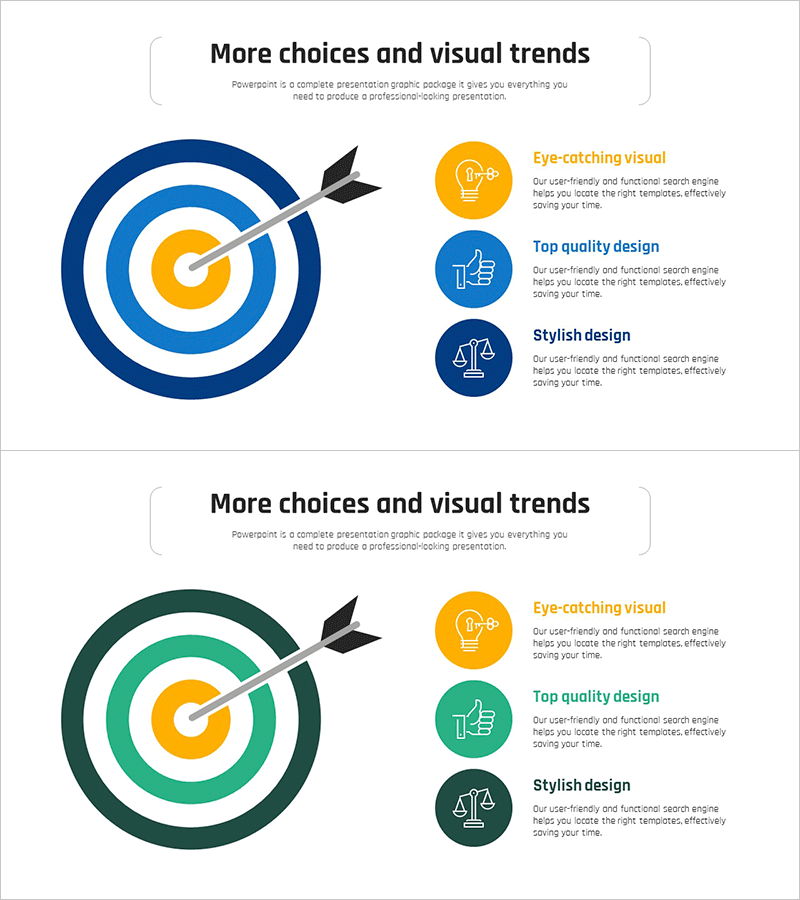
A PowerPoint slide featuring a concentric target diagram with arrow design to visualize business goals and strategic execution. The structure expands from a golden center point through three layers of blue and white circles, clearly representing core objectives and phased implementation strategies. The 2-slide set offers multiple color variations (blue and green versions) for flexible presentation needs. Ideal for business introduction, strategic planning, and goal management sections in professional presentations. Delivered in 16:9 widescreen PPTX format compatible with all presentation environments.
Usage Points
-
Main Usage
Visualizes organizational core objectives at the center and displays phased execution strategies through concentric circles, creating a clear roadmap for goal achievement. Effectively communicates strategic direction to executives and team members in business introduction, strategic planning, and goal management presentations.
-
How to Use
Enter the primary objective in the central golden circle, then add detailed strategies and action items in each concentric layer. The arrow indicates the direction of goal achievement, emphasizing left-to-right progression flow. Colors can be customized to distinguish departments or implementation phases.
-
Recommended For
Recommended for executives, business planners, project managers, and marketing professionals presenting business objectives, strategic planning, and performance management. Particularly suitable for organizations with multi-layered goal structures, including company-wide strategy sharing, quarterly goal setting, and business plan presentations.
-
Slide Structure
2-slide set featuring blue and green color versions. Each slide displays a golden center point expanding through 3 concentric layers (blue-white-blue or green-white-green circles) with a left-facing arrow indicating goal achievement direction. Text input areas are positioned on each circular layer for easy customization.
Related Products
-

Export Business Transportation Diagram – Efficient Business Planning
#Company Introduction #Business Introduction #Diagram
-
Business Areas Introduction & Table Slide - Cluster Design
#Company Introduction #Business Introduction #Diagram
-
Description of SNS Business Area – Effective Business Model Cluster
#Company Introduction #Product/Service Introduction #Diagram
-
SNS Business Circular Diagram - A Symbol of Collaboration and Growth
#Company Introduction #Business Introduction #Diagram
