



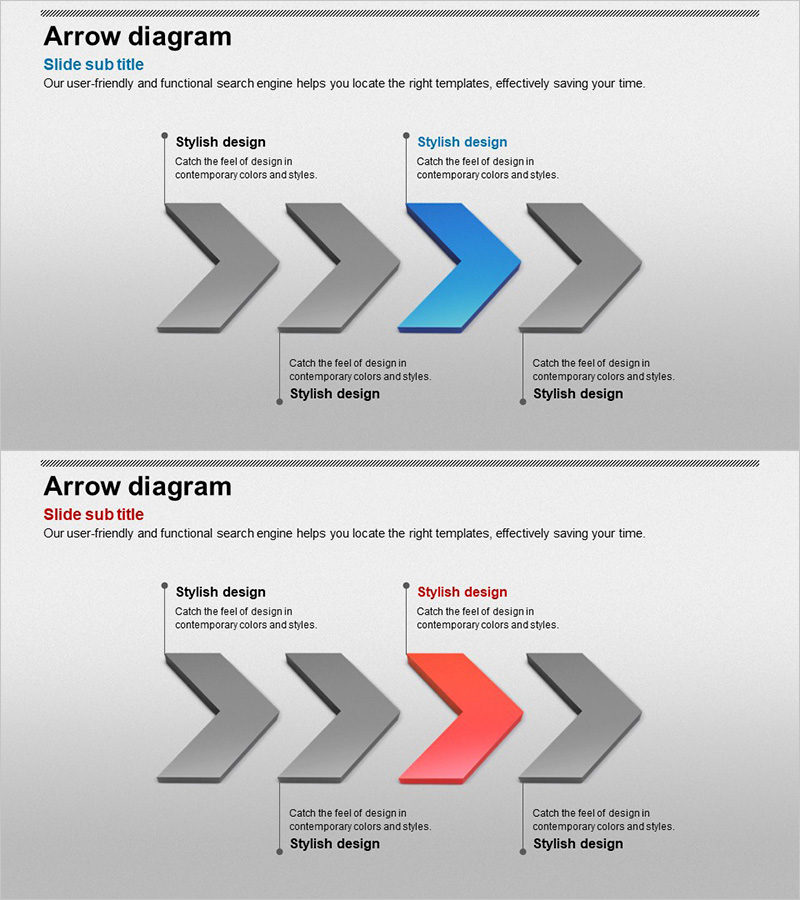
3D Arrow Linear Diagram
RJ0300053_7
- Last Update 05/02/2025
- File Size 1.7MB
- # of Slides 2
- File Format PPTX
- Slide Ratio 16:9
- Color
Keywords
About the Product
A linear diagram PowerPoint slide featuring four 3D arrow nodes progressing from left to right, with three gray arrows and one highlighted accent arrow in blue or red. Each node includes a text description area above for adding stage-specific information, goals, and outcomes. This 16:9 widescreen presentation template with 2 slides is ready to use in business plans, strategy reports, and project timeline presentations.
Usage Points
-
Main Usage
Visualizes processes, strategies, and timelines as a left-to-right linear flow. One of the four stages is highlighted in blue or red to emphasize the current phase, key milestone, or critical decision point in your presentation.
-
How to Use
Enter stage names, objectives, owners, and timelines in the text boxes above each arrow node. Customize the accent arrow color to match your presentation theme. Use in business plans, strategy reports, and project timeline slides.
-
Recommended For
Ideal for executives, planners, marketing teams, and project managers presenting business strategies, project management phases, marketing campaign timelines, product launch roadmaps, organizational change initiatives, and educational program progression.
-
Slide Structure
2-slide set with 4 three-dimensional arrow nodes arranged horizontally. Three arrows in gray, one in accent color (blue or red). Text description areas positioned above each node for stage information. 16:9 widescreen format.
Related Products
-
Future Learning Direction Line Diagram
#Business Strategy #Diagram #Step-by-Step Schedule Plan
-

Stretching After Working Out – Health and Vitality
#Business Strategy #Diagram #Other
-
Strategy and Step Diagram – Infographic for Business Direction
#Business Strategy #Diagram #Step-by-Step Schedule Plan
-
Stylish Design Inspired Presentation Template
#Business Strategy #Diagram #Step-by-Step Schedule Plan
