



Monthly Schedule Planner Circular Diagram – Leading Change in Business Management
RJ0300019_7
- Last Update 04/23/2025
- File Size 10.9MB
- # of Slides 2
- File Format PPTX
- Slide Ratio 16:9
- Color
Keywords
- #Content-Based Slides
- #Design-Based Slides
- #Business Strategy
- #Business Management
- #Diagram
- #Step-by-Step Schedule Plan
- #Implementation Schedule
- #Cluster
- #Combination Diagram
- #16:9
- #monthly schedule diagram PowerPoint
- #circular diagram slide
- #overlapping diagram template
- #business management presentation
- #6-month timeline slide
- #PowerPoint diagram slide design
About the Product
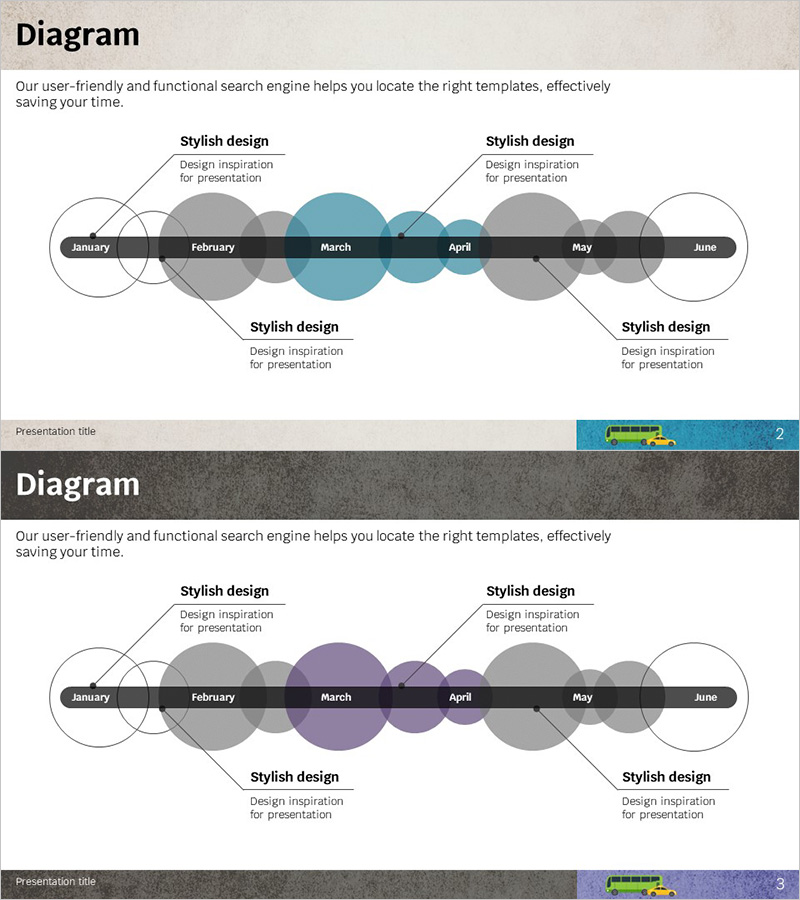
An overlapping circular diagram PowerPoint slide designed to visualize monthly schedule planning across a 6-month timeline. The slide features 12 overlapping circular nodes representing January through June, allowing you to mark key milestones and monthly objectives. Text boxes positioned at the top and bottom provide space for stylish design elements and additional messaging. The charcoal gray and teal color scheme delivers professional appeal suitable for business presentations. The 2-slide set offers multiple color variations (teal and purple accents) that can be customized to match your presentation theme and corporate branding.
Usage Points
-
Main Usage
This slide effectively visualizes business timelines and monthly project schedules in a systematic manner. It is ideal for presenting project roadmaps, quarterly goal achievement plans, and annual business strategy initiatives. The overlapping circular node structure emphasizes monthly continuity and interdependencies.
-
How to Use
Enter monthly objectives, milestones, and key dates into each circular node. Use the top and bottom text boxes to add overall cycle themes or core messages. Customize colors to distinguish priority levels or categories, and add arrows to highlight process flow and sequential relationships.
-
Recommended For
Business managers, project managers, and marketing professionals can use this slide for annual planning presentations, quarterly reports, and business strategy meetings. It is particularly effective for explaining long-term project progress and phase-by-phase execution to stakeholders.
-
Slide Structure
The 2-slide set features 12 overlapping circular nodes (2 per month, January through June) arranged along a central horizontal axis with monthly labels. Text boxes are symmetrically positioned at the top and bottom of each slide. Slide 1 emphasizes teal accents while Slide 2 features purple accents, providing color variation options.
Related Products
-

Schedule Planning Arrow Diagram – Visualizing Step-by-Step Project Timelines
#Business Strategy #Business Management #Diagram
-
Optimized Project Progress Schedule Slide
#Business Strategy #Business Management #Diagram
-
Business Services Introduction Diagram – Visualizing with Cluster and Overlap
#Product/Service Introduction #Business Strategy #Diagram
-
Weekly Learning Curriculum Overview – Strategic Planning for Organizational Goals
#Business Strategy #Business Management #Diagram
