



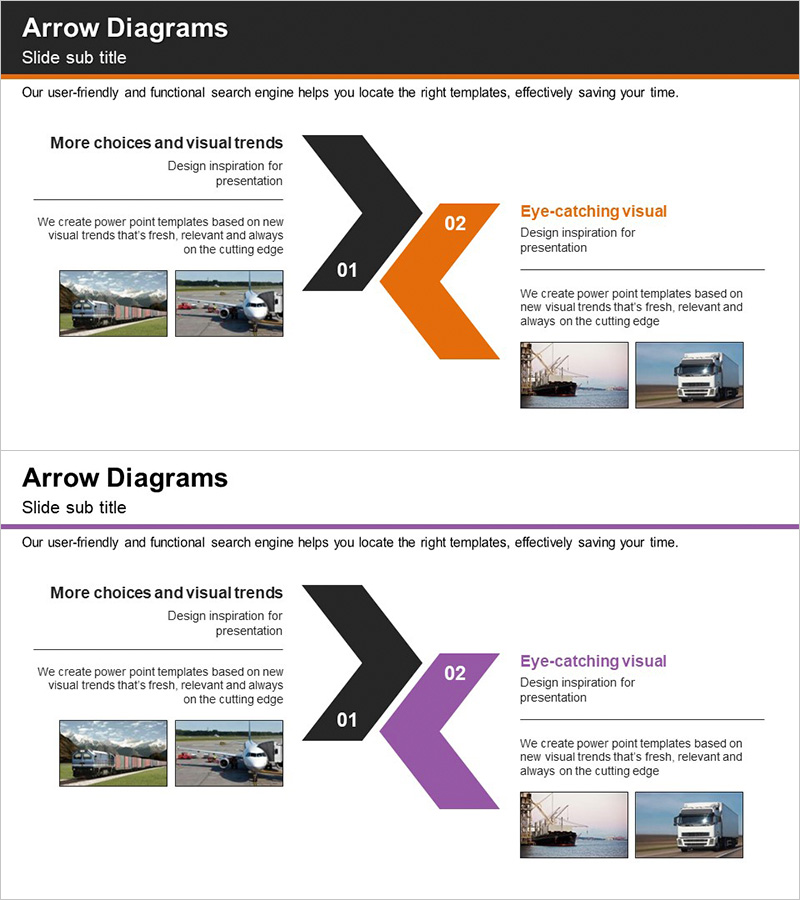
Introduction to World Trade Services - Multidirectional Flow Diagram
RJ0300017_9
- Last Update 04/22/2025
- File Size 0.1MB
- # of Slides 2
- File Format PPTX
- Slide Ratio 16:9
- Color
Keywords
- #Content-Based Slides
- #Design-Based Slides
- #Product/Service Introduction
- #Diagram
- #Product/Service Introduction
- #Program Introduction
- #Flow
- #Multidirectional Flow
- #16:9
- #multidirectional arrow diagram PowerPoint
- #two-way flow slide template
- #bidirectional process diagram
- #arrow flow chart PPT
- #business process flow diagram
About the Product
A multidirectional arrow diagram PowerPoint slide featuring left and right arrows expanding symmetrically. The black left arrow and orange right arrow create a balanced two-way flow structure, with numbered stages (01, 02) and dedicated text areas. Image insertion spaces are included on both sides, making it ideal for visualizing bidirectional processes, service flows, and business interactions. Delivered as a 16:9 ratio, 2-slide PPTX file ready for immediate editing and customization for trade, service, and business presentations.
Usage Points
-
Main Usage
Designed to visually represent bidirectional processes, mutual interactions, and two-way relationships. The symmetrical left-right arrow structure effectively communicates product-customer interactions, import-export flows, supply-demand relationships, and reciprocal business models with clarity and impact.
-
How to Use
Insert titles, descriptions, and images into each arrow stage to explain the two-way flow. Place the first process in the black left arrow and the second process in the orange right arrow, using the center numbered areas to emphasize stages. Freely edit colors, text, and images to match your presentation needs.
-
Recommended For
Ideal for international trade presentations, service process explanations, interaction model demonstrations, and bidirectional relationship visualizations. Recommended for executives, sales teams, and marketing professionals presenting business models, partnerships, customer journeys, and cross-functional workflows.
-
Slide Structure
2-slide set with symmetrical bidirectional arrow design. Each slide features a black left arrow (01) and orange right arrow (02) with text input areas inside the arrows and image insertion spaces on both sides for balanced information and visual content placement.
Related Products
-
Green & Gray Template Wide Text box – Trustworthy Structure
#Product/Service Introduction #Diagram #Product/Service Introduction
-
Cluster Diagram Introducing Korean Traditional Culture
#Product/Service Introduction #Diagram #Product/Service Introduction
-
Friendship Photo Shoot Concept - Capturing Joyful Moments
#Product/Service Introduction #Product/Service Introduction #Program Introduction
-
Five Color Wide Template – Engaging Infographic Elements
#Product/Service Introduction #Diagram #Program Introduction
