



Solution Bulb Diagram – Presenting Innovative Strategies
RJ0300016_13
- Last Update 04/22/2025
- File Size 1.3MB
- # of Slides 2
- File Format PPTX
- Slide Ratio 16:9
- Color
Keywords
- #Content-Based Slides
- #Design-Based Slides
- #Business Strategy
- #Operational Plan
- #Text Box
- #As-Is To-Be
- #Mitigation Measures
- #Rectangle Text Box
- #16:9
- #solution bulb diagram PowerPoint
- #innovation strategy slide
- #business strategy presentation
- #how to create a solution diagram in PowerPoint
- #multi-solution visualization slide
About the Product
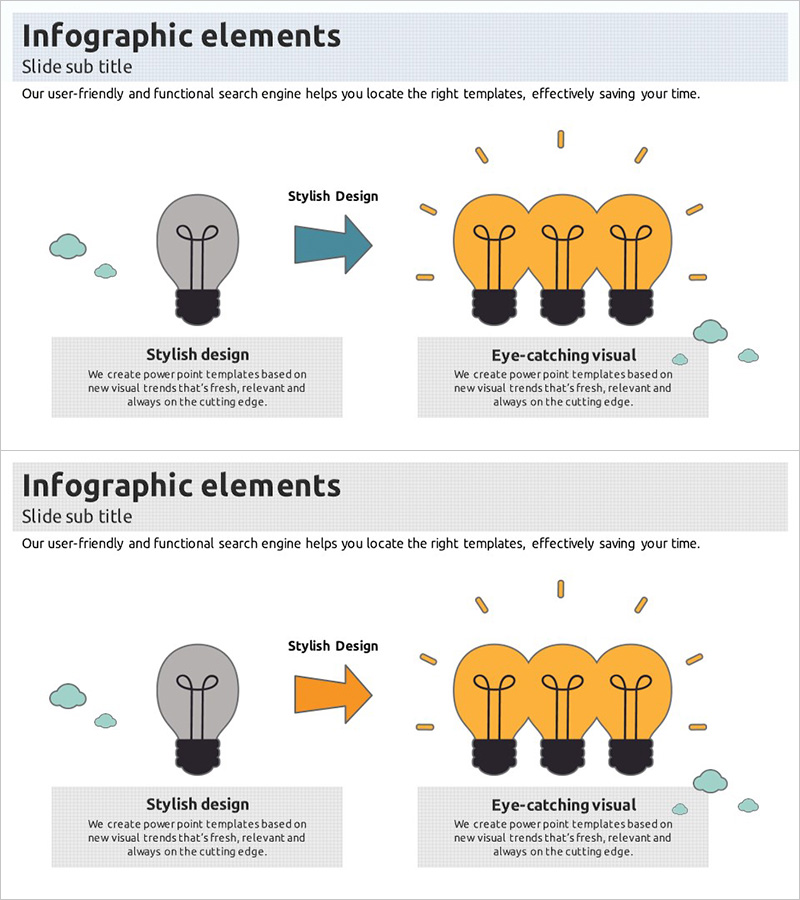
A visually compelling PowerPoint slide featuring a bulb diagram that illustrates innovative problem-solving strategies. The design progresses from a single gray bulb on the left to three golden bulbs on the right, representing the evolution from problem identification to multi-faceted solutions. Two text boxes on the left side explain 'Stylish Design' and 'Eye-catching Visual' concepts, making it ideal for business strategy presentations and operational planning. The 16:9 format includes 2 fully editable slides in PPTX, allowing you to customize content while maintaining the professional visual hierarchy.
Usage Points
-
Main Usage
Effectively communicates how a single problem can be addressed through multiple innovative solutions. The gray-to-gold color transition emphasizes transformation and growth, making it ideal for presenting strategic direction to executives, investors, and team members.
-
How to Use
Integrate this slide into business plans, strategy presentations, and operational planning sessions to introduce key solutions. Populate the left text boxes with specific strategy names and map detailed implementation approaches to the bulb groups to enhance audience comprehension.
-
Recommended For
Executives, planning teams, marketing departments, and new business development professionals will find this slide valuable for strategy presentations and proposal pitches. It's particularly effective for projects requiring multi-faceted approaches or innovation initiative announcements.
-
Slide Structure
The 2-slide set provides identical diagram layouts with two text input areas (top and bottom left) plus a title section. The bulb icons and directional arrows are fixed design elements that support flexible color customization to match your brand guidelines.
Related Products
-

Clarity-Driven Communication Comparison Slide
#Business Strategy #Operational Plan #Diagram
-
Ribbon Item Overview – Operational Planning and Problem Solving
#Operational Plan #Diagram #Text Box
-
Problem Solving Solutions Slide – Efficiently Communicated with Multidirectional Diagram
#Operational Plan #Diagram #Text Box
-
Action Plan Items Slide – Efficiency in Business Management
#Business Management #Operational Plan #Text Box
